We've captured the moments from FabCon & SQLCon that everyone is talking about, and we are bringing them to the community, live and on-demand. Starts on April 14th. Register now
Hello,
I am experiencing the same issue as what happened in Feb 2022 and seemed to fix itself but now it is happening again
Everything works fine in PBI Desktop.
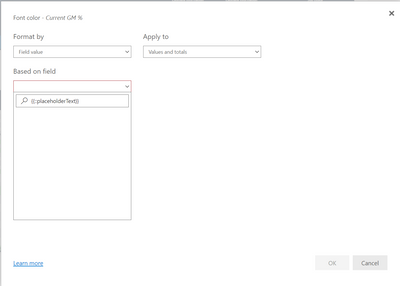
When trying to use conditional formatting in PBI service you are not able to access the conditional formatting list and instead there is a {{Text PlaceHolder}}
I am using edge
I have tried clearing cache, deleting favourite and re adding and allowing pop ups
I have also tried disabling the Power BI Infrastructure Update Preview in Desktop and re uploading but stillhave the same issue
Solved! Go to Solution.
Hi @shwright ,
It seems like an issue. Have submitted this issue internal to confirm(ICM:299551845), would update here as soon as possible if there is any progress about it.
Possible workaround: Add “?conditionalFormattingModern=1” to the end of the URL to turn on the feature switch for the modern conditionalFormatting dialog which does not have this issue.
Best Regards
Community Support Team _ chenwu zhu
Hi @shwright ,
It seems like an issue. Have submitted this issue internal to confirm(ICM:299551845), would update here as soon as possible if there is any progress about it.
Possible workaround: Add “?conditionalFormattingModern=1” to the end of the URL to turn on the feature switch for the modern conditionalFormatting dialog which does not have this issue.
Best Regards
Community Support Team _ chenwu zhu
Thanks for the reply
If you have recently started exploring Fabric, we'd love to hear how it's going. Your feedback can help with product improvements.
A new Power BI DataViz World Championship is coming this June! Don't miss out on submitting your entry.
Share feedback directly with Fabric product managers, participate in targeted research studies and influence the Fabric roadmap.