cancel
Showing results for 
Search instead for 
Did you mean: 

We've captured the moments from FabCon & SQLCon that everyone is talking about, and we are bringing them to the community, live and on-demand. Starts on April 14th. Register now

Reply
Anonymous
Not applicable

Composite Model schedule refresh

We are trying to create a composite model using Azure Analysis Service source i.e. a pre-existing model. This model has Calculated table using Union and Direct Query sources from multiple models. When we try to schedule it for refresh, it won't refresh and gives a Single Sign-in error. Please let us know how to make it work. Please note, when we try to refresh manually, it works fine. Please let us know how to make this work or if there is a work around for the same. Thanks

5 REPLIES 5
Anonymous
Not applicable

Hi @GilbertQ  

Unfortunately that is not working for a report with composite models. I have the same problem @Anonymous described. The disable SSO options in the Advanced settings on the gateway dataset configuration does not exists for Analysis Services, so we cannot disable it from there as we can do with SQL Server connection for example.

Finally @v-kkf-msft, i have the latest version of the On-Premise Data Gateway, i have logged in with the same account but still i am getting the same error as @Anonymous described.

GilbertQ
Super User
Super User

Hi @Anonymous 


I am not 100% sure if you can combine a calculated table with DirectQuery with a composite model to get it to refresh succesfully.


The only thing that I can think of is to make sure all data sources go via the Gateway?


Did I answer your question? Mark my post as a solution!

Proud to be a Super User!


Power BI Blog

Anonymous
Not applicable

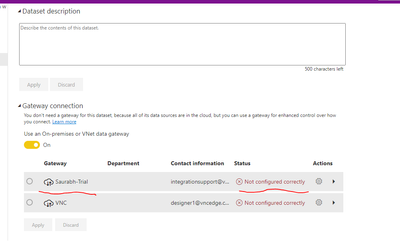
Hi Gilbert, thanks for the help, we did move forward with the Gateway approach but while trying to connect a gateway for analysis services, we are receiving an error as follows "on-premises data gateway's service account failed to impersonate the user".
We are sure that the credentials are right. I feel that due to analysis services we are facing this problem, and we are struggling with the solution for this. 

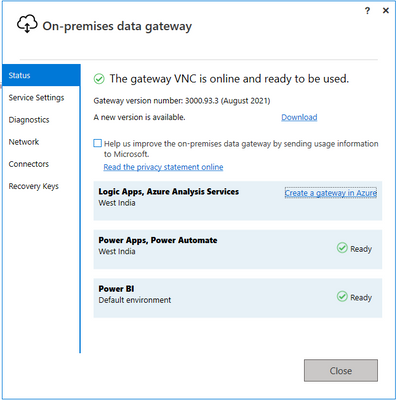
We are attaching a screenshot for reference. Please let us know if there is a wayout.
-Thanks
 

Karan_9650_0-1632203783345.pngKaran_9650_1-1632204086666.png


Hi @Anonymous ,


This looks as if your gateway is not configured correctly.


vkkfmsft_0-1632471406639.png


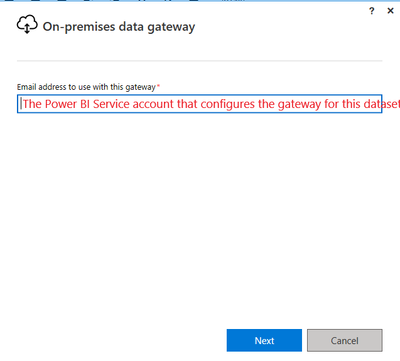
Please install the latest version of the gateway: https://powerbi.microsoft.com/gateway/ . And then log into the gateway using the account that is currently logged into the Power BI Service.


sign in.png   acc.png


If the problem is still not resolved, please provide detailed error information or the expected result you expect. Let me know immediately, looking forward to your reply.

Best Regards,
Winniz

If this post helps, then please consider Accept it as the solution to help the other members find it more quickly.

Hi @Anonymous 


For Azure Analysis Services you should be able to configure this under the Data Source Settings?


GilbertQ_0-1632282547324.png


Did I answer your question? Mark my post as a solution!

Proud to be a Super User!


Power BI Blog

Helpful resources

Announcements
New to Fabric survey Carousel

New to Fabric Survey

If you have recently started exploring Fabric, we'd love to hear how it's going. Your feedback can help with product improvements.

Power BI DataViz World Championships carousel

Power BI DataViz World Championships - June 2026

A new Power BI DataViz World Championship is coming this June! Don't miss out on submitting your entry.

Join our Fabric User Panel

Join our Fabric User Panel

Share feedback directly with Fabric product managers, participate in targeted research studies and influence the Fabric roadmap.

March Power BI Update Carousel

Power BI Community Update - March 2026

Check out the March 2026 Power BI update to learn about new features.