FabCon is coming to Atlanta
Join us at FabCon Atlanta from March 16 - 20, 2026, for the ultimate Fabric, Power BI, AI and SQL community-led event. Save $200 with code FABCOMM.
Register now!- Power BI forums
- Get Help with Power BI
- Desktop
- Service
- Report Server
- Power Query
- Mobile Apps
- Developer
- DAX Commands and Tips
- Custom Visuals Development Discussion
- Health and Life Sciences
- Power BI Spanish forums
- Translated Spanish Desktop
- Training and Consulting
- Instructor Led Training
- Dashboard in a Day for Women, by Women
- Galleries
- Data Stories Gallery
- Themes Gallery
- Contests Gallery
- QuickViz Gallery
- Quick Measures Gallery
- Visual Calculations Gallery
- Notebook Gallery
- Translytical Task Flow Gallery
- TMDL Gallery
- R Script Showcase
- Webinars and Video Gallery
- Ideas
- Custom Visuals Ideas (read-only)
- Issues
- Issues
- Events
- Upcoming Events
Get Fabric Certified for FREE during Fabric Data Days. Don't miss your chance! Request now
- Power BI forums
- Forums
- Get Help with Power BI
- Service
- Re: Composite Model: Issues publishing to another ...
- Subscribe to RSS Feed
- Mark Topic as New
- Mark Topic as Read
- Float this Topic for Current User
- Bookmark
- Subscribe
- Printer Friendly Page


- Mark as New
- Bookmark
- Subscribe
- Mute
- Subscribe to RSS Feed
- Permalink
- Report Inappropriate Content
Composite Model: Issues publishing to another Company via Azure B2B
Hi
Has anybody managed to distribute a composite model to an employee from another company?
I have been using the composite model feature which has been great and has hugely sped up the development time for my reporting.
However, I cannot seem to distribute the composite report to employees in an another company, which is proving to be very problematic.
I can distribute the same composite report, complete with row level security, to staff from my own company and it works fine.
And I have also managed to use the Azure B2B method of granting access to give an the separate company employee access to a model that is not composite (it is a Direct Query only).
The problem only seems to occur with the specific combination of a composite model and a separate company.
Any help would be gratefully received.
Solved! Go to Solution.


- Mark as New
- Bookmark
- Subscribe
- Mute
- Subscribe to RSS Feed
- Permalink
- Report Inappropriate Content
Hi @Trotter ,
Maybe you can try enable this.
Admin portal -> Tenant settings -> Export and sharing settings
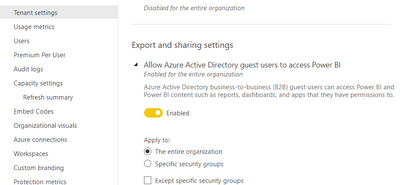
Export and sharing admin settings - Power BI | Microsoft Docs
Best Regards
Community Support Team _ chenwu zhu
If this post helps, then please consider Accept it as the solution to help the other members find it more quickly.
- Mark as New
- Bookmark
- Subscribe
- Mute
- Subscribe to RSS Feed
- Permalink
- Report Inappropriate Content
Thanks.
You might be right. I'll test this tomorrow and see if it works.
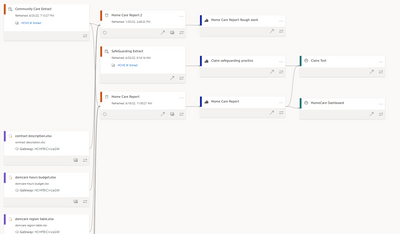
I had view and build allowed for the underlying dataset (called community care extract) but not for the dataset that is created when I set up the composite model (called Home care report). See the diagram below.
I will change to allow build on the Home care report as well and see if that works.
- Mark as New
- Bookmark
- Subscribe
- Mute
- Subscribe to RSS Feed
- Permalink
- Report Inappropriate Content
Hi @Trotter ,
Did that work?
Maybe you need to check if the guest user(employees in an another company) has the read permission of the Home Care report dataset.
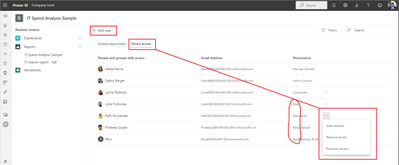
Manage dataset access permissions - Power BI | Microsoft Docs
Best Regards
Community Support Team _ chenwu zhu
If this post helps, then please consider Accept it as the solution to help the other members find it more quickly.
- Mark as New
- Bookmark
- Subscribe
- Mute
- Subscribe to RSS Feed
- Permalink
- Report Inappropriate Content
Unfortunately it has not worked, I have tried adding build and viewer access.
I think the issue might lie with the Azure B2B process, I did not have "Invite external user to your orgnaisation" allowed when the Azure B2B invite was sent to the external employee.
I'm going to try ticking this and resending the invite to see if it fixes the issue.
- Mark as New
- Bookmark
- Subscribe
- Mute
- Subscribe to RSS Feed
- Permalink
- Report Inappropriate Content
Hi @Trotter ,
Maybe you can try enable this.
Admin portal -> Tenant settings -> Export and sharing settings
Export and sharing admin settings - Power BI | Microsoft Docs
Best Regards
Community Support Team _ chenwu zhu
If this post helps, then please consider Accept it as the solution to help the other members find it more quickly.
- Mark as New
- Bookmark
- Subscribe
- Mute
- Subscribe to RSS Feed
- Permalink
- Report Inappropriate Content
I found that I needed to resend the Azure B2B invite after changing the settings mentioned in the posts above and that worked.
Thanks


- Mark as New
- Bookmark
- Subscribe
- Mute
- Subscribe to RSS Feed
- Permalink
- Report Inappropriate Content
- Mark as New
- Bookmark
- Subscribe
- Mute
- Subscribe to RSS Feed
- Permalink
- Report Inappropriate Content
Hi Ben
They have pro-licences.
So far I have been testing on one employee who has a profile with my company and the external company.
So she has an email with my company (.....@healthcarehomes.co.uk) and the external company (.....@manorcourtcare.co.uk).
She now has 2 pro licences, one for both of these profiles.
Regards
Matthew
- Mark as New
- Bookmark
- Subscribe
- Mute
- Subscribe to RSS Feed
- Permalink
- Report Inappropriate Content
What permissions are assigned to the remote user on the dataset (click the three dots next to dataset and click permissions. Is it read or read and build?
I'm wondering if it's related to this:
Historically anyone accessing a report based on a composite model needed build permissions on all datasets in the chain. They've changed it so anyone with PPU or Premium only needs read permissions but the constraint is still currently present for those with just pro licences.

Helpful resources

Power BI Monthly Update - November 2025
Check out the November 2025 Power BI update to learn about new features.

Fabric Data Days
Advance your Data & AI career with 50 days of live learning, contests, hands-on challenges, study groups & certifications and more!

FabCon Atlanta 2026
Join us at FabCon Atlanta, March 16-20, for the ultimate Fabric, Power BI, AI and SQL community-led event. Save $200 with code FABCOMM.


