cancel
Showing results for 
Search instead for 
Did you mean: 

The Power BI Data Visualization World Championships is back! Get ahead of the game and start preparing now! Learn more

Reply
marcusearly
Advocate II
Advocate II

Comments - Tagging Users - Incomplete List

Hello,


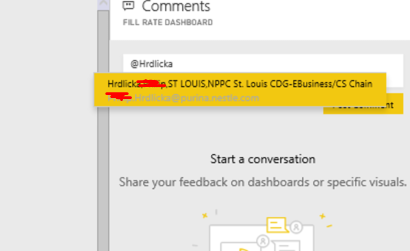
When attempting to tag users in the new comment feature, I cannot get to some common names. "@Hrdlicka,XXX" will bring up the correct user name:


Phil.PNG


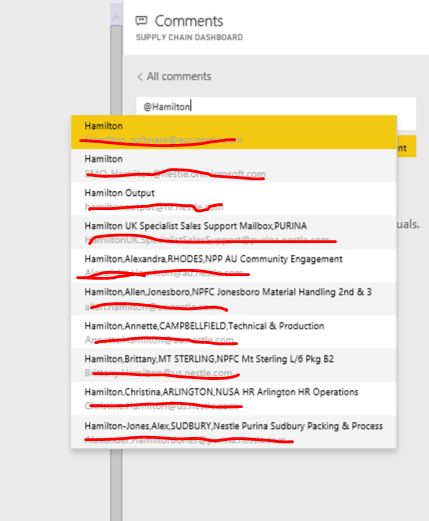
When we use a more common name, like "Hamilton,K", we only get the first 10 options in the directory and have no way to scroll down. Completing the name doesnt offer any names from the directory if its not in the top 10 alphabatized. Is anyone else having this issue or is this unique to my organization? Typing their email address with an "@" at the beginning doesnt seem to work either.


Thanks.

4 REPLIES 4
v-yuta-msft
Community Support
Community Support

Hi marcusearly,


I have made a test on your issue but couldn't reproduce it. Typing a "@" then type alias can locate the user account. So it works well on my side. If this feature still works not so good on your side, could you show some sample user name which can't be located automatically?


Regards,

Jimmy Tao

Capture.PNGCapture.PNG

Thanks Jimmy,

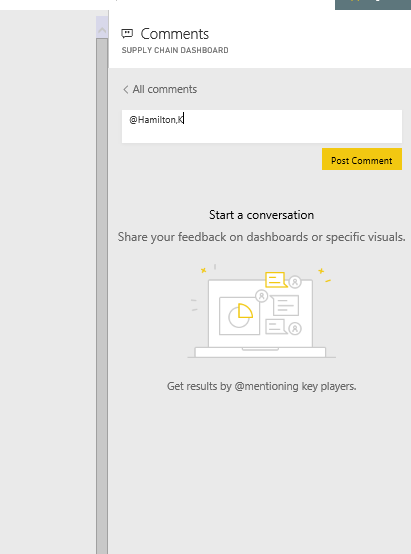
"@hamilton,katherine" does not currently work for me. "@hamilton, katherine" does not currently work for me. Her Name is setup in our directory as "Hamilton,Katherine,ST LOUIS,Supply Chain Business Intelligence". Is there a way to reference her by her email address?


When I type "@Hamilton" I get the first ten users in my directory and nothing further. The moment I add a comma and start a first name, all options disappear. (second image)


Thanks,

Marcus


Any help you can provide would be greatly appreciated. We have a similar situation when updating users and publishing an app but in that interface can get around it by typing the users email address which connects to the directory and gets around this issue. Unfortunately comments werent developed the same way. Thanks!

Anonymous
Not applicable

I am having the same issue as well. Please limit this to only the people who has access to the workspace only

Helpful resources

Announcements
Power BI DataViz World Championships

Power BI Dataviz World Championships

The Power BI Data Visualization World Championships is back! Get ahead of the game and start preparing now!

December 2025 Power BI Update Carousel

Power BI Monthly Update - December 2025

Check out the December 2025 Power BI Holiday Recap!

FabCon Atlanta 2026 carousel

FabCon Atlanta 2026

Join us at FabCon Atlanta, March 16-20, for the ultimate Fabric, Power BI, AI and SQL community-led event. Save $200 with code FABCOMM.