cancel
Showing results for 
Search instead for 
Did you mean: 

The Power BI Data Visualization World Championships is back! Get ahead of the game and start preparing now! Learn more

Reply
Anonymous
Not applicable

Classifying a pivot table

Hi, 


I have Sales Table and a "pivot table" in my dashboard wich I'm trying to classify it. One of the columns shows the probability of closing that sale, that can be "Very high", "High", or "Medium".


I'd like to classify from "Very High" to "Medium", but the Power BI only allows me to classify alphabetically. How can I make this work?

1 ACCEPTED SOLUTION

Hi, @Anonymous 

As mentioned by @selimovd ,you should create a calculated column rather than a measure, then sort column by this new calculated colum.

22.png

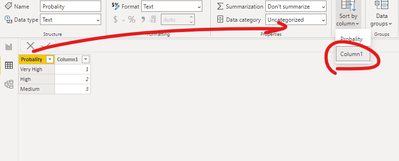
You can also consider creating  the following sort table  (here you also need to select the column "probability" and sort it by column "column1") . You need to use the field "probability" in this new table to create visual.


26.png

Please check my attached file for more details.


Best Regards,
Community Support Team _ Eason

View solution in original post

4 REPLIES 4
selimovd
Super User
Super User

Hey @Anonymous ,


you can create a sort by column in the table. This table should contain the order, something like this would do it:


SoryByColumn =
SWITCH(
    TRUE(),
    myTable[classification] = "Very high", 1,
    myTable[classification] = "High", 2,
    myTable[classification] = "Medium", 3
)


Then you have to set that as sort by column for your classification column:

Sort by column in Power BI Desktop - Power BI | Microsoft Docs


Then the default sort order is according to your sort by column, so "Very high" should appear first.


If you need any help please let me know.
If I answered your question I would be happy if you could mark my post as a solution ✔️ and give it a thumbs up 👍
 
Best regards
Denis
 
Anonymous
Not applicable

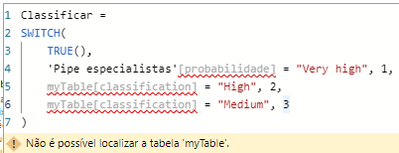
I've created this measure, but it just can't use a table as refer:

mpoppes_0-1623082552624.png


Am I putting the formula in the right place?

Hey @Anonymous ,


in general when you answer in this community always mark people with @Anonymous . Otherwise I will not be notified that there is a new reply. This one now I've seen by chance.


Did you add it as calculated column? It won't work when you add it as measure.

Then you have to add the column in the right table, in your case I guess 'Pipe espacialistas'. And then you have to replace all the table references (myTable[classification]) to the real column ('Pipe espacialistas'[probabilidade]).


Try that and then it hopefully should work.

If you need any help please let me know.
If I answered your question I would be happy if you could mark my post as a solution ✔️ and give it a thumbs up 👍
 
Best regards
Denis
 

Hi, @Anonymous 

As mentioned by @selimovd ,you should create a calculated column rather than a measure, then sort column by this new calculated colum.

22.png

You can also consider creating  the following sort table  (here you also need to select the column "probability" and sort it by column "column1") . You need to use the field "probability" in this new table to create visual.


26.png

Please check my attached file for more details.


Best Regards,
Community Support Team _ Eason

Helpful resources

Announcements
Power BI DataViz World Championships

Power BI Dataviz World Championships

The Power BI Data Visualization World Championships is back! Get ahead of the game and start preparing now!

December 2025 Power BI Update Carousel

Power BI Monthly Update - December 2025

Check out the December 2025 Power BI Holiday Recap!

FabCon Atlanta 2026 carousel

FabCon Atlanta 2026

Join us at FabCon Atlanta, March 16-20, for the ultimate Fabric, Power BI, AI and SQL community-led event. Save $200 with code FABCOMM.