This time we’re going bigger than ever. Fabric, Power BI, SQL, AI and more. We're covering it all. You won't want to miss it.
Learn moreLevel up your Power BI skills this month - build one visual each week and tell better stories with data! Get started
I've got a model with about 14 different dates.
The model is published to Power BI service.
Users are now interacting with the model and adding visualizations but some want to create charts and tables using these dates, but they all want dates in a different format.
Some just want to see the month number.
Some just want to see the day.
Some just want to see the year.
Some want to see the YYYY-MM.
Some want to see the quarter.
How do we accomplish this in Power BI service when creating reports?
Solved! Go to Solution.
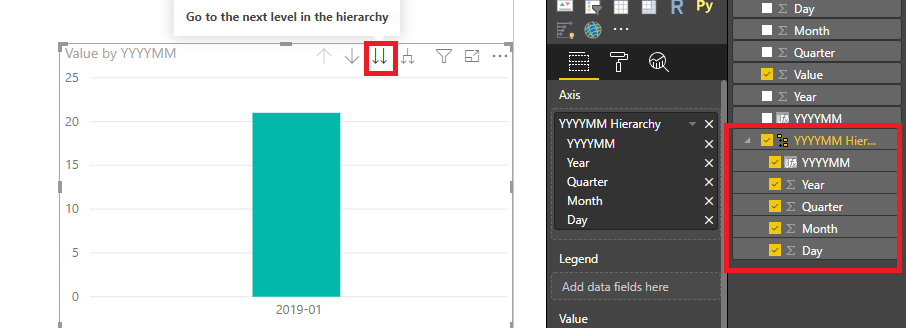
You may new a hierarchy in desktop.Add the Year,Month...columns to the hierarchy.Then click the icon to go to different levels.
Regards,
So what I gather is that this is not possible to do in PowerBI Service.
You may new a hierarchy in desktop.Add the Year,Month...columns to the hierarchy.Then click the icon to go to different levels.
Regards,
So for every possible date format that the report builder may want in a report or a dashboard in PowerBI service has to first be manually created in PowerBI Desktop??
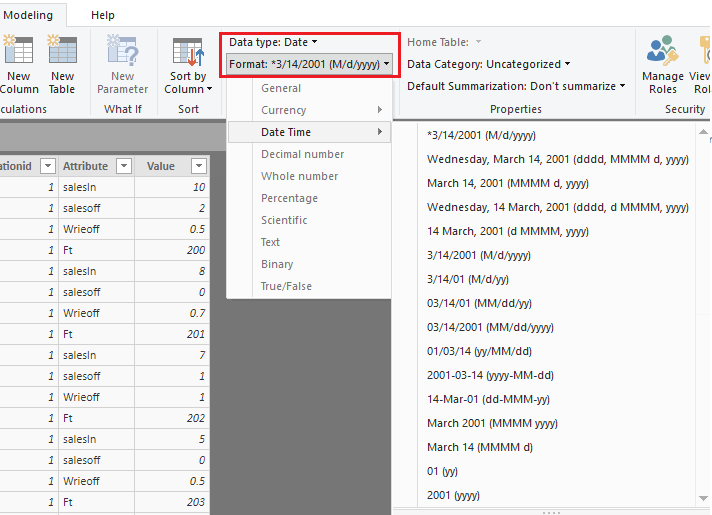
You may also use date format.If it doesn't have the format you request,you may format it manually.
Regards,
The method you show here uses the same formatting for every visualization, correct?
Is there a way to use a different format for each visualization? For example, I like the longer formats for a card (Monday, June 30, 2014), but a shorter format (6/30/2014) for a table or matrix.
Check out the April 2026 Power BI update to learn about new features.
Sign up to receive a private message when registration opens and key events begin.
If you have recently started exploring Fabric, we'd love to hear how it's going. Your feedback can help with product improvements.
| User | Count |
|---|---|
| 11 | |
| 9 | |
| 9 | |
| 7 | |
| 6 |
| User | Count |
|---|---|
| 38 | |
| 27 | |
| 25 | |
| 22 | |
| 22 |