
cancel
Showing results for 
Search instead for 
Did you mean: 

Join the FabCon + SQLCon recap series. Up next: Power BI, Real-Time Intelligence, IQ and AI, and Data Factory take center stage. All sessions are available on-demand after the live show. Register now

Reply
Anonymous
Not applicable

Card notation billions

Hi All,

We'd like to change the notation of billions to the dutch formatting like Mjd. Is this possible via a language/regional setting?

I've changed the dataset regional settings, browser language and Power BI Display language. All seem to make no difference. 

The field is a regular number field, not a currency. A format suloloin where we would have to change a measure is not preferred.


2021-07-09 08_27_00-Postvak IN -.png


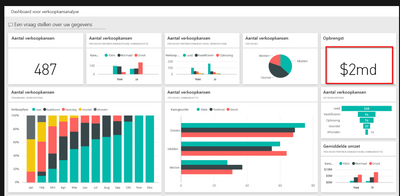
Microsoft shows something similar here 
https://docs.microsoft.com/nl-nl/power-bi/create-reports/sample-opportunity-analysis 

RemyBosman_0-1625812349365.png


6 REPLIES 6
v-easonf-msft
Community Support
Community Support

Hi,  @Anonymous 

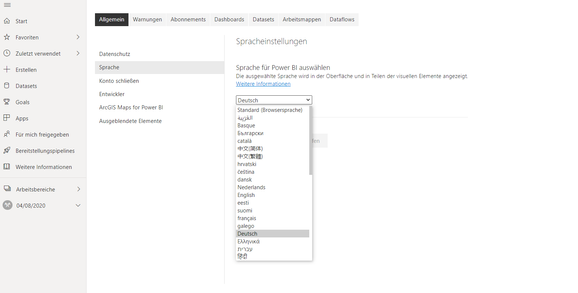
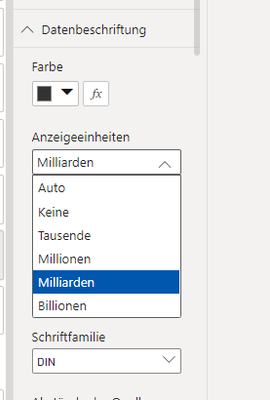
My side is working normally, it is recommended to refresh the page after changing the language setting on the powerbi service.

21.png

22.png

23.png


Best Regards,
Community Support Team _ Eason

Anonymous
Not applicable

Hi Eason,

Can you check if this also works on a non-currency field? I'm not working with a currecy field but a number field.

Thanks,
Remy

Hi,  @Anonymous 

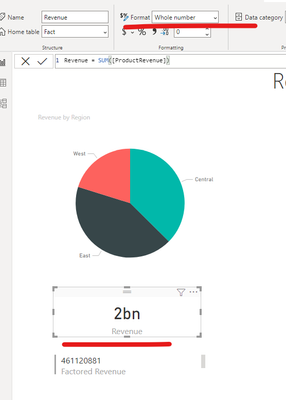
Also works.
Desktop:

24.png
Service:

25.png


Best Regards,
Community Support Team _ Eason
If this post helps, then please consider Accept it as the solution to help the other members find it more quickly.

Anonymous
Not applicable

Thanks. It seems to be a bug in the Dutch notations. German language settings works fine for me too. I've raised a ticket with MS. 

Hi, @Anonymous 

Did you get any reply from the MS engineer?

Has the problem been resolved?


Best Regards,
Community Support Team _ Eason

collinq
Super User
Super User

HI @Anonymous ,


I would have thought that changing the regional settings alone would have done it.  That said, I suggest that you download the report that you are referring to and see if there is a clue in there - maybe a format option or a theme?  let us know if that is helpful.


Did I answer your question? Mark my post as a solution!

Proud to be a Datanaut!
Private message me for consulting or training needs.


Helpful resources

Announcements
April Power BI Update Carousel

Power BI Monthly Update - April 2026

Check out the April 2026 Power BI update to learn about new features.

New to Fabric survey Carousel

New to Fabric Survey

If you have recently started exploring Fabric, we'd love to hear how it's going. Your feedback can help with product improvements.

Power BI DataViz World Championships carousel

Power BI DataViz World Championships - June 2026

A new Power BI DataViz World Championship is coming this June! Don't miss out on submitting your entry.

FabCon and SQLCon Highlights Carousel

FabCon &SQLCon Highlights

Experience the highlights from FabCon & SQLCon, available live and on-demand starting April 14th.