Don't miss your chance to take the Fabric Data Engineer (DP-600) exam for FREE! Find out how by watching the DP-600 session on-demand now through April 28th.
Learn moreJoin the FabCon + SQLCon recap series. Up next: Power BI, Real-Time Intelligence, IQ and AI, and Data Factory take center stage. All sessions are available on-demand after the live show. Register now
We have an Oracle database connection to our Power BI report and published it to the power BI premium workspace. All the setup related to Gateway on the service is working perfectly fine. We have pulished report with the incremental refresh enabled along with RangeStart and RangeEne parameters.
We enabled additional logging in On-prem data gateway and enbaled EmitQueryTrace in gateway config file.
Still we are not able to see the actual query that is fired to the source server.
We do have access on the source and there also the query was not logged in v$sql view.
Can anyone please help me on how I can view these queries either in gateway logs or in Oracle DB.
We have already referred to a similar post here:
On-Prem Gateway logs
But we are not able to get the queries in logs after following the same steps.
We instead get something like the following data:
"let RangeStart=DateTime.FromText("20190101T00:00:00"),
RangeEnd=DateTime.FromText("20190102T00:00:00")
in
PolicyBased_36686F87_B3FA_4760_A613_9C6D47A37170
, __AS_Table__ = Table.FromValue(__AS_Query__)"
Hi @didosh,
Based on my research, there are three ways for you to query the logs for Power BI:
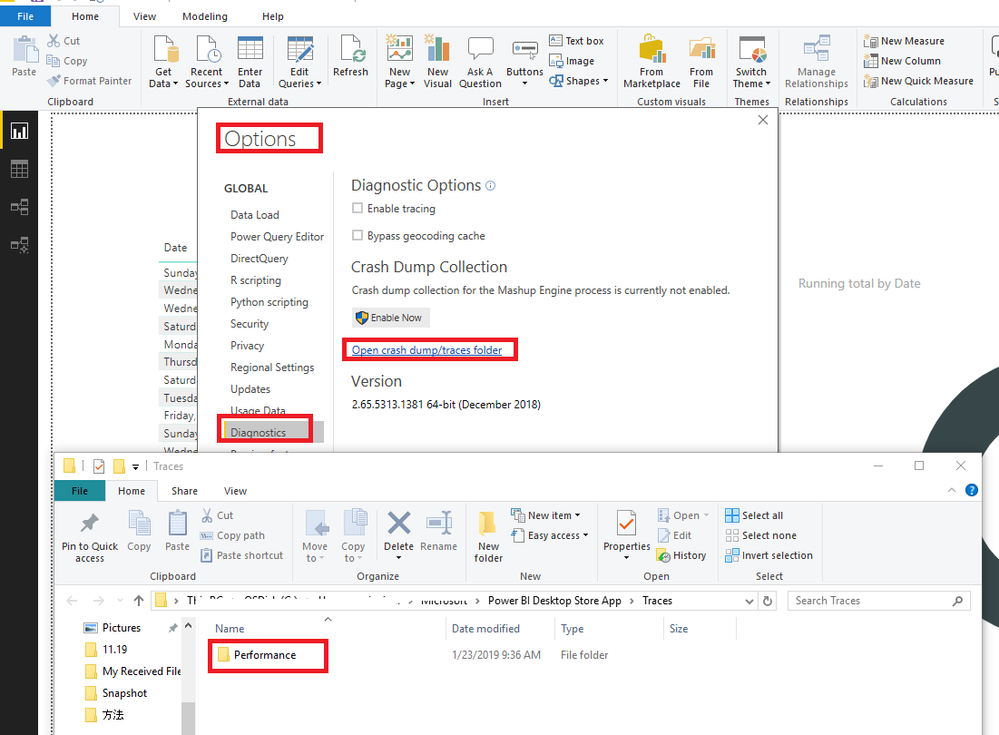
1.You could open the Performence file to see the logs for Power BI Desktop:
File -> Options and Settings -> Options -> Diagnostics -> Open crash dump/traces folder
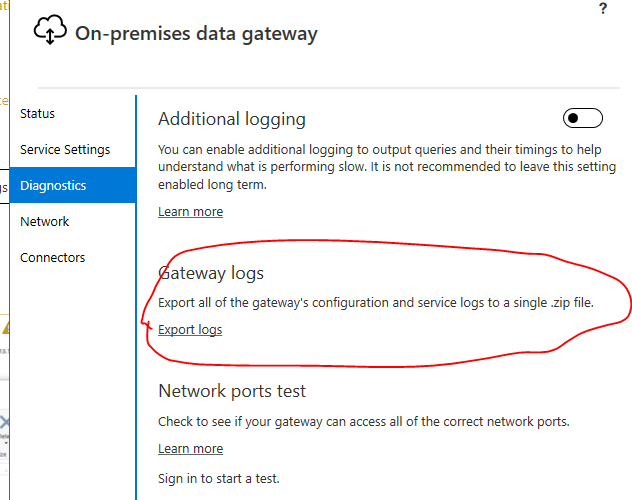
2.You could open the Gateway logs to have a view.
3.You could use the fiddler to capture.
https://docs.microsoft.com/en-us/power-bi/service-gateway-onprem-tshoot#fiddler-trace
Also I suggest you could view the logs in your Oracle DB, if all above could not help you to solve your problem, you could create a support ticket here: https://powerbi.microsoft.com/en-us/support/
Regards,
Daniel He
Check out the April 2026 Power BI update to learn about new features.
If you have recently started exploring Fabric, we'd love to hear how it's going. Your feedback can help with product improvements.
A new Power BI DataViz World Championship is coming this June! Don't miss out on submitting your entry.
| User | Count |
|---|---|
| 10 | |
| 10 | |
| 9 | |
| 7 | |
| 7 |
| User | Count |
|---|---|
| 42 | |
| 31 | |
| 26 | |
| 19 | |
| 19 |