cancel
Showing results for 
Search instead for 
Did you mean: 

Vote for your favorite vizzies from the Power BI Dataviz World Championship submissions. Vote now!

Reply
didosh
Microsoft Employee
Microsoft Employee

Capture Power BI Service Query logs for Oracle DB source

We have an Oracle database connection to our Power BI report and published it to the power BI premium workspace. All the setup related to Gateway on the service is working perfectly fine. We have pulished report with the incremental refresh enabled along with RangeStart and RangeEne parameters.

We enabled additional logging in On-prem data gateway and enbaled EmitQueryTrace in gateway config file.
Still we are not able to see the actual query that is fired to the source server.
We do have access on the source and there also the query was not logged in v$sql view. 


Can anyone please help me on how I can view these queries either in gateway logs or in Oracle DB. 
We have already referred to a similar post here:
On-Prem Gateway logs

But we are not able to get the queries in logs after following the same steps. 
We instead get something like the following data:
"let RangeStart=DateTime.FromText("20190101T00:00:00"),
RangeEnd=DateTime.FromText("20190102T00:00:00")
in
PolicyBased_36686F87_B3FA_4760_A613_9C6D47A37170
, __AS_Table__ = Table.FromValue(__AS_Query__)"

1 REPLY 1
v-danhe-msft
Microsoft Employee
Microsoft Employee

Hi @didosh,

Based on my research, there are three ways for you to query the logs for Power BI:

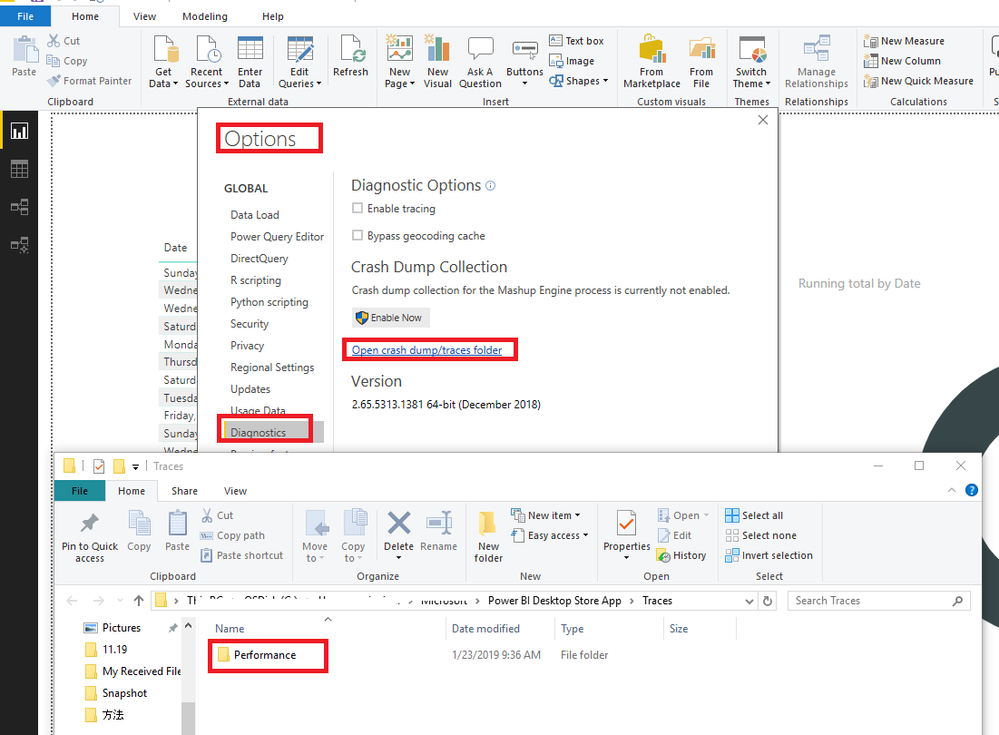
1.You could open the Performence file to see the logs for Power BI Desktop:

File -> Options and Settings -> Options -> Diagnostics -> Open crash dump/traces folder

1.PNG

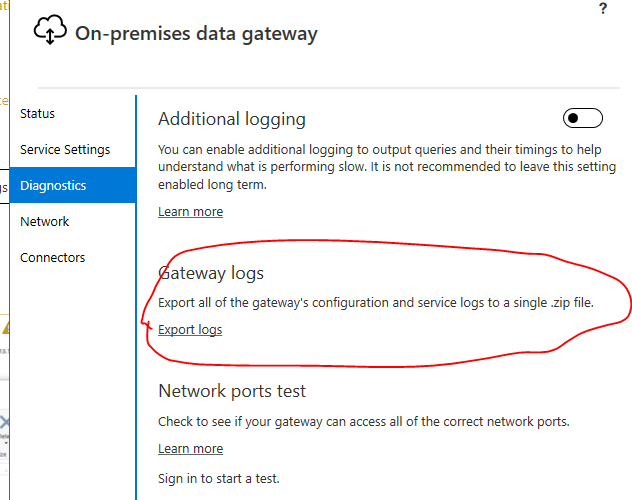
2.You could open the Gateway logs to have a view.

1.PNG

3.You could use the fiddler to capture.

https://docs.microsoft.com/en-us/power-bi/service-gateway-onprem-tshoot#fiddler-trace


Also I suggest you could view the logs in your Oracle DB, if all above could not help you to solve your problem, you could create a support ticket here: https://powerbi.microsoft.com/en-us/support/


Regards,

Daniel He


Community Support Team _ Daniel He
If this post helps, then please consider Accept it as the solution to help the other members find it more quickly.

Helpful resources

Announcements
Power BI DataViz World Championships

Power BI Dataviz World Championships

Vote for your favorite vizzies from the Power BI World Championship submissions!

Sticker Challenge 2026 Carousel

Join our Community Sticker Challenge 2026

If you love stickers, then you will definitely want to check out our Community Sticker Challenge!

January Power BI Update Carousel

Power BI Monthly Update - January 2026

Check out the January 2026 Power BI update to learn about new features.

FabCon Atlanta 2026 carousel

FabCon Atlanta 2026

Join us at FabCon Atlanta, March 16-20, for the ultimate Fabric, Power BI, AI and SQL community-led event. Save $200 with code FABCOMM.