Share feedback directly with Fabric product managers, participate in targeted research studies and influence the Fabric roadmap.
Sign up nowGet Fabric certified for FREE! Don't miss your chance! Learn more
Hi,
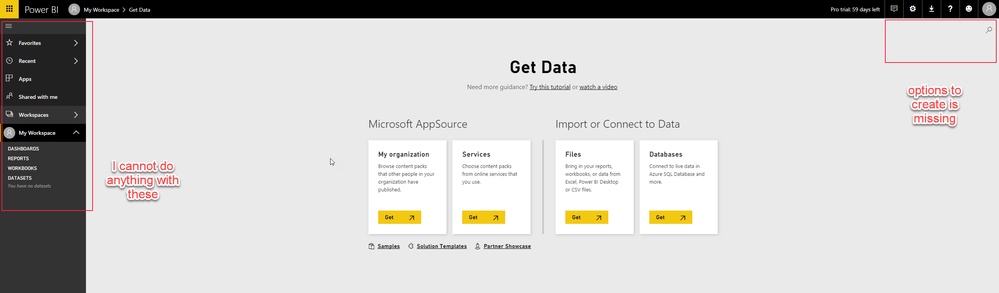
Does anybody know why I cannot see the same as in the following tutorial: https://docs.microsoft.com/en-us/power-bi/service-real-time-streaming
My PowerBI service app looks like this:
Why is that?
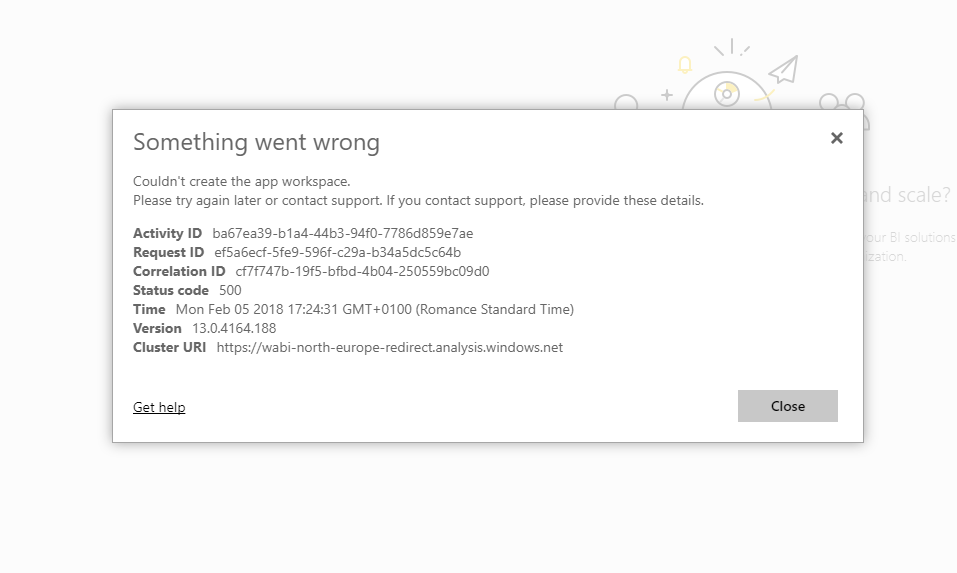
Also, I cannot create any workspaces, it always fails:
Solved! Go to Solution.
@jsvobodacz The streaming dataset can be created from "Datasets", not get data. Go to your Datasets, Click "Create" in the upper right and you will see "Streaming dataset" as an option.
In order to create an App workspace, you need a Pro license. If you have a Pro license, it is possible for your Office 365 admin team to disable the ability to create an App Workspace (Office 365 group).
@jsvobodacz The streaming dataset can be created from "Datasets", not get data. Go to your Datasets, Click "Create" in the upper right and you will see "Streaming dataset" as an option.
In order to create an App workspace, you need a Pro license. If you have a Pro license, it is possible for your Office 365 admin team to disable the ability to create an App Workspace (Office 365 group).
Thanks! This is correct for both issues.
I just could not get around this "get data" until I saw a "skip for now" link and then the option to create and choose streaming data set appeared.![]()
If you love stickers, then you will definitely want to check out our Community Sticker Challenge!
Check out the January 2026 Power BI update to learn about new features.
| User | Count |
|---|---|
| 19 | |
| 10 | |
| 8 | |
| 7 | |
| 7 |
| User | Count |
|---|---|
| 51 | |
| 43 | |
| 30 | |
| 27 | |
| 25 |