cancel
Showing results for 
Search instead for 
Did you mean: 

We've captured the moments from FabCon & SQLCon that everyone is talking about, and we are bringing them to the community, live and on-demand. Starts on April 14th. Register now

Reply
schaema3
Advocate III
Advocate III

Cannot load model

Hi,


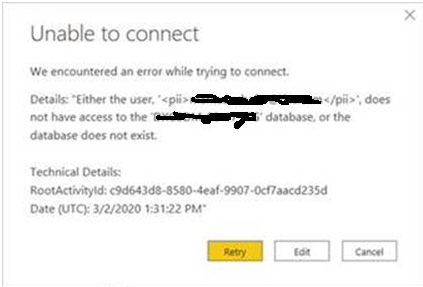
we're using the Microsoft Power BI cloud to host our reporting platform. Recently the data model of a report got replaced with a new data model. Before this happened I re-pointed my file to the new data model. Now when I digged out an older report (that still pointed to the old data model) I got this two error message:


Cannot load model errors.png

It is possible to close the left error message and get re-pointed to the SQL Server Analysis  Servces database. When I'm fixing the connection (with going through internal authentification process), the Power BI report doesn't re-point to the changes I just entered but falls back to the old database (that no longer exists). The eror that now pops up is this one:

Cannot load model error2.png

It now turns into an endless loop. Neither the Retry, nor Edit nor Cancel button react. Only way is to kill the report via Task Manager. 

Zipping the PBIX report and removing on the zipped folder the 'connection' folder does not resolve this issue. Any idea if is possible to recover the old report and to re-post it to the new data source?


Thank you in advance for your help.

5 REPLIES 5
v-easonf-msft
Community Support
Community Support

Hi ,  @schaema3 

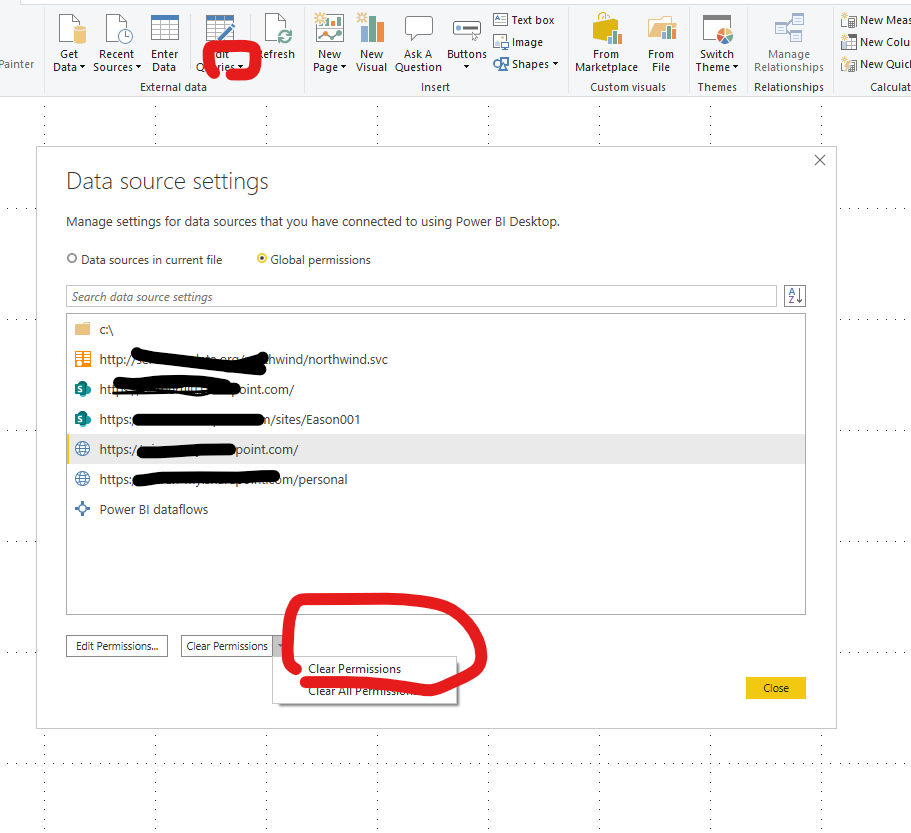
Have you tried to clear the original data source permission?

Try to open a new powerbi desktop, and clear the datasource permission.


39.png

After that, please reopen and  reconfigure  your  pbix file .


Best Regards,
Community Support Team _ Eason

Hi Eason,


that doesn't work either. I tried both, opening a new report clearing the data source permissions, closing Power BI and re-opening the broken report and opening the report out of Power BI without closing the app. Both result in the same. Only way is killing the process with the task manager, no way to either get access or to even close the app.

Hi , @schaema3 

Sorry I can't fix it on my side currently, please kindly raise it to the support team for better advice, thanks a lot!
https://powerbi.microsoft.com/en-us/support/


Best Regards,
Community Support Team _ Eason

Anonymous
Not applicable

Hey @schaema3 


You should be able to open the PBIX, Open Query Editor, click on the gear icon next to source in the applied steps pane to the right and change the source. It should attempt to refresh or reload when you do this. I do this regularly as I have to fix the source for everything from SQL tables to Excel files whenever they are renamed.


Is it freezing on you before this part of the process?


If this helps please kudo. 

If this solves your problem please accept it as a solution.

Hi Tad17,

Yes, it freezes before you actually can access the report to do modifications. I couldn't find any way to get on. Looks to me like a BI bug.

Helpful resources

Announcements
New to Fabric survey Carousel

New to Fabric Survey

If you have recently started exploring Fabric, we'd love to hear how it's going. Your feedback can help with product improvements.

Power BI DataViz World Championships carousel

Power BI DataViz World Championships - June 2026

A new Power BI DataViz World Championship is coming this June! Don't miss out on submitting your entry.

Join our Fabric User Panel

Join our Fabric User Panel

Share feedback directly with Fabric product managers, participate in targeted research studies and influence the Fabric roadmap.

March Power BI Update Carousel

Power BI Community Update - March 2026

Check out the March 2026 Power BI update to learn about new features.