Join us at FabCon Atlanta from March 16 - 20, 2026, for the ultimate Fabric, Power BI, AI and SQL community-led event. Save $200 with code FABCOMM.
Register now!The Power BI Data Visualization World Championships is back! Get ahead of the game and start preparing now! Learn more
I'm trying to get incremental refresh working in our environment. We have a premium workspace that I am publishing to. I have a table with an AccountingDate column (DateTime) that I have imported into my desktop PowerBI. I've defined the RangeStart/RangeEnd parameters and filtered against the AccountingDate column. I have enabled Incremental Refresh against the query. I can publish to the service, I get a successful message, but when I go to the service to look at the dataset, there is a warning icon. When I click on the technical details, I get
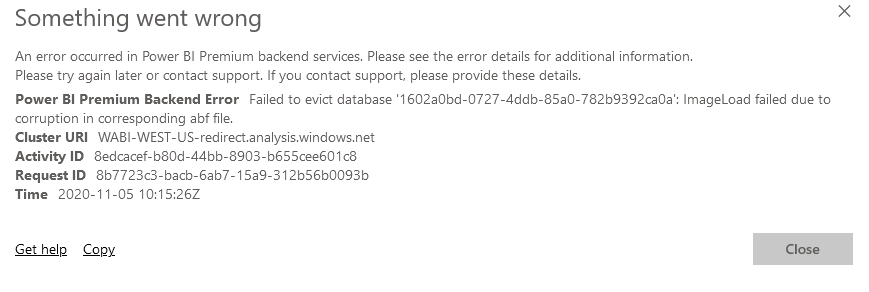
If I remove the Incremental Refresh option from the query, I can publish and refresh fine. I don't know how to get around the error about unable to evict the database or what that error means.
Another interesting thing I noticed. After publishing 'with' Incremental Refresh option enabled, if I look at the settings for the dataset and go into parameters, I do not see RangeStart/RangeEnd, but maybe they are not showing because they are reserved parameters and cannot be modified.
Solved! Go to Solution.
I wound up downloading the October 2020 edition of PowerBI desktop (I was previously using a July 2020 edition) and created a new project which allowed me to get incremental refresh working. Unfortunately, any previous pbix files that I had been playing with regarding incremental refresh would no longer open - I just received an error that something went wrong.
Hi @Anonymous
You may refer to these blogs about incremental refresh in Power BI.
Blog1: Incremental refresh in Power BI
Blog2: Incremental Refresh with Power BI Premium
Best Regards,
Rico Zhou
If this post helps, then please consider Accept it as the solution to help the other members find it more quickly.
I wound up downloading the October 2020 edition of PowerBI desktop (I was previously using a July 2020 edition) and created a new project which allowed me to get incremental refresh working. Unfortunately, any previous pbix files that I had been playing with regarding incremental refresh would no longer open - I just received an error that something went wrong.
The Power BI Data Visualization World Championships is back! Get ahead of the game and start preparing now!