cancel
Showing results for 
Search instead for 
Did you mean: 

View all the Fabric Data Days sessions on demand. View schedule

Reply
casto_jm
Regular Visitor

Cannot connect to Azure Analysis Service model using non administrator user account

Hi everyone,


I've manage succesfully connect live to our Azure Analysis Servicemodel and report is working after publishing to power bi service. The problem is that when other users (which have access to this report and don't have administrator role on Azure Analysis Service) cannot access the report because power bi cannot connect to model when they are accessing report. From my account or other users with admin privileges everything is fine. How to fix this behaviour?

1 ACCEPTED SOLUTION

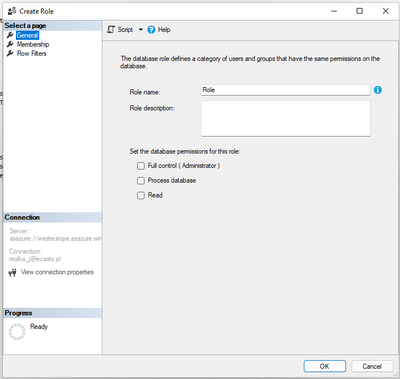
Ok we found out where is the problem - Roles in AAS works a little bit different comparing to Power BI and it not only filter data but determine what permissions are granted to mentioned members, so we only added new members to existing in our case role in AAS model using SSMS.

casto_jm_0-1652954818795.png


View solution in original post

5 REPLIES 5
AnkitKukreja
Super User
Super User

Hi! @casto_jm 


What roles does a user have on AAS and do you see any errors? Can you share the error details?


For Power BI trainings or support dm or reach out to me on LinkedIn.
If my response has successfully addressed your question or concern, I kindly request that you mark this post as resolved. Additionally, if you found my assistance helpful, a thumbs-up would be greatly appreciated.

Thanks,
Ankit Kukreja
www.linkedin.com/in/ankit-kukreja1904

Hi @AnkitKukreja 


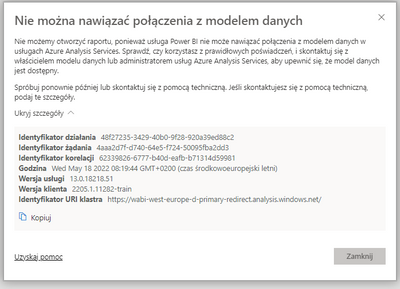
Unfortunately I have only message in polish but I can translate it for you:
Cannot connect to data model

We cannot open report, because Power BI service cannot establish connection to data model in Azure Analysis Services. Check if you are using correct credentials and contact with data model owner or Azure Analysis Services administrator to make sure that data model is available.

Try again later or contact with technical support. If you contact with technical support, provide these details.

casto_jm_0-1652860732335.png

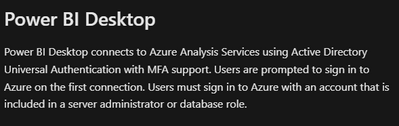
In terms of roles, user which couldn't connect to data model doesn't had any rights, we tried with admin role and it worked, then we switched to contributor and stopped working. We found out in microsoft documentation that user connecting to model has to have admin rights but we didn't think that this applies to every user.

https://docs.microsoft.com/en-us/azure/analysis-services/analysis-services-manage-users

casto_jm_1-1652860738984.png


Can you try Owner permission instead of Admin. Also, I would advice if you have multiple users, then create an AD group and add the required users to that group and provide access at one go.


For Power BI trainings or support dm or reach out to me on LinkedIn.
If my response has successfully addressed your question or concern, I kindly request that you mark this post as resolved. Additionally, if you found my assistance helpful, a thumbs-up would be greatly appreciated.

Thanks,
Ankit Kukreja
www.linkedin.com/in/ankit-kukreja1904

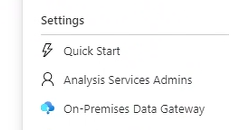
Owner role doesn't work with or without a group. I think it's worth mentioning that it's only working when user is added as admin but in only in Analysis Services Admins

casto_jm_0-1652885061975.png


Ok we found out where is the problem - Roles in AAS works a little bit different comparing to Power BI and it not only filter data but determine what permissions are granted to mentioned members, so we only added new members to existing in our case role in AAS model using SSMS.

casto_jm_0-1652954818795.png


Helpful resources

Announcements
November Power BI Update Carousel

Power BI Monthly Update - November 2025

Check out the November 2025 Power BI update to learn about new features.

Fabric Data Days Carousel

Fabric Data Days

Advance your Data & AI career with 50 days of live learning, contests, hands-on challenges, study groups & certifications and more!

FabCon Atlanta 2026 carousel

FabCon Atlanta 2026

Join us at FabCon Atlanta, March 16-20, for the ultimate Fabric, Power BI, AI and SQL community-led event. Save $200 with code FABCOMM.

Top Solution Authors