cancel
Showing results for 
Search instead for 
Did you mean: 

The Power BI Data Visualization World Championships is back! Get ahead of the game and start preparing now! Learn more

Reply
jsnbravo
Frequent Visitor

Cannot Start Deployment Pipelines

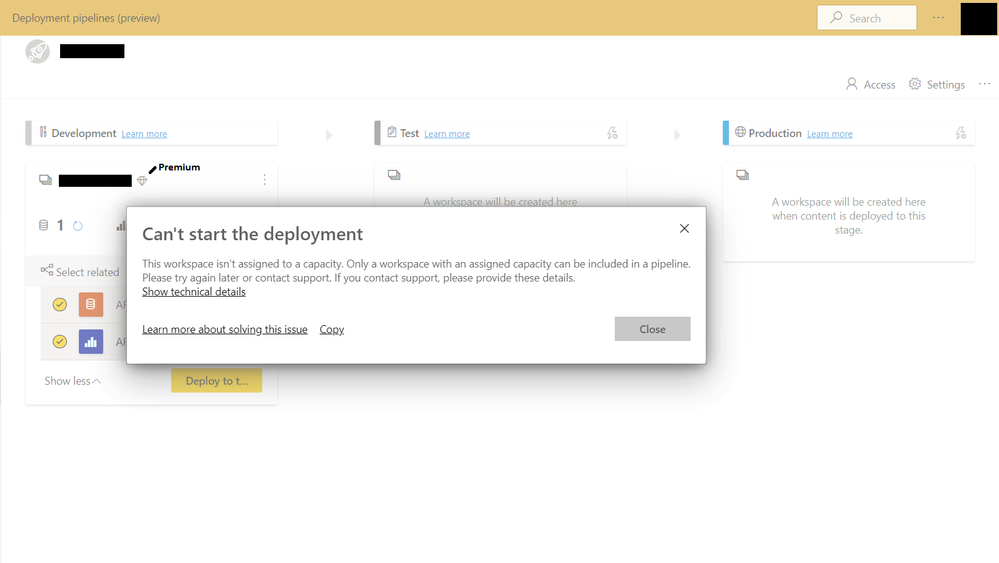
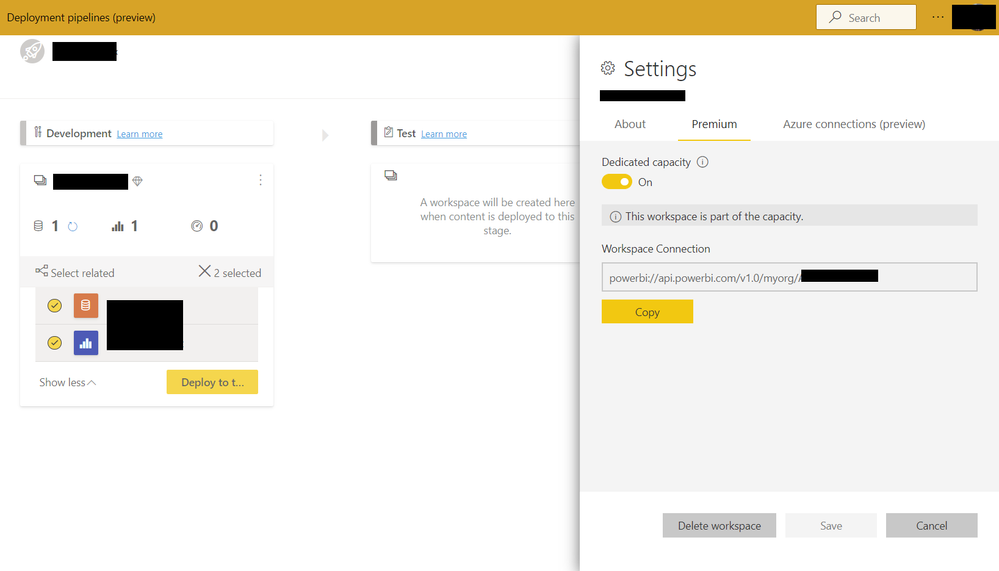
I'm trying to use the new Deployment Pipelines feature, however I'm encountering an error message saying that "This workspace isn't assigned to a capacity. Only a workspace with an assigned capacity can be included in a pipeline" even though my original workspace is already Premium and is part of a Premium capacity. Isn't the point of the new Deployment Pipelines feature is that it will automatically create 2 new workspaces under the same Premium capacity?


Can someone help me identify what's causing this issue?


Error message while deploying to Test stageError message while deploying to Test stageWorkspace is part of a Premium capacityWorkspace is part of a Premium capacity

1 REPLY 1
nickyvv
Most Valuable Professional

Hi @jsnbravo,

it could that the error message you are seeing is from the next stage. I'm not sure if you got the message after clicking "Deploy to Test"?
For the deployment to work you need to have:
* access to create a (v2) workspace
* assignment access to a Premium capacity

If this is both the case then please file a ticket with support, which is free for Pro and Premium users!


Did I answer your question? Mark my post as a solution!

Blog: nickyvv.com | @NickyvV


Helpful resources

Announcements
Power BI DataViz World Championships

Power BI Dataviz World Championships

The Power BI Data Visualization World Championships is back! Get ahead of the game and start preparing now!

December 2025 Power BI Update Carousel

Power BI Monthly Update - December 2025

Check out the December 2025 Power BI Holiday Recap!

FabCon Atlanta 2026 carousel

FabCon Atlanta 2026

Join us at FabCon Atlanta, March 16-20, for the ultimate Fabric, Power BI, AI and SQL community-led event. Save $200 with code FABCOMM.