Join us at FabCon Atlanta from March 16 - 20, 2026, for the ultimate Fabric, Power BI, AI and SQL community-led event. Save $200 with code FABCOMM.
Register now!The Power BI Data Visualization World Championships is back! Get ahead of the game and start preparing now! Learn more
Hello,
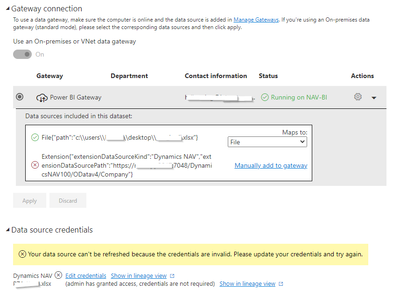
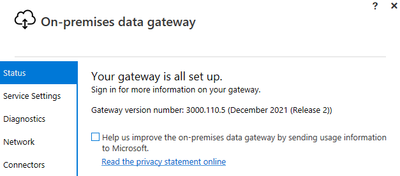
We have production server Dynamics NAV 2017 available only in local network (LAN). Using Power BI Desktop we have created Power BI Report. As data source we use DynamicsNAV and Excel file. All information succsefully refresh to Power BI Desktop during development. After we publish report to Power BI Service, we can't refresh it anymore. Power BI Gateway version : 3000.110.5
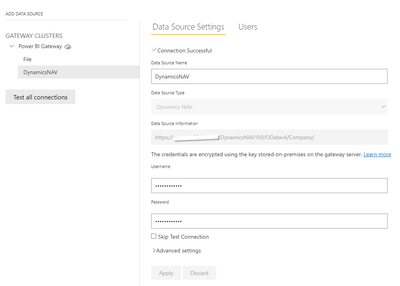
Excel file sucsesfully maped with dataset, but Dynamics NAV not mapping, I have tried to press "Manually add to gateway" and add it manually, but nothing changes after I've create data source.
Any ideas?
Solved! Go to Solution.
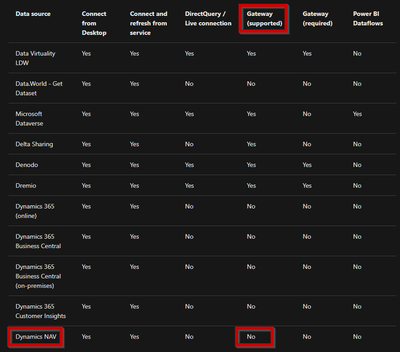
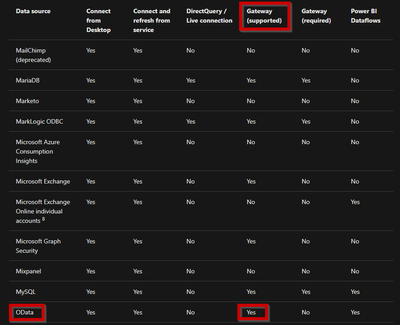
I got answer from Microsoft Support. Basically "Dynamics NAV" data source can't be used with Power BI Gateway, so I we will use "OData Feed" data source. Hops this information will help someone 🙂
https://docs.microsoft.com/en-us/power-bi/connect-data/power-bi-data-sources
I got answer from Microsoft Support. Basically "Dynamics NAV" data source can't be used with Power BI Gateway, so I we will use "OData Feed" data source. Hops this information will help someone 🙂
https://docs.microsoft.com/en-us/power-bi/connect-data/power-bi-data-sources
Doesn't help.
Hi @Aigars ,
Try this:
Under Gateway Cluster Settings, select Allow user's cloud data sources to refresh through this gateway cluster > Apply.
https://docs.microsoft.com/en-us/power-bi/connect-data/service-gateway-mashup-on-premises-cloud
Best Regards,
Jay
Check out the November 2025 Power BI update to learn about new features.
Advance your Data & AI career with 50 days of live learning, contests, hands-on challenges, study groups & certifications and more!