FabCon is coming to Atlanta
Join us at FabCon Atlanta from March 16 - 20, 2026, for the ultimate Fabric, Power BI, AI and SQL community-led event. Save $200 with code FABCOMM.
Register now!- Power BI forums
- Get Help with Power BI
- Desktop
- Service
- Report Server
- Power Query
- Mobile Apps
- Developer
- DAX Commands and Tips
- Custom Visuals Development Discussion
- Health and Life Sciences
- Power BI Spanish forums
- Translated Spanish Desktop
- Training and Consulting
- Instructor Led Training
- Dashboard in a Day for Women, by Women
- Galleries
- Data Stories Gallery
- Themes Gallery
- Contests Gallery
- QuickViz Gallery
- Quick Measures Gallery
- Visual Calculations Gallery
- Notebook Gallery
- Translytical Task Flow Gallery
- TMDL Gallery
- R Script Showcase
- Webinars and Video Gallery
- Ideas
- Custom Visuals Ideas (read-only)
- Issues
- Issues
- Events
- Upcoming Events
The Power BI Data Visualization World Championships is back! Get ahead of the game and start preparing now! Learn more
- Power BI forums
- Forums
- Get Help with Power BI
- Service
- Re: Calculated column looks correct on preview but...
- Subscribe to RSS Feed
- Mark Topic as New
- Mark Topic as Read
- Float this Topic for Current User
- Bookmark
- Subscribe
- Printer Friendly Page


- Mark as New
- Bookmark
- Subscribe
- Mute
- Subscribe to RSS Feed
- Permalink
- Report Inappropriate Content
Calculated column looks correct on preview but blank on refresh (dataflow)
I'm pulling data from SQL and am putting in a calculated date column. The data source only gives me a week start date column, there is another column that I can use to calculate the day of the week; there is a description that will end with 1Total, 2Total, 3Total, etc. where 1 refers to Monday.
I use the following code to extract the number from this description and then use it in a Date.AddDays function to get a proper date for that row of data.
Table.AddColumn(Source, "Date", each Date.AddDays([Week StartDate],Number.FromText(Text.Start(Text.End([Name],6),1))-1), type date)
There's no problem with this step when looking at the preview when editing the query. It looks fine and pulls through as expected. But when I actually run the query the column comes through blank.
I initially thought that it was to do with lazy evaluation of the query. One of the steps in my query was to delete the [Name] column in the above code as it was unneccsary after this date has been calculated. I thought it might be that it was not evaluating the add column step properly until after the [Name] column had been deleted.
However I have altered the query so it leaves in this column and it makes no difference 😞
Solved! Go to Solution.
- Mark as New
- Bookmark
- Subscribe
- Mute
- Subscribe to RSS Feed
- Permalink
- Report Inappropriate Content
Support have come back with a solution that appears to work.
The original code to add the column in was this:
Table.AddColumn(Source, "Date", each Date.AddDays([Week StartDate],Number.FromText(Text.Start(Text.End([Name],6),1))-1), type date)
They said to wrap the Date.AddDays() with Date.From() like so:
Table.AddColumn(Source, "Date", each Date.From(Date.AddDays([Week StartDate],Number.FromText(Text.Start(Text.End([Name],6),1))-1)), type date)
- Mark as New
- Bookmark
- Subscribe
- Mute
- Subscribe to RSS Feed
- Permalink
- Report Inappropriate Content
Support have come back with a solution that appears to work.
The original code to add the column in was this:
Table.AddColumn(Source, "Date", each Date.AddDays([Week StartDate],Number.FromText(Text.Start(Text.End([Name],6),1))-1), type date)
They said to wrap the Date.AddDays() with Date.From() like so:
Table.AddColumn(Source, "Date", each Date.From(Date.AddDays([Week StartDate],Number.FromText(Text.Start(Text.End([Name],6),1))-1)), type date)

- Mark as New
- Bookmark
- Subscribe
- Mute
- Subscribe to RSS Feed
- Permalink
- Report Inappropriate Content
Hi @Veles ,
I'm not so clear for your data structure. Can you please explain more about these?
How to Get Your Question Answered Quickly
In addition, you mentioned 'name' field. Did this field from datasource or calculate fields based on m query formula?
Regards,
Xiaoxin Sheng
- Mark as New
- Bookmark
- Subscribe
- Mute
- Subscribe to RSS Feed
- Permalink
- Report Inappropriate Content
Here's a sample of the data source. Name and Week StartDate are columns on the data source. All other columns are irrelevant for this scenario.
The number contained in the middle of the Name is equivalent of the weekday number (where 1 = Monday). I'm using this to calculate what the actual date is of that bit of data.
I have absolutely no issue with this calculation, it works fine when building the query and viewing it in the query editor. The problem is when I run the query the column comes out blank, all the values I was seeing when building the query don't appear.
| Name | Week StartDate | Expected Result |
| Value1Total | 20/05/2019 | 20/05/2019 |
| Value2Total | 20/05/2019 | 21/05/2019 |
| Value3Total | 20/05/2019 | 22/05/2019 |
| Value4Total | 20/05/2019 | 23/05/2019 |
| Value5Total | 20/05/2019 | 24/05/2019 |
| Value6Total | 20/05/2019 | 25/05/2019 |
| Value7Total | 20/05/2019 | 26/05/2019 |
| Transactions1Total | 20/05/2019 | 20/05/2019 |
| Transactions2Total | 20/05/2019 | 21/05/2019 |
| Transactions3Total | 20/05/2019 | 22/05/2019 |
| Transactions4Total | 20/05/2019 | 23/05/2019 |
| Transactions5Total | 20/05/2019 | 24/05/2019 |
| Transactions6Total | 20/05/2019 | 25/05/2019 |
| Transactions7Total | 20/05/2019 | 26/05/2019 |
- Mark as New
- Bookmark
- Subscribe
- Mute
- Subscribe to RSS Feed
- Permalink
- Report Inappropriate Content
HI @Veles ,
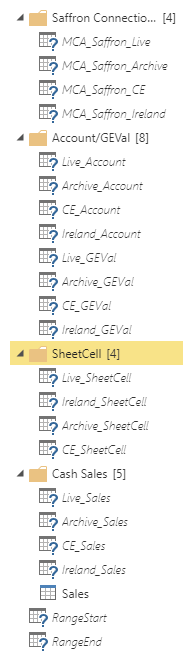
Is there a 'lightning' icon on your entity?
If this is a case, it seems like you're using computed entities, please take a look at official document to know the limitations:
Using computed entities on Power BI Premium
Regards,
Xiaoxin Sheng
- Mark as New
- Bookmark
- Subscribe
- Mute
- Subscribe to RSS Feed
- Permalink
- Report Inappropriate Content
Hi @Anonymous
No computed entities in my dataflow

- Mark as New
- Bookmark
- Subscribe
- Mute
- Subscribe to RSS Feed
- Permalink
- Report Inappropriate Content
HI @Veles ,
I can't reproduce this, maybe you can open a support ticket for this.

Regards,
Xiaoxin Sheng
- Mark as New
- Bookmark
- Subscribe
- Mute
- Subscribe to RSS Feed
- Permalink
- Report Inappropriate Content
Thanks @Anonymous I've raised a ticket to look into this
Helpful resources

Power BI Dataviz World Championships
The Power BI Data Visualization World Championships is back! Get ahead of the game and start preparing now!

Power BI Monthly Update - November 2025
Check out the November 2025 Power BI update to learn about new features.

FabCon Atlanta 2026
Join us at FabCon Atlanta, March 16-20, for the ultimate Fabric, Power BI, AI and SQL community-led event. Save $200 with code FABCOMM.


