cancel
Showing results for 
Search instead for 
Did you mean: 

July 7 - July 17 | Round 2 of the Power BI Dataviz World Championships. Don't miss your chance! Learn more

Reply
saket_mca1
Frequent Visitor

Calculate Measure

Hi,


I have a scenairo in which I have to display 2(Sales, Sales_History) measure values by Region having 'Month-Year' as a filter. Consider like I have data for each day from Jan 2016 to July 2017 and I applied filter as Mar-2017. then valuse for measures should be as below


Sales:- Should display data for Mar-2017 month only.

Sales_History:- Should display data from Jan 2016 to Mar 2017.


For e.g

                              Sales                 Sales_History

--------------------------------------------------------

Region1                 20                          235 (Sum from Jan 2016 to Mar 2017 for Region1) 

Region2                 25                          225 (Sum from Jan 2016 to Mar 2017 for Region2)

Region1                 15                          215 (Sum from Jan 2016 to Mar 2017 for Region3)

Region1                 22                          205 (Sum from Jan 2016 to Mar 2017 for Region4)


Please anyone let me know how this can be done in Power BI.


Regards

Saket 


1 ACCEPTED SOLUTION
v-caliao-msft
Microsoft Employee
Microsoft Employee

@saket_mca1,


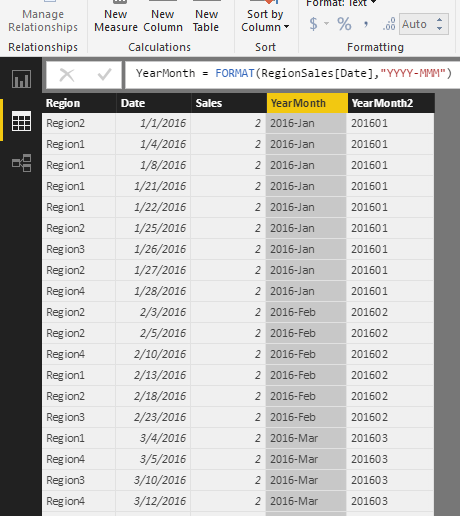
This requirement can be done by a cumulative total. Please refer to the steps below to see the details.

  1. Create two calculate column in your date table.
    YearMonth = FORMAT(RegionSales[Date],"YYYY-MMM")
    YearMonth2 = FORMAT(RegionSales[Date],"YYYYMM")
    Capture.PNG
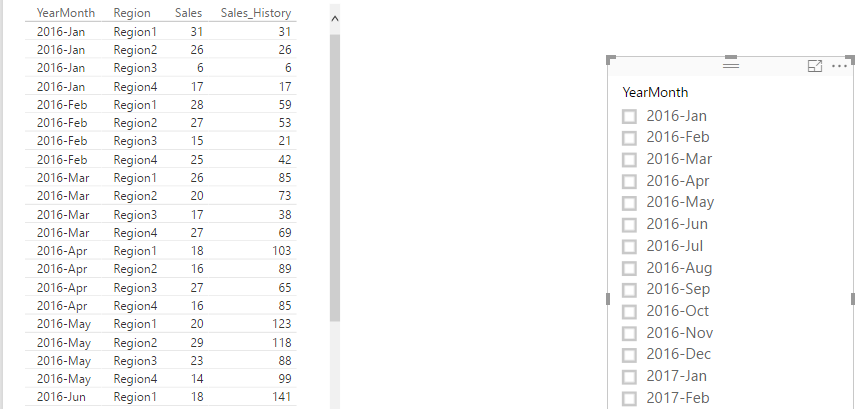
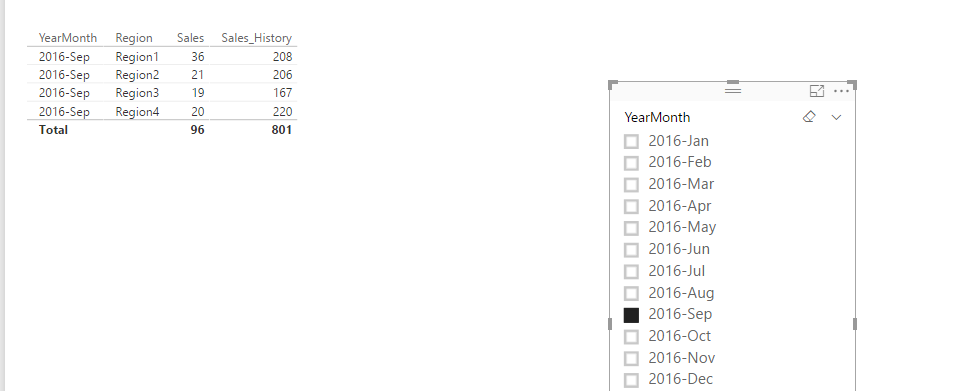
  2. Create cumulative total measure
    Sales_History = CALCULATE(SUM(RegionSales[Sales]),FILTER(ALLEXCEPT(RegionSales,RegionSales[Region]),RegionSales[YearMonth2]<=MAX(RegionSales[YearMonth2])))
    Capture1.PNGCapture2.PNG

Regards,

Charlie Liao

View solution in original post

2 REPLIES 2
v-caliao-msft
Microsoft Employee
Microsoft Employee

@saket_mca1,


This requirement can be done by a cumulative total. Please refer to the steps below to see the details.

  1. Create two calculate column in your date table.
    YearMonth = FORMAT(RegionSales[Date],"YYYY-MMM")
    YearMonth2 = FORMAT(RegionSales[Date],"YYYYMM")
    Capture.PNG
  2. Create cumulative total measure
    Sales_History = CALCULATE(SUM(RegionSales[Sales]),FILTER(ALLEXCEPT(RegionSales,RegionSales[Region]),RegionSales[YearMonth2]<=MAX(RegionSales[YearMonth2])))
    Capture1.PNGCapture2.PNG

Regards,

Charlie Liao

Hi Charlie,


Thanks for your previous response. It helped me a lot. 

In continuous to our discussion, I have the same requirement but with some change. In previous measure calculation we applied filter based on Region. But now I am looking for a calculated measure which don't have any filter.


So that we can display the measure column not only with Region but also with other dimension column e.g. Product Category, Sales Type. 


I tried doing that but didn't figure it out. So Please let me know if you can help me out with this requirement.


Regards

Saket


Helpful resources

Announcements
FabCon and SQLCon Barcelona 2026

FabCon & SQLCon – Barcelona 2026

Join us in Barcelona for FabCon and SQLCon, the Fabric, Power BI, SQL, and AI community event. Save €200 with code FABCMTY200.

60 days of Data Days Carousel

Data Days 2026

Join Fabric Data Days 2026: 60 days of free live/on-demand sessions, challenges, study groups, and certification opportunities.

Power BI DataViz World Championships carousel

Power BI DataViz World Championships - June 2026

A new Power BI DataViz World Championship is coming this June! Don't miss out on submitting your entry.