cancel
Showing results for 
Search instead for 
Did you mean: 

The Power BI Data Visualization World Championships is back! Get ahead of the game and start preparing now! Learn more

Reply
Anonymous
Not applicable

Azure Blob Storage Schedule Refresh

Dear Power BI users,


I am currently working on a project where multiple parquet files are imported from a single Azure Blob Storage and transformed using Python scripts. In this thread an example is given for automatic refresh with Azure Blob Storage as dataset source.


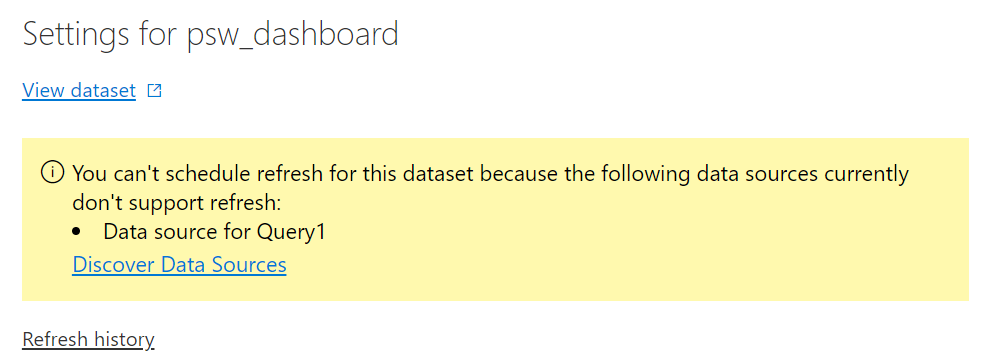
Surprisingly, the dataset does not have an automatic refresh option, as shown below:


refresh_datasets0.png


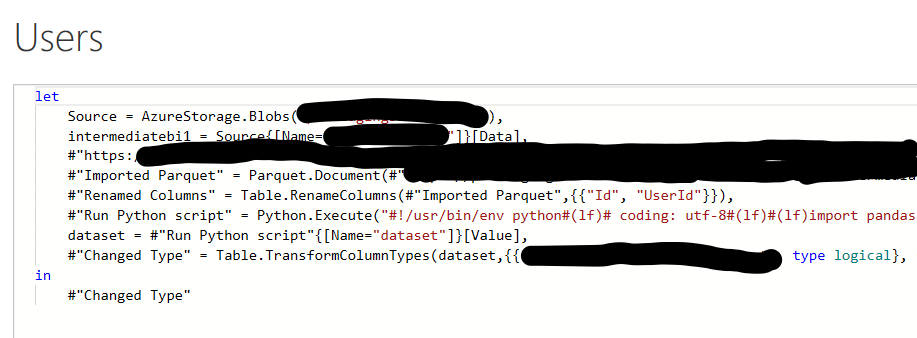
Here is an overview of one of the tables advanced editor. There are 5 tables imported from the Azure Blob Storage, which all have the same import/transformation structure.


advanced_editor_power_bi.png


The final goal is to have an automatic daily refresh of the dataset for the dashboard using Azure Blob Storage as data source with transformations in Python.


Thanks in advance!

2 REPLIES 2
v-yanjiang-msft
Community Support
Community Support

Hi @Anonymous ,

I think the problem still lies in the data source, what will appear when you click on the Discover Data Sources in your snapshot?As only the Azure Blob Storage data source supports refresh, I guess it's the multiple parquet files cause your problem, maybe you can do some processing before you import the data in Power BI.

Here's some information may help you.
https://docs.microsoft.com/en-us/power-bi/connect-data/service-admin-troubleshoot-unsupported-data-source-for-refresh

https://www.sqlshack.com/how-to-access-data-from-azure-blob-storage-using-power-bi/

https://stackoverflow.com/questions/51696655/read-multiple-parquet-files-in-a-folder-and-write-to-single-csv-file-using-pytho

Best Regards,
Community Support Team _ kalyj

If this post helps, then please consider Accept it as the solution to help the other members find it more quickly.


Anonymous
Not applicable

Hello @v-yanjiang-msft ,


Thanks for your reply.

I contacted the Power BI help desk and they proposed adding a Power BI Gateway.


With a person gateway running locally on my laptop the refresh is succesful. This would however require my laptop to be running 24/7 for scheduled refreshed.


I am currently looking into a gateway hosted remotely, will give an update if I got it working.


Kind regards,


Mark

Helpful resources

Announcements
Power BI DataViz World Championships

Power BI Dataviz World Championships

The Power BI Data Visualization World Championships is back! Get ahead of the game and start preparing now!

December 2025 Power BI Update Carousel

Power BI Monthly Update - December 2025

Check out the December 2025 Power BI Holiday Recap!

FabCon Atlanta 2026 carousel

FabCon Atlanta 2026

Join us at FabCon Atlanta, March 16-20, for the ultimate Fabric, Power BI, AI and SQL community-led event. Save $200 with code FABCOMM.