This time we’re going bigger than ever. Fabric, Power BI, SQL, AI and more. We're covering it all. You won't want to miss it.
Learn moreGet Fabric Certified for FREE during AI Skills Fest. This week only. Secure your voucher now.
Hello! I'm trying to use Selenium in python to access a report in app.powerbi.com and export data from a table visual automatically.
The problem is I can't select anything in the report. The script manages to find the elements but doesn't interact with them. I've also tried to see if there's a different frame I need to switch to, but I couldn't find any.
When I'm doing it manually I click in '...' More Options and Export Data.
Has anyone managed to do this? I'm open to new solutions that don't include Selenium
I will try to use Python with Selenium to achive this goal. Let's see.
Are you on shared capacity or on Premium?
Power BI performance analyzer allows you to "borrow" the DAX query for each visual, and you can then run that query in your XMLA endpoint of choice (DAX studio, SSMS, etc)
Opening this in DAX Studio gives:
// DAX Query
DEFINE
VAR __DS0Core =
SUMMARIZECOLUMNS(
ROLLUPADDISSUBTOTAL(
ROLLUPGROUP(
'Vulnerabilities'[Plugin ID],
'Vulnerabilities'[Open Date],
'Vulnerabilities'[Host],
'Vulnerabilities'[Repeated],
'Vulnerabilities'[Status]
), "IsGrandTotalRowTotal"
),
"SumCount", CALCULATE(SUM('Vulnerabilities'[Count]))
)
VAR __DS0PrimaryWindowed =
TOPN(
502,
__DS0Core,
[IsGrandTotalRowTotal],
0,
'Vulnerabilities'[Open Date],
1,
'Vulnerabilities'[Plugin ID],
1,
'Vulnerabilities'[Host],
1,
'Vulnerabilities'[Repeated],
1,
'Vulnerabilities'[Status],
1
)
EVALUATE
__DS0PrimaryWindowed
ORDER BY
[IsGrandTotalRowTotal] DESC,
'Vulnerabilities'[Open Date],
'Vulnerabilities'[Plugin ID],
'Vulnerabilities'[Host],
'Vulnerabilities'[Repeated],
'Vulnerabilities'[Status]
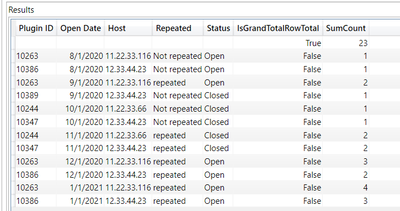
and executing it gives:
Don't miss out on Data Days, June 15 through August 7. Learn Fabric, Power BI, SQL, AI and more.
Check out the May 2026 Power BI update to learn about new features.
| User | Count |
|---|---|
| 16 | |
| 11 | |
| 10 | |
| 8 | |
| 7 |
| User | Count |
|---|---|
| 41 | |
| 36 | |
| 36 | |
| 28 | |
| 20 |