cancel
Showing results for 
Search instead for 
Did you mean: 

The Power BI Data Visualization World Championships is back! Get ahead of the game and start preparing now! Learn more

Reply
Anonymous
Not applicable

Automatically Update Data on Teams without Re-Publish from Desktop

Hello Forum,


This is a great forum I have got so many answers out of it which saved my life! So I just thought I would go ahead and ask something that has been troubling me for about 2 weeks.


My situation, I have an excel spreadsheet in Teams, which I managed to link to a Desktop Power BI report. I have also published this report on service for everyone to see. 


The reason the excel file (dataset) is on Teams is so everyone can update the file and theoritically be able to view the updated dashboard online. Unfortunately whenever an update is made to the excel file, the only way to get the service report to refresh is to :


1. Open the desktop version and refresh

2. Re-publish the report and wait 20-30 minutes.


Is there any way that I can immediately get the results to refresh on service without needing to open the desktop version? As the desktop version is currently on my laptop locally and whenever someone makes a change they need to message me being like "Please refresh and republish the file". Which doesn't seem very efficient. 


Thank you in advance!

4 REPLIES 4
Sujitkr47
New Member

This might be different from the actual mentioned problem in above. But i am having difficulties on auto refresh reports which made from a Sharepoint online list,  published on Microsoft teams. What i can see is, the Power BI online application updates the report automatically once the list item updated. But, if i open the report on Power BI desktop application it doesn't reflects the updated list data.


Is there any way out to get the updated reports while sharepoint online list items getting updated without opening the Power BI desktop application and update the reports once again manually and republish it to my teams workspace?


Please help !

mussaenda
Super User
Super User

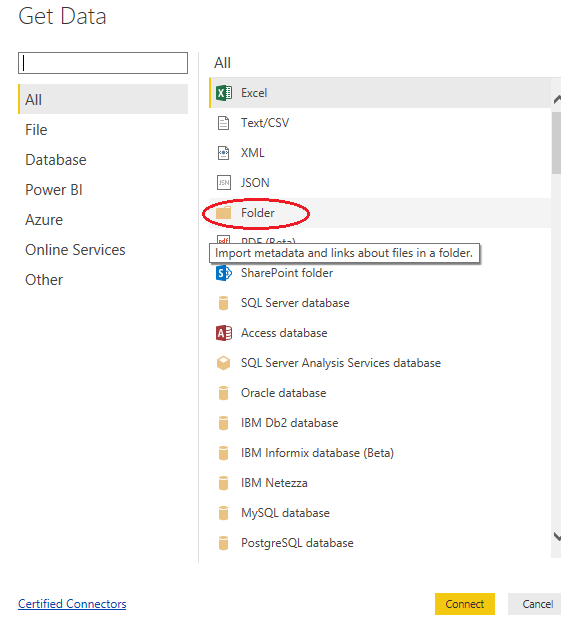
Hi, have you tried putting your excel on a folder then import it to power bi via folder and not via excel?


folder.png


It worked on my side.

Anonymous
Not applicable

HI @Anonymous ,

How did you publish your report? Can you please explain more about these steps?

How to Get Your Question Answered Quickly

In addition. I'd like to suggest you take a look at following link to know more about how to configure scheduled refresh: Configuring scheduled refresh

Regards,

Xiaoxin Sheng

Anonymous
Not applicable

Hello Xiaoxin,


Thank you for getting back to me and sharing the links.  


I have followed the following steps:


1. Uploaded the excel spreadsheet on Microsoft Teams

2. Connected to Teams from power BI desktop using "Get Data" following this post

3. Built my dashboard on desktop version

4. Published using the publish button on Power BI Desktop and chose "My Workspace" as the place to publish


Hope this makes sense , I apologise if I am missing a point here. I have also scheduled a refresh using a similar method to the one described on the link you shared, however it still won't update online unless I refresh the desktop version and republish it. 


Thank you again for your reply.


Kind Regards,


Stratoshad

Helpful resources

Announcements
Power BI DataViz World Championships

Power BI Dataviz World Championships

The Power BI Data Visualization World Championships is back! Get ahead of the game and start preparing now!

December 2025 Power BI Update Carousel

Power BI Monthly Update - December 2025

Check out the December 2025 Power BI Holiday Recap!

FabCon Atlanta 2026 carousel

FabCon Atlanta 2026

Join us at FabCon Atlanta, March 16-20, for the ultimate Fabric, Power BI, AI and SQL community-led event. Save $200 with code FABCOMM.