cancel
Showing results for 
Search instead for 
Did you mean: 

The Power BI Data Visualization World Championships is back! Get ahead of the game and start preparing now! Learn more

Reply
illmatic
Frequent Visitor

Automatic Refresh on dynamic data sources - SharePoint

Apologies if this question has been asked ad nauseum.  I'm having difficulty trying to figure out how to transition a dynamic data query made to SharePoint API to Power BI Service.

The query works fine in Power BI Desktop, but not in the service.  It notes that the issue is with Query 1.   Here is my query:


let
    Source = OData.Feed("https://contoso.com/pwa/_api/ProjectData/Projects?$select=ProjectId,ProjectName,ProjectWorkspaceInternalUrl&$filter=ProjectWorkspaceInternalUrl ne null"),
    #"AllListData" = Table.AddColumn(Source, "Risks", each
    GetList([ProjectWorkspaceInternalUrl], "Risks")),
    #"Expanded Risks" = Table.ExpandTableColumn(AllListData, "Risks", {"Exposure"}, {"Risks.Exposure"}),
    #"Renamed Columns" = Table.RenameColumns(#"Expanded Risks",{{"Risks.Exposure", "Risk Score"}})

in
    #"Renamed Columns"


1 ACCEPTED SOLUTION

Hi Stephen,

I think you may have misinterpreted the question.  This does not have to do with credentials; there is a dynamic query at the 'GetList' action.   I am unable to schedule an automated refresh due to this reason and received an error stating as much. 

In any case, I was able to resolve by using Chris Webb's method of Json.Document source and Web.Contents to use relative paths so that the Source Url could continue to be read and I can iterate throughout all my subsites and aggregate all lists.

View solution in original post

5 REPLIES 5
Anonymous
Not applicable

Hi @illmatic ,


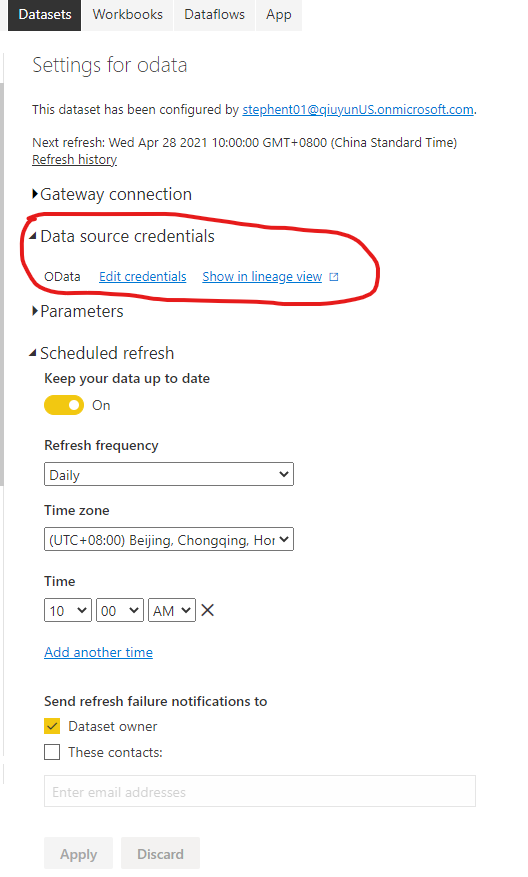
From your query, you can see that your data source is OData. The report of OData data source is published to Power BI Service without a gateway. You only need to have the correct credentials to configure the scheduled refresh.

Screenshot 2021-04-28 092901.png


Best Regards,

Stephen Tao


If this post helps, then please consider Accept it as the solution to help the other members find it more quickly.

Hi Stephen,

I think you may have misinterpreted the question.  This does not have to do with credentials; there is a dynamic query at the 'GetList' action.   I am unable to schedule an automated refresh due to this reason and received an error stating as much. 

In any case, I was able to resolve by using Chris Webb's method of Json.Document source and Web.Contents to use relative paths so that the Source Url could continue to be read and I can iterate throughout all my subsites and aggregate all lists.

can you share the link to the "Chris Webb's method of Json.Document source and Web.Contents" thanks

Hi!

This is the Chris's blog: - https://blog.crossjoin.co.uk/2016/08/16/using-the-relativepath-and-query-options-with-web-contents-i...

I was also able to solve the problem using this.

Hi!
I am also stuck at a similar position. And I am also using the Odata.Feed() in the URL. And I am unable to understand how to implement Json.Document ; Web.Contents  with this Odata.Feed. Like should I keep it as it is or replace it with Web.Contents or something?
If it is possible, then can you reply with your updated query which includes "Json.Document ; Web.Contents" in the query?

Thanks in advance!

Helpful resources

Announcements
Power BI DataViz World Championships

Power BI Dataviz World Championships

The Power BI Data Visualization World Championships is back! Get ahead of the game and start preparing now!

December 2025 Power BI Update Carousel

Power BI Monthly Update - December 2025

Check out the December 2025 Power BI Holiday Recap!

FabCon Atlanta 2026 carousel

FabCon Atlanta 2026

Join us at FabCon Atlanta, March 16-20, for the ultimate Fabric, Power BI, AI and SQL community-led event. Save $200 with code FABCOMM.