
Don't miss your chance to take the Fabric Data Engineer (DP-700) exam on us!
Learn moreWe've captured the moments from FabCon & SQLCon that everyone is talking about, and we are bringing them to the community, live and on-demand. Starts on April 14th. Register now
Hey I'm learning Power BI for some stuff for work, and I connected an excel file that is on our team's site to Power BI, and it shows up under "Workbooks" but it never refreshes unless I do it manually. I've been reading and seems workbooks done this way should be auto-refreshing hourly but its not. Am I missing something or does that feature require a Power BI Pro license? Thanks!
Solved! Go to Solution.
Hi @Anonymous ,
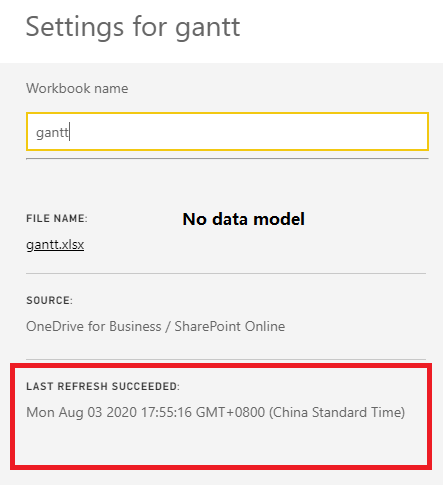
Is there a data model in your excel?
If there is not, OneDrive refresh won't be enable.
If there is a data model, OneDrive refresh could be enable.
You can check it by referring to below screenshots:
Best Regards,
Icey
If this post helps, then please consider Accept it as the solution to help the other members find it more quickly.
Hi @Anonymous ,
Is there a data model in your excel?
If there is not, OneDrive refresh won't be enable.
If there is a data model, OneDrive refresh could be enable.
You can check it by referring to below screenshots:
Best Regards,
Icey
If this post helps, then please consider Accept it as the solution to help the other members find it more quickly.
Hi @Anonymous ,
You would have to publish the report to the Service and you can refresh on the service up to 8 times a day with the basic license.
https://docs.microsoft.com/en-us/power-bi/connect-data/refresh-data
Proud to be a Datanaut!
Private message me for consulting or training needs.
If you have recently started exploring Fabric, we'd love to hear how it's going. Your feedback can help with product improvements.
A new Power BI DataViz World Championship is coming this June! Don't miss out on submitting your entry.
Share feedback directly with Fabric product managers, participate in targeted research studies and influence the Fabric roadmap.
| User | Count |
|---|---|
| 29 | |
| 23 | |
| 17 | |
| 15 | |
| 14 |