We've captured the moments from FabCon & SQLCon that everyone is talking about, and we are bringing them to the community, live and on-demand. Starts on April 14th. Register now
Hi Guys,
Im setup as a PowerBI Administrator (not 365 administrator) for a USA tenant. Ive got access to the PowerBI admin centre and audit log page. However, when I click into the audit log page I get the warning below. Its letting me navigate all around the audit log, setting filters etc...but wont pull back any data. Any idea why?
Request: /api/adminauditlogconfig/
Status code: 403
Exception: System.UnauthorizedAccessException
Diagnostic information: {Version:16.00.1480.001,Environment:WEUPROD,DeploymentId:7deb614ab723416aa8242d781f6fc114,InstanceId:WebRole_IN_2,SID:7ff30994-eff5-499f-8f2f-497f18a1261d,CID:ea9d031f-b552-4ff0-814b-3473556bec1d}
Time: 2016-11-02T08:32:03.9455791Z
Thanks!
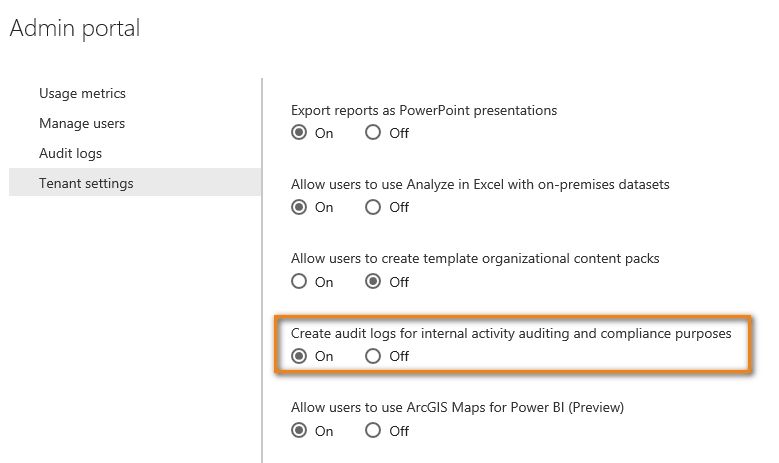
Can the 365 administrator see any audit log? Please also make sure following option has been turned on.
To provide non-administrator accounts with access to the audit log, you will need to assign permissions within the Exchange Online Admin Center. For example, you could assign a user to an existing role group, such as Organization Management, or you could create a new role group with the Audit Logs role. For more information, see Permissions in Exchange Online. Please make sure the 365 administrator assign sufficient permission to your account.
One more thing, auditing is a Power BI Pro feature and auditing events are only available for Power BI Pro users.
Best Regards,
Herbert
If you have recently started exploring Fabric, we'd love to hear how it's going. Your feedback can help with product improvements.
A new Power BI DataViz World Championship is coming this June! Don't miss out on submitting your entry.
Share feedback directly with Fabric product managers, participate in targeted research studies and influence the Fabric roadmap.