Join us at FabCon Atlanta from March 16 - 20, 2026, for the ultimate Fabric, Power BI, AI and SQL community-led event. Save $200 with code FABCOMM.
Register now!The Power BI Data Visualization World Championships is back! Get ahead of the game and start preparing now! Learn more
Hi BI lovers,
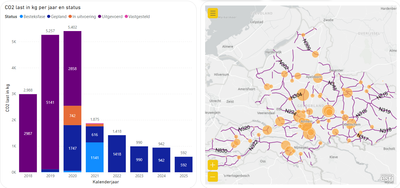
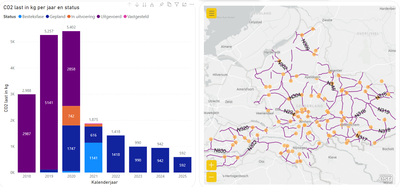
In my desktop version 2.100.1182.0 i can display the ArcGis dot sizes.
As soon as I publish this online I don't see dot sizes anymore.
result;
Somebody knows how to fix this?
Regards,
Charaf
Solved! Go to Solution.
It works now, nothing changed.
Im a little bit concerned that i have no controle on this issue.
Hopefully it stays like this.
Thanks everybody for your replys.
It works now, nothing changed.
Im a little bit concerned that i have no controle on this issue.
Hopefully it stays like this.
Thanks everybody for your replys.
@Anonymous
Strange things are happening.
When i save and reopen the pbix file. the size of the dots are back too default again.
I remove the size data and put it back again to see the dots sizes scaled again.
So i think its not an browser problem.
Thanks for your reply.
Hi @Anonymous ,
Are you using the Egde browser? Have you tried opening Power BI Service in another browser to see if the same problem occurs?
Hope it helps,
Community Support Team _ Caitlyn
If this post helps then please consider Accept it as the solution to help the other members find it more quickly.
HI @Anonymous ,
Do you have the license for ArcGis? I know that some of the functionality is lost if you do not have the license. I would also suggest that you contact ESRI directly about this visual since they are the ones best able to troubleshoot.
Proud to be a Datanaut!
Private message me for consulting or training needs.
i dont have a license for ArcGis. But i have done this many times without a license.
I can use another map visuals but im curious how this problem occurs and i like to solve it.
The Power BI Data Visualization World Championships is back! Get ahead of the game and start preparing now!
Check out the November 2025 Power BI update to learn about new features.