EDIT: Added images to help illustrate the issue and a postulation as to the cause
I have a workspace with 3 different dashboards in it. I want to have the app land on one dashboard, but allow the users to select one of the others after landing. Tiles within a single dashboard are working as expected.
Despite any sharing or authorization settings I do, I cannot get the app itself to contain more than the single dashboard. The strange part is if I specify it to land on any of the other 2 dashboards, it lands on a blank page and says that they do not exist. If you then click on the error, it takes you to the report, which works fine.
So the app appears to have the CORRECT REPORTS, but NOT the DASHBOARDS. I believe this is a bug without workaround, but I haven't seen it reported elsewhere. Has anyone else had problems publishing an app with more than 1 dashboard?
Is it possible this is because the 1 dashboard that is shown was created using the +Create dialogue in the workspace, while the other 2 dashboards were created through the "Pin" dialogue in the reports?
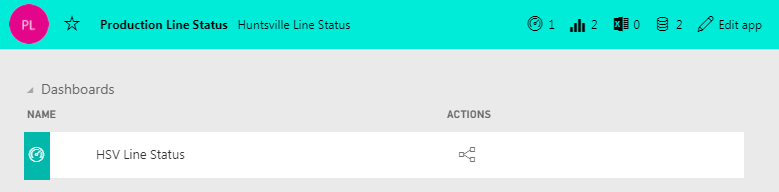
This is the app. As shown, there is only 1 dashboard available. When I click "Edit App" It takes me to the workspace.
This is the workspace of the app. As you can see, there are 3 dashbaords here. Despite updating the app, or pointing specifically to one of the other dashboards, I cannot get them to appear in the app.
I just got off the phone with support. We were able to resolve this by unpublishing and republishing the app. The data lost was the description, shared users list, and the URL.
I would still like to point out this as a likely bug, at least there is a workaround to force the application to update. This is a less than ideal, but working solution.
I just got off the phone with support. We were able to resolve this by unpublishing and republishing the app. The data lost was the description, shared users list, and the URL.
I would still like to point out this as a likely bug, at least there is a workaround to force the application to update. This is a less than ideal, but working solution.