cancel
Showing results for 
Search instead for 
Did you mean: 

The Power BI Data Visualization World Championships is back! Get ahead of the game and start preparing now! Learn more

Reply
ML222
Frequent Visitor

Alignment for Personalized Visuals

Hi,


I have personalized visuals enabled for my reports. When a user adds an additional column, the column header is defaulted to left aligned, which does not match the rest of the table which is center aligned.

I can't see a way to change this. Does anyone know if it is possible to change the alignment of Personalised Visuals in Power BI Service?


Thanks,

Max

1 ACCEPTED SOLUTION
Burningsuit
Resident Rockstar
Resident Rockstar

Hi @ML222 

When I use personalised visualizations, it appears to use the formatting of the "Column Headers" rather than the "Specific column" formatting of the rightmost column.

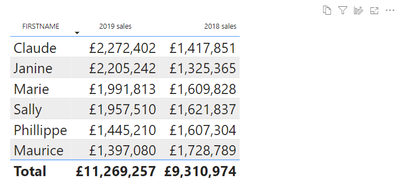
So in my example here, "2019 Sales" is formatted by setting "Column Headers" to centered in Power BI Desktop, but "2018 Sales" is formatted by setting "Specific Column" to right-justified ("apply to header" turned on).

Burningsuit_0-1667298750561.png

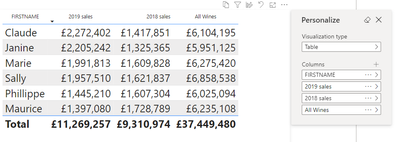
Then , when I add a personalized column in Service the new column "All Wines" header is centered (like the "Column Headers") rather than following the rightmost column (Like "Specific column").

Burningsuit_1-1667298858844.png

So, it seems that there is no way to adjust the column settings in Personalized visuals, but they pick up the formatting that has been applied, but it depends how you apply the formatting in Desktop.

Hope this helps

Stuart

View solution in original post

5 REPLIES 5
Burningsuit
Resident Rockstar
Resident Rockstar

Hi @ML222 

When I use personalised visualizations, it appears to use the formatting of the "Column Headers" rather than the "Specific column" formatting of the rightmost column.

So in my example here, "2019 Sales" is formatted by setting "Column Headers" to centered in Power BI Desktop, but "2018 Sales" is formatted by setting "Specific Column" to right-justified ("apply to header" turned on).

Burningsuit_0-1667298750561.png

Then , when I add a personalized column in Service the new column "All Wines" header is centered (like the "Column Headers") rather than following the rightmost column (Like "Specific column").

Burningsuit_1-1667298858844.png

So, it seems that there is no way to adjust the column settings in Personalized visuals, but they pick up the formatting that has been applied, but it depends how you apply the formatting in Desktop.

Hope this helps

Stuart

Thank you!

That is what is happening. I had some columns that had specific column alignment at the end and this was making the new fields look like they weren't matching!

Anonymous
Not applicable

Hi @ML222 ,


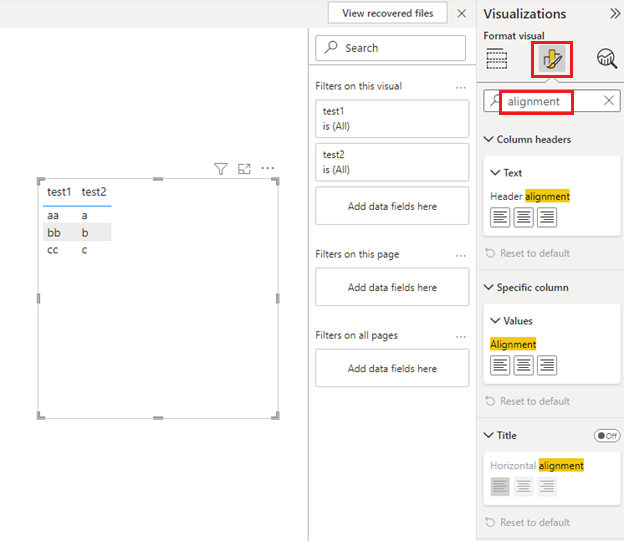
Please try upgrading Power BI Desktop to the latest version.Then, select the visual and search for [alignment] in [Format] to set it according to your needs.


You can refer to the following documents that may be helpful to you:

Let users personalize visuals in a report - Power BI | Microsoft Learn

Solved: Custom Visual Text Alignment Formatting Option - Microsoft Power BI Community

Solved: matrix visual value alignment - Microsoft Power BI Community


Picture1.png


Best Regards,

Neeko Tang

If this post helps, then please consider Accept it as the solution to help the other members find it more quickly. 

Hi Neeko,


This is related to personalized visuals. My table already has formatting applied, but when users personalise the visual and add additional fields, it does not respect the alignment formatting of the rest of the table.


Anonymous
Not applicable

Hi @ML222 ,


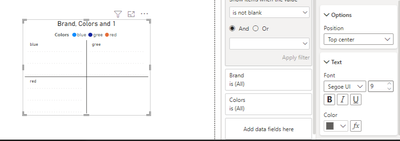
That might be what you meant? Please try setting the position.

vtangjiemsft_0-1667293614938.pngvtangjiemsft_1-1667293634503.png

If that doesn't help, please provide a simplified PBIX file and expected output, pay attention to protect private data, thank you in advance.


Best Regards,

Neeko Tang

If this post helps, then please consider Accept it as the solution to help the other members find it more quickly. 

Helpful resources

Announcements
Power BI DataViz World Championships

Power BI Dataviz World Championships

The Power BI Data Visualization World Championships is back! Get ahead of the game and start preparing now!

December 2025 Power BI Update Carousel

Power BI Monthly Update - December 2025

Check out the December 2025 Power BI Holiday Recap!

FabCon Atlanta 2026 carousel

FabCon Atlanta 2026

Join us at FabCon Atlanta, March 16-20, for the ultimate Fabric, Power BI, AI and SQL community-led event. Save $200 with code FABCOMM.