cancel
Showing results for 
Search instead for 
Did you mean: 

The Power BI Data Visualization World Championships is back! Get ahead of the game and start preparing now! Learn more

Reply
JohnKNis
Advocate II
Advocate II

Adobe Analytics data refresh

Hi All


I'm having an issue refreshing data from Adobe Analytics in the Power BI service. I get this error


Underlying error code: -2147467259
Underlying error message: AdobeAnalytics failed to get the response: 'The underlying connection was closed: Could not establish trust relationship for the SSL/TLS secure channel.'.
DM_ErrorDetailNameCode_UnderlyingHResult: -2147467259
Microsoft.Data.Mashup.ValueError.DataSourceKind: AdobeAnalytics
Microsoft.Data.Mashup.ValueError.DataSourcePath: AdobeAnalytics
Microsoft.Data.Mashup.ValueError.ErrorUri: https://analytics.adobe.io:443/discovery/me
Microsoft.Data.Mashup.ValueError.Reason: DataSource.Error
Cluster URI: WABI-UK-SOUTH-B-PRIMARY-redirect.analysis.windows.net
Activity ID: b70ae871-d495-4afe-b0dd-190a72e83336
Request ID: e9dfbdd9-0b4f-013c-f59d-f72b65a93e33
Time: 2022-08-02 16:50:09Z


I've updated to the latest Data Gateway, not that this should go though the gateway, and I can refresh the data in Power BI desktop. its just the service that doesnt work. Any idears welcome

2 ACCEPTED SOLUTIONS
Anonymous
Not applicable

Hi @JohnKNis


According to the error message, this issue is related to SSL/TLS secure. Generally, it means your machine doesn’t trust the website’s root certificate authority.


You may check these settings and troubleshoot this issue with the help with IT firstly.

1.Is your machine that installs the gateway enabled TLS 1.2 or higher?

2.Is there any change on firewall, proxy or on the network?


Generally, there are some solutions for such kind of issue.

1. Install the SSL certificate’s root certificate

2. Bypass the error


Here are some blogs may help you.

The underlying connection was closed: Could not establish trust relationship for the SSL/TLS secure ...

The underlying connection was closed: Could not establish trust relationship for the SSL/TLS secure ...


Best regards, 

Community Support Team Selina zhu 

If this post helps, then please consider Accept it as the solution to help the other members find it more quickly 

View solution in original post

JohnKNis
Advocate II
Advocate II

Turns out the error, ws not related to SSL/TLS security, rather that you can only have data from Adobe Analytics in the dataset.


If you have dataset with data from Adobe Analytics and an on prem data source the refresh will fail. I have sort of got round this buy having a data set with just Adobe Analytics data and a data set with the on prem data then combining them in a report

View solution in original post

3 REPLIES 3
QueryWhiz
Post Patron
Post Patron

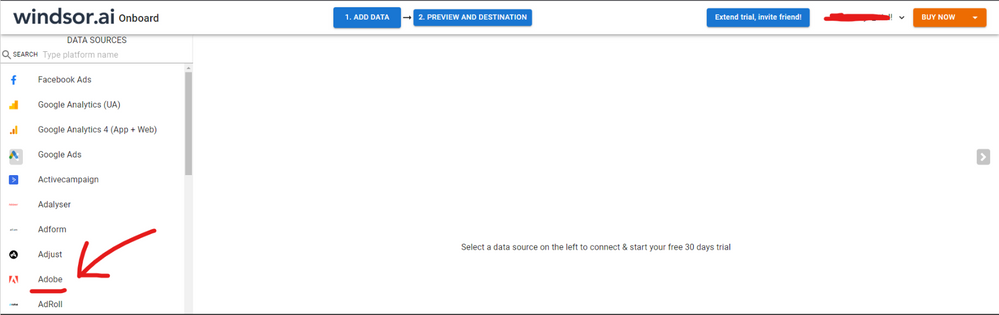
Hi @JohnKNis were you able to find a solution? I used the Adobe connector but I had some issues with my data sometimes. As a workaround, maybe you can test your connection using a 3rd partyt tool. I've tried windsor.ai , supemetrics (which doesn't has PBI as a destination, so you first have to export to Google Sheets and then export to PBI) and funnel.io. I stayed with windsor because it is much cheaper so just to let you know other options. In case you wonder,  to make the connection first search for the Adobe connector in the data sources list:


ADOBE-1.png


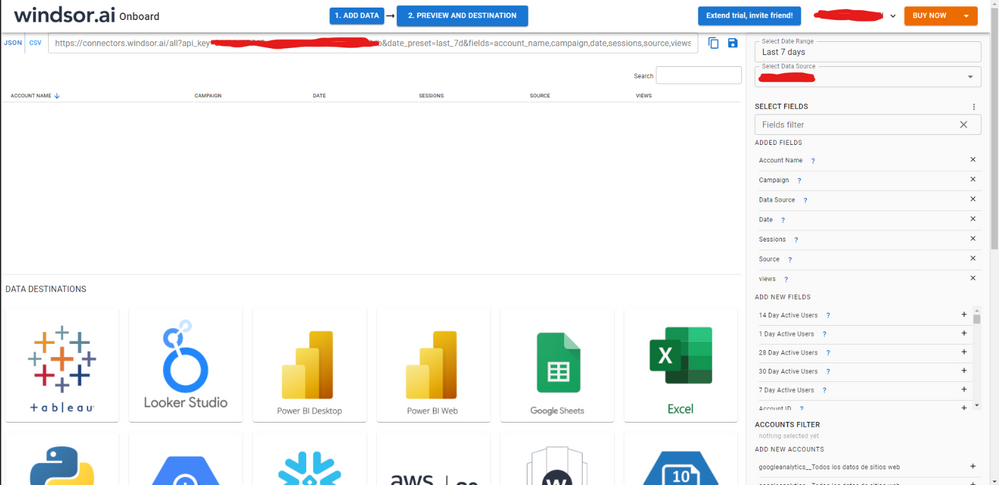
Then, you should enter your Adobe credentials to make the connection. After that, you'll see a preview of your data where you can select the fields you want to see in PBI. 


ADOBE-2.png


Finally, you just have to choose PBI as destination and copy and paste the url that will appear there in PBI desktop --> Get Data --Web > --> Paste the link


SELECT_DESTINATION_NEW.png

JohnKNis
Advocate II
Advocate II

Turns out the error, ws not related to SSL/TLS security, rather that you can only have data from Adobe Analytics in the dataset.


If you have dataset with data from Adobe Analytics and an on prem data source the refresh will fail. I have sort of got round this buy having a data set with just Adobe Analytics data and a data set with the on prem data then combining them in a report

Anonymous
Not applicable

Hi @JohnKNis


According to the error message, this issue is related to SSL/TLS secure. Generally, it means your machine doesn’t trust the website’s root certificate authority.


You may check these settings and troubleshoot this issue with the help with IT firstly.

1.Is your machine that installs the gateway enabled TLS 1.2 or higher?

2.Is there any change on firewall, proxy or on the network?


Generally, there are some solutions for such kind of issue.

1. Install the SSL certificate’s root certificate

2. Bypass the error


Here are some blogs may help you.

The underlying connection was closed: Could not establish trust relationship for the SSL/TLS secure ...

The underlying connection was closed: Could not establish trust relationship for the SSL/TLS secure ...


Best regards, 

Community Support Team Selina zhu 

If this post helps, then please consider Accept it as the solution to help the other members find it more quickly 

Helpful resources

Announcements
Power BI DataViz World Championships

Power BI Dataviz World Championships

The Power BI Data Visualization World Championships is back! Get ahead of the game and start preparing now!

December 2025 Power BI Update Carousel

Power BI Monthly Update - December 2025

Check out the December 2025 Power BI Holiday Recap!

FabCon Atlanta 2026 carousel

FabCon Atlanta 2026

Join us at FabCon Atlanta, March 16-20, for the ultimate Fabric, Power BI, AI and SQL community-led event. Save $200 with code FABCOMM.