This time we’re going bigger than ever. Fabric, Power BI, SQL, AI and more. We're covering it all. You won't want to miss it.
Learn moreJoin the FabCon + SQLCon recap series. Up next: Power BI, Real-Time Intelligence, IQ and AI, and Data Factory take center stage. All sessions are available on-demand after the live show. Register now
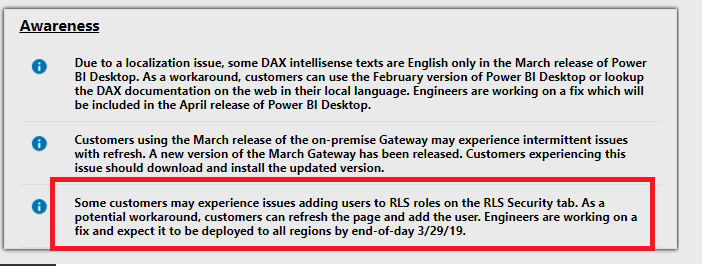
I need to add additional users to Row Level Secutity. When I go to Dataset --> Security and select the group to add users to I see the users currently in the group greyed out. Add is also greyed out. When I key an email address to add to the group it does not stick.I have verified that the user i am trying to add is not already in the group. Seems I have lost authority to add to this list.
Me and my colleagues are having the exact same problem within my organisation. It's becoming a major problem.
Hi @marthagj
This is a known issue here.Please try the workaround as BITom said in this post.
--'A quick workaround I've found is to use the Edge or IE browser and to refresh the page before navigating to RLS page. This allows me to add members into the RLS groups but I need to refresh the page each time I switch reports that I am editing RLS on. Otherwise, no auto-correct or ability to save new members. On Chrome, I cannot manage to add new users to RLS groups even with this workaround. '
Regards,
Hi @marthagj
You may refer to below post to add external users to the group.
Regards,
Hi Cherie,
Thanks but my issue is with internal users. I successfully added a handful several weeks ago but now when I go to add additional users to Row Level Security everything is greyed out. I attempt to enter a new name to the role but the save button remains un-clickable. These are all active directory users that I am trying to enter.
Check out the April 2026 Power BI update to learn about new features.
If you have recently started exploring Fabric, we'd love to hear how it's going. Your feedback can help with product improvements.
A new Power BI DataViz World Championship is coming this June! Don't miss out on submitting your entry.
| User | Count |
|---|---|
| 11 | |
| 10 | |
| 9 | |
| 8 | |
| 8 |
| User | Count |
|---|---|
| 49 | |
| 34 | |
| 27 | |
| 21 | |
| 20 |