cancel
Showing results for 
Search instead for 
Did you mean: 

Try your skills in the Power BI Dataviz World Championship! Round one ends June 26. Join now

Reply
nannimora
Helper I
Helper I

Active refresh data for SQL Cloud Dataset

Hello,

I'm trying to update my dataset but i don't know how to do it.

I'll try to explain better my issue.

My dataset is stored on SQL Server in Cloud.

So I connected my pbix to this dataset with Power BI Desktop. 

I have uploaded this dataset on my personal area in Power BI Service. Now if I try to schedule the data update the area is gray.

I don't know if I have to install a geteway but where? there isn't a physical server.


Thanks for the help.

Regards

1 ACCEPTED SOLUTION
v-robertq-msft
Community Support
Community Support

Hi, @nannimora 

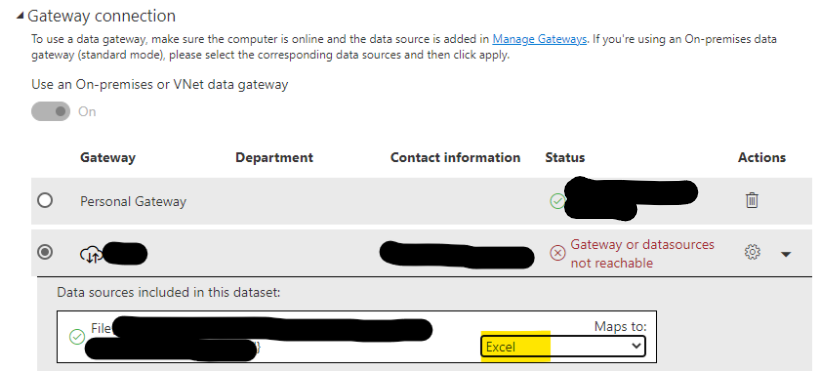
According to my experience, you can not open and set the scheduled refresh for your dataset if you haven’t applied the correct credential in the Power BI service. Normally we configure the credential when we add the data source to the gateway and select and the gateway and map data source in the “Gateway connection”:
Screenshot 2021-06-25 152110.png


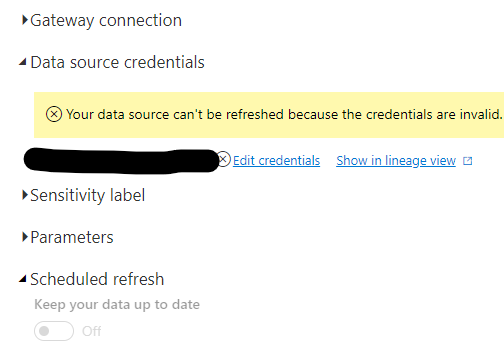
If your data source is in the cloud and you don’t need a gateway, you should also enter the correct credential in the credential pane to unlock the “Scheduled refresh”:
vrobertqmsft_1-1624439985965.png


Configure scheduled refresh in Power BI

One blog about Power BI Scheduled refresh greyed out


According to how to judge if you have to install a geteway, I think you can follow these sentences explained in this blog,  which explains it in detail:

Screenshot 2021-06-25 153924.png


Thank you very much!


Best Regards,

Community Support Team _Robert Qin

If this post helps, then please consider Accept it as the solution to help the other members find it more quickly.

View solution in original post

2 REPLIES 2
v-robertq-msft
Community Support
Community Support

Hi, @nannimora 

According to my experience, you can not open and set the scheduled refresh for your dataset if you haven’t applied the correct credential in the Power BI service. Normally we configure the credential when we add the data source to the gateway and select and the gateway and map data source in the “Gateway connection”:

Screenshot 2021-06-25 152110.png


If your data source is in the cloud and you don’t need a gateway, you should also enter the correct credential in the credential pane to unlock the “Scheduled refresh”:

vrobertqmsft_1-1624439985965.png


Configure scheduled refresh in Power BI

One blog about Power BI Scheduled refresh greyed out


According to how to judge if you have to install a geteway, I think you can follow these sentences explained in this blog,  which explains it in detail:

Screenshot 2021-06-25 153924.png


Thank you very much!


Best Regards,

Community Support Team _Robert Qin

If this post helps, then please consider Accept it as the solution to help the other members find it more quickly.

selimovd
Most Valuable Professional

Hey @nannimora ,


where exactly is your SQL Server in the cloud? Is it on a VM? Then you have to install a Gateway on the VM. Is it an Azure SQL database? Then it will work without a Gateway.

Do you have any other data sources in your file? Usually it's grayed out when there are data sources that cannot be refreshed in the cloud or need a gateway.


If you need any help please let me know.
If I answered your question I would be happy if you could mark my post as a solution ✔️ and give it a thumbs up 👍
 
Best regards
Denis
 

Helpful resources

Announcements
Fabric Data Days is here Carousel

Data Days 2026

Don't miss out on Data Days, June 15 through August 7. Learn Fabric, Power BI, SQL, AI and more.

Power BI DataViz World Championships carousel

Power BI DataViz World Championships - June 2026

A new Power BI DataViz World Championship is coming this June! Don't miss out on submitting your entry.