cancel
Showing results for 
Search instead for 
Did you mean: 

Join the FabCon + SQLCon recap series. Up next: Power BI, Real-Time Intelligence, IQ and AI, and Data Factory take center stage. All sessions are available on-demand after the live show. Register now

Reply
pragyamishra
Helper II
Helper II

report server backup

Dear All,


Can anyone help me in understanding what do I need to do to backup my reports and everything else on the report server?

Is it enough to just backup the report server database and report server temp DB or do I need to backup something else?

Also, can someone guide me to the best strategy to achieve backup in Power BI Report Server?


Thanks,

Pragya

1 ACCEPTED SOLUTION
muchinski
Resolver II
Resolver II

Hi,


for a complete backup plan, you should take care of 3 items:

  1. Databases
    • ReportServer
    • ReportServerTempDB
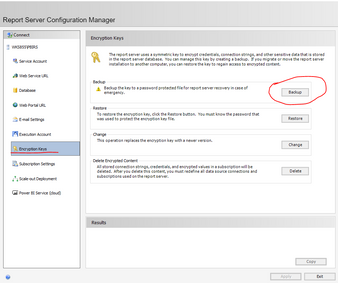
  2. Encryption key
    • Doable using the Report Server Configuration Manager >  Encryption key
    • Capture.PNG
    • Without this, your saved passwords on connection string would be lost in a case of disaster
  3. Configuration files
    • Default location: C:\Program Files\Microsoft Power BI Report Server\PBIRS\ReportServer
    • Files:
      • rsreportserver.config
      • rssrvpolicy.config
      • web.config

Well, this is a summary. More info can be found on https://docs.microsoft.com/en-us/sql/reporting-services/install-windows/backup-and-restore-operation...

View solution in original post

2 REPLIES 2
muchinski
Resolver II
Resolver II

Hi,


for a complete backup plan, you should take care of 3 items:

  1. Databases
    • ReportServer
    • ReportServerTempDB
  2. Encryption key
    • Doable using the Report Server Configuration Manager >  Encryption key
    • Capture.PNG
    • Without this, your saved passwords on connection string would be lost in a case of disaster
  3. Configuration files
    • Default location: C:\Program Files\Microsoft Power BI Report Server\PBIRS\ReportServer
    • Files:
      • rsreportserver.config
      • rssrvpolicy.config
      • web.config

Well, this is a summary. More info can be found on https://docs.microsoft.com/en-us/sql/reporting-services/install-windows/backup-and-restore-operation...

Thanks @muchinski

Helpful resources

Announcements
April Power BI Update Carousel

Power BI Monthly Update - April 2026

Check out the April 2026 Power BI update to learn about new features.

New to Fabric survey Carousel

New to Fabric Survey

If you have recently started exploring Fabric, we'd love to hear how it's going. Your feedback can help with product improvements.

Power BI DataViz World Championships carousel

Power BI DataViz World Championships - June 2026

A new Power BI DataViz World Championship is coming this June! Don't miss out on submitting your entry.

FabCon and SQLCon Highlights Carousel

FabCon &SQLCon Highlights

Experience the highlights from FabCon & SQLCon, available live and on-demand starting April 14th.