cancel
Showing results for 
Search instead for 
Did you mean: 

We've captured the moments from FabCon & SQLCon that everyone is talking about, and we are bringing them to the community, live and on-demand. Starts on April 14th. Register now

Reply
LoraBennett
Frequent Visitor

oData Data Source Credentials issue

Hello all


I've mananged to publish 3 Power BI reports to our PBIRS successfully, all have in-built data source connections to oData, with the string provided from the published report themselves. 


Though despite the report being uploaded with an authentication type of Organization, when it gets to the server it's defaulted to Anonymous and therefore fails to reload.


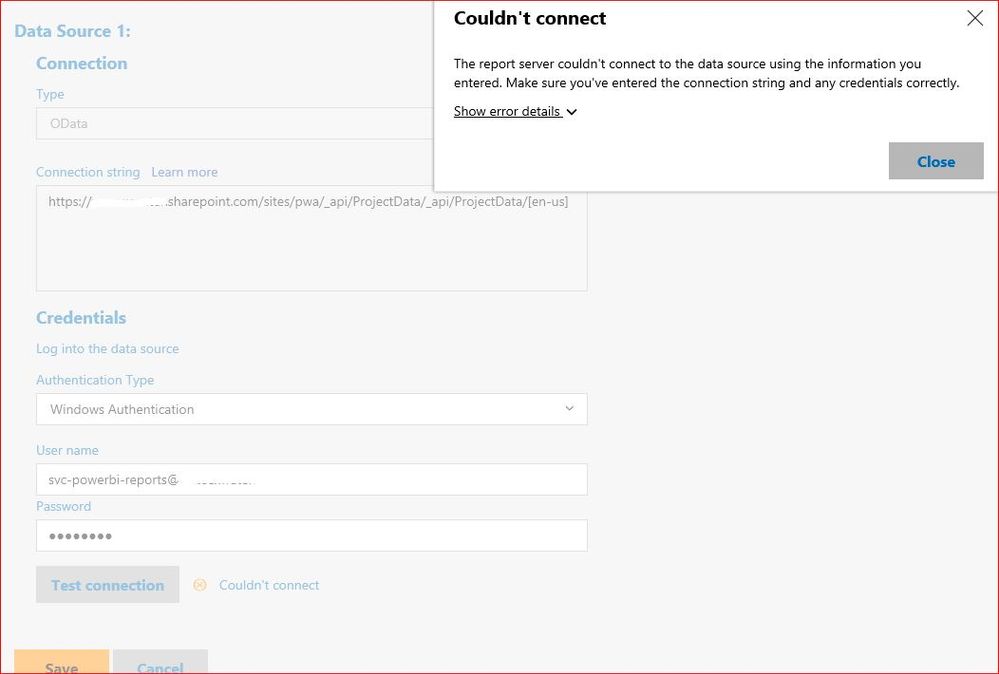
I've tried changing this to both windows and then to basic, providing it  with the Power BI service account  credentials(which has an admin PWA licence and a Power BI Pro licence), however it tells me that my login or password is incorrect.


I've also asked another PWA Admin (who refreshes the same Power BI reports manually) to try his credentials to see whether it an issue with the service account however he also gets the same error.


Capture.JPG


Any ideas where I'm going wrong?

1 ACCEPTED SOLUTION

I eventually raised this with Microsoft themselves and got a response...connection to SPOL or POL is not possible with PBIRS.


Basically, Sharepoint Online REST API uses Forms Authentication and PBIRS doesn't support the forms authentication as Power BI Service does. Due to this Power BI Desktop can't authenticate against the REST API using OData type connections.


You can use Sharepoint Online Type connections to build a report against the SPOL site but this type of connection is not supported for server side refresh operations therefore would require manual update by the report designer, which means editing the report and pulling data  and saving to PBIRS again.


In a nutshell, computer says no.

View solution in original post

2 REPLIES 2
Anonymous
Not applicable

Hello,

I have similar problems.

In fact, all this account service thing do not have much documentation.

Can we have help on this?

thx

I eventually raised this with Microsoft themselves and got a response...connection to SPOL or POL is not possible with PBIRS.


Basically, Sharepoint Online REST API uses Forms Authentication and PBIRS doesn't support the forms authentication as Power BI Service does. Due to this Power BI Desktop can't authenticate against the REST API using OData type connections.


You can use Sharepoint Online Type connections to build a report against the SPOL site but this type of connection is not supported for server side refresh operations therefore would require manual update by the report designer, which means editing the report and pulling data  and saving to PBIRS again.


In a nutshell, computer says no.

Helpful resources

Announcements
New to Fabric survey Carousel

New to Fabric Survey

If you have recently started exploring Fabric, we'd love to hear how it's going. Your feedback can help with product improvements.

Power BI DataViz World Championships carousel

Power BI DataViz World Championships - June 2026

A new Power BI DataViz World Championship is coming this June! Don't miss out on submitting your entry.

Join our Fabric User Panel

Join our Fabric User Panel

Share feedback directly with Fabric product managers, participate in targeted research studies and influence the Fabric roadmap.

March Power BI Update Carousel

Power BI Community Update - March 2026

Check out the March 2026 Power BI update to learn about new features.