Don't miss your chance to take the Fabric Data Engineer (DP-600) exam for FREE! Find out how by watching the DP-600 session on-demand now through April 28th.
Learn moreJoin the FabCon + SQLCon recap series. Up next: Power BI, Real-Time Intelligence, IQ and AI, and Data Factory take center stage. All sessions are available on-demand after the live show. Register now
Hello,
I am adding data to an existing visualization in my organization, but it appears that there are formatting lines that separate the caregories in the Report Server view. I want to figure out how to view these lines on Desktop, and/or remove them entirely.
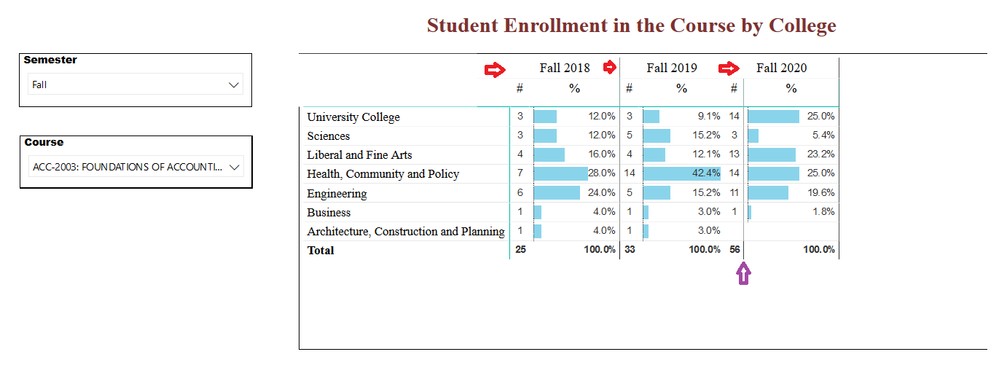
These lines appear to be somewhat arbitrarily placed. In the screenshot below, in red, you can see that the second arrow shows that the line extends to the top of the visualization, while the third arrow shows that the line stops between the two headers. The purple arrow shows that the line in the third column was improperly placed, after the # column, instead of before it.
Report Server view. Arrows show lines that don't show up in Desktop view.
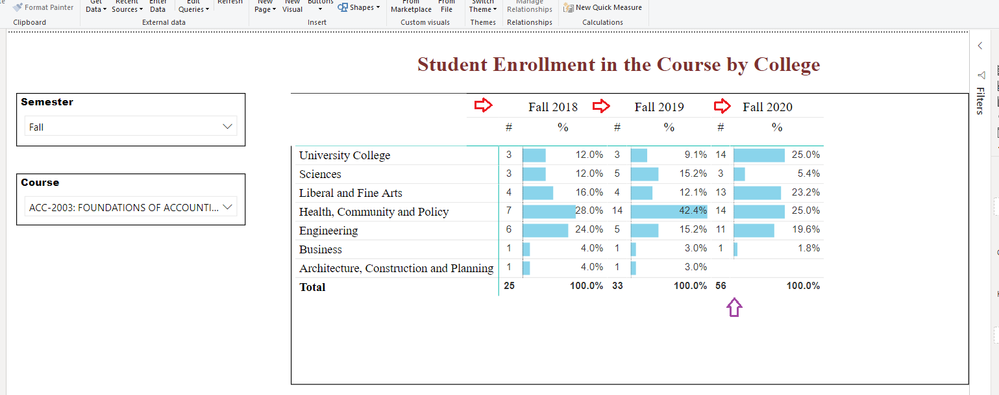
The screenshot below shows Power BI Desktop, where these lines do not appear at all.
Desktop view. Arrows show where lines show up in Report Server view, but do not appear here.
Hi @de_Weerd ,
it depends on the Browser you use. In some cases the Edge works better than the Firefox but it always depends. If there are only some small visualization errors you can first testing the diffrent browsers you got. If the error still remain you can try to build a Background picture in which the visual can be embedd. Hope this answer will help 🙂
If this post has helped you, please give it a thumbs up!
Did I answer your question? Mark my post as a solution!
Check out the April 2026 Power BI update to learn about new features.
If you have recently started exploring Fabric, we'd love to hear how it's going. Your feedback can help with product improvements.
A new Power BI DataViz World Championship is coming this June! Don't miss out on submitting your entry.
| User | Count |
|---|---|
| 3 | |
| 3 | |
| 2 | |
| 2 | |
| 2 |
| User | Count |
|---|---|
| 5 | |
| 3 | |
| 3 | |
| 3 | |
| 3 |