
cancel
Showing results for 
Search instead for 
Did you mean: 

The Power BI Data Visualization World Championships is back! Get ahead of the game and start preparing now! Learn more

Reply
tmhalila
Resolver II
Resolver II

Update Power BI Model from the SQL Server

Hello,

Assist please, I am importing data from the SQL Server database, while the ETL team is in the progress of updating tables in the Database. From the Power BI desktop, I disabled the Autodetection of the relationship. But when a new table is added to the database I only import one table but am unsure if it comes with the relationship from the database. Can I use the "Select related Table" button? and how it works.


tmhalila_0-1655621628377.png


4 REPLIES 4
Hariharan_R
Solution Sage
Solution Sage

Hi @tmhalila 

"Select Related Tables" works when you have tables with primary key and foreign key relationships exist in the database. for example, if you have product, product category tables in db and both has product key or product category key like primary and foreign key then if you choose product table and select related tables then product category table automatically selected for you.


Thanks

Hari

Did I answer your question? Then please mark my post as the solution.
If I helped you, click on the Thumbs Up to give Kudos.


My Blog :: YouTube Channel :: My Linkedin


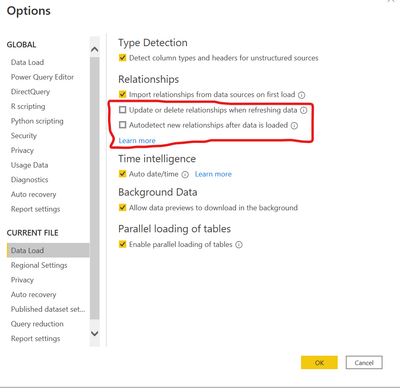
Thank you for the reply and by saying so this works similarly to the two options in Data Load even if I uncheck.

tmhalila_0-1655714948359.png


Hi @tmhalila 

Relationship within Power BI will be based on the name of the columns across tables and data type. if you have product key in both product and product category table then relationship will be created automatically if those check boxes are enables. If not then we need to manually create a relationship between the tables.

Thanks

Hari

Did I answer your question? Then please mark my post as the solution.
If I helped you, click on the Thumbs Up to give Kudos.


My Blog :: YouTube Channel :: My Linkedin


Sorry if I am not getting to you quickly.
From my scenario, I have unchecked the two boxes in the relationship part but once I select the "Select related Table" button then the new table creates a relationship with the available tables.

Now, my question is the relation created automatically by Power BI? or is the one coming from Database Server ..... NOTE I am importing data from the SQL Server and I need the relationship from the Server not manually created in Power BI.

Helpful resources

Announcements
Power BI DataViz World Championships

Power BI Dataviz World Championships

The Power BI Data Visualization World Championships is back! Get ahead of the game and start preparing now!

December 2025 Power BI Update Carousel

Power BI Monthly Update - December 2025

Check out the December 2025 Power BI Holiday Recap!

FabCon Atlanta 2026 carousel

FabCon Atlanta 2026

Join us at FabCon Atlanta, March 16-20, for the ultimate Fabric, Power BI, AI and SQL community-led event. Save $200 with code FABCOMM.

Top Solution Authors