FabCon is coming to Atlanta
Join us at FabCon Atlanta from March 16 - 20, 2026, for the ultimate Fabric, Power BI, AI and SQL community-led event. Save $200 with code FABCOMM.
Register now!- Power BI forums
- Get Help with Power BI
- Desktop
- Service
- Report Server
- Power Query
- Mobile Apps
- Developer
- DAX Commands and Tips
- Custom Visuals Development Discussion
- Health and Life Sciences
- Power BI Spanish forums
- Translated Spanish Desktop
- Training and Consulting
- Instructor Led Training
- Dashboard in a Day for Women, by Women
- Galleries
- Data Stories Gallery
- Themes Gallery
- Contests Gallery
- QuickViz Gallery
- Quick Measures Gallery
- Visual Calculations Gallery
- Notebook Gallery
- Translytical Task Flow Gallery
- TMDL Gallery
- R Script Showcase
- Webinars and Video Gallery
- Ideas
- Custom Visuals Ideas (read-only)
- Issues
- Issues
- Events
- Upcoming Events
The Power BI Data Visualization World Championships is back! Get ahead of the game and start preparing now! Learn more
- Power BI forums
- Forums
- Get Help with Power BI
- Report Server
- Re: URL link to Paginated Reports
- Subscribe to RSS Feed
- Mark Topic as New
- Mark Topic as Read
- Float this Topic for Current User
- Bookmark
- Subscribe
- Printer Friendly Page

- Mark as New
- Bookmark
- Subscribe
- Mute
- Subscribe to RSS Feed
- Permalink
- Report Inappropriate Content
URL link to Paginated Reports
Hi, It seems For Image--> Actions -->URL option is still not available for PBIRS (Jan 2019).
From PowerBIRS, I want a link to Paginated Reports using Button or Image. So how do I acheive this in Report Server ?
I do not want to display whole URL, instead 'Click Here', 'Data' as Title/Label because I have a plan to pass parameters to Paginated Reports.
Solved! Go to Solution.


- Mark as New
- Bookmark
- Subscribe
- Mute
- Subscribe to RSS Feed
- Permalink
- Report Inappropriate Content
@Anonymous wrote:
Hi, It seems For Image--> Actions -->URL option is still not available for PBIRS (Jan 2019).
The May 2019 (or later) releases have an option of WebUrl in the Action setting for images and buttons.


- Mark as New
- Bookmark
- Subscribe
- Mute
- Subscribe to RSS Feed
- Permalink
- Report Inappropriate Content
Hi all,
I'm using the URL to Paginated Reports from my Power BI reports, but there is one thing I cannot make work and I can't figure out why. I want to pass a value to a Boolean parameter - I tried true/false, I tried 0/1, nothing works. The rest of my text/int parameters work fine, but the Boolean is being ignored. Has anyone managed to make Boolean ones work in URL?
TIA
- Mark as New
- Bookmark
- Subscribe
- Mute
- Subscribe to RSS Feed
- Permalink
- Report Inappropriate Content
@pdacheva wrote:
I'm using the URL to Paginated Reports from my Power BI reports, but there is one thing I cannot make work and I can't figure out why. I want to pass a value to a Boolean parameter - I tried true/false, I tried 0/1, nothing works. The rest of my text/int parameters work fine, but the Boolean is being ignored. Has anyone managed to make Boolean ones work in URL?
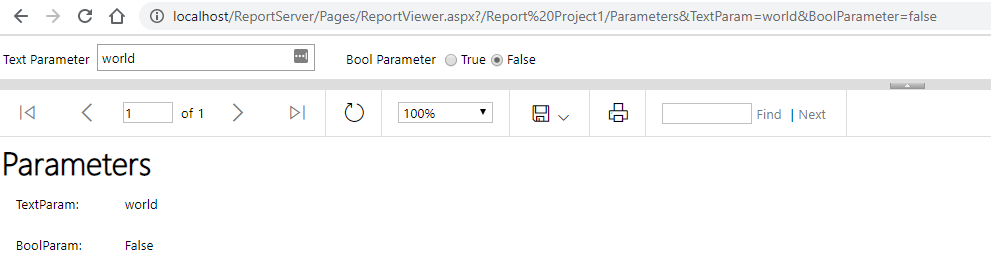
Yes, it works fine for me passing in either true/false or True/False. If I try passing in anything else like 0/1 I get an error about the type being incorrect for the variable type being incorrect and if I alter the name of the parameter I get an error about trying to set a variable which does not exist. So I can't think how your url parameter would be ignored
- Mark as New
- Bookmark
- Subscribe
- Mute
- Subscribe to RSS Feed
- Permalink
- Report Inappropriate Content
Hi d_gosbell,
Thanks for your prompt feedback!
Actually I'm not sending URLs to a Report Server. I have a Power BI report published on the Power BI Service that redirects to a Paginated Report published on the Power bI Service as well. Probably that's where the issue is.
I tried with True/False and true/false, but nothing. I don't get error message, but the value is not passed (I try to pass False).
I'm not sure whether it's because I have a default value =true set to this Parameter, but again, for the rest of the Parameters I have, it works OK.
Thanks again!
- Mark as New
- Bookmark
- Subscribe
- Mute
- Subscribe to RSS Feed
- Permalink
- Report Inappropriate Content
@Anonymous wrote:
Hi, It seems For Image--> Actions -->URL option is still not available for PBIRS (Jan 2019).
The May 2019 (or later) releases have an option of WebUrl in the Action setting for images and buttons.


- Mark as New
- Bookmark
- Subscribe
- Mute
- Subscribe to RSS Feed
- Permalink
- Report Inappropriate Content
Hello @d_gosbell I see this post is pretty old, but maybe you can still help me out.
Im trying to do the same (link into a paginated report), but cannt seem to get the URL correctly.
Actual PBI url: https://app.powerbi.com/groups/XXXXXX/rdlreports/XXXXXX?experience=power-bi
I tried adding my parameter at the end, since it already has "?experience"
https://app.powerbi.com/groups/XXXXXX/rdlreports/XXXXXX?experience=power-bi&luxk_parent_id=RP-1387
This got me into the report page, but not into the specific report.
Any help would be great. Thanks!
- Mark as New
- Bookmark
- Subscribe
- Mute
- Subscribe to RSS Feed
- Permalink
- Report Inappropriate Content
This thread is based around the on-prem report server so the syntax is different.
if that luxk_parent_id is a parameter it will need to be prefixed with rp:
eg.
For the service you can use the url format outlined here URL parameters in paginated reports in Power BI - Power BI | Microsoft Learn - this doc includes
- Mark as New
- Bookmark
- Subscribe
- Mute
- Subscribe to RSS Feed
- Permalink
- Report Inappropriate Content
Perfect, thank you!
Helpful resources

Power BI Dataviz World Championships
The Power BI Data Visualization World Championships is back! Get ahead of the game and start preparing now!

Power BI Monthly Update - November 2025
Check out the November 2025 Power BI update to learn about new features.

FabCon Atlanta 2026
Join us at FabCon Atlanta, March 16-20, for the ultimate Fabric, Power BI, AI and SQL community-led event. Save $200 with code FABCOMM.

| User | Count |
|---|---|
| 8 | |
| 2 | |
| 2 | |
| 2 | |
| 2 |


