Join us at the 2025 Microsoft Fabric Community Conference
Microsoft Fabric Community Conference 2025, March 31 - April 2, Las Vegas, Nevada. Use code MSCUST for a $150 discount.
Register now- Power BI forums
- Get Help with Power BI
- Desktop
- Service
- Report Server
- Power Query
- Mobile Apps
- Developer
- DAX Commands and Tips
- Custom Visuals Development Discussion
- Health and Life Sciences
- Power BI Spanish forums
- Translated Spanish Desktop
- Training and Consulting
- Instructor Led Training
- Dashboard in a Day for Women, by Women
- Galleries
- Webinars and Video Gallery
- Data Stories Gallery
- Themes Gallery
- Contests Gallery
- Quick Measures Gallery
- R Script Showcase
- COVID-19 Data Stories Gallery
- Community Connections & How-To Videos
- 2021 MSBizAppsSummit Gallery
- 2020 MSBizAppsSummit Gallery
- 2019 MSBizAppsSummit Gallery
- Events
- Ideas
- Custom Visuals Ideas
- Issues
- Issues
- Events
- Upcoming Events
The Power BI DataViz World Championships are on! With four chances to enter, you could win a spot in the LIVE Grand Finale in Las Vegas. Show off your skills.
- Power BI forums
- Forums
- Get Help with Power BI
- Report Server
- Re: Problem with scheduled refresh of a report in ...
- Subscribe to RSS Feed
- Mark Topic as New
- Mark Topic as Read
- Float this Topic for Current User
- Bookmark
- Subscribe
- Printer Friendly Page

- Mark as New
- Bookmark
- Subscribe
- Mute
- Subscribe to RSS Feed
- Permalink
- Report Inappropriate Content
Problem with scheduled refresh of a report in power bi report server october 2020 rectified release
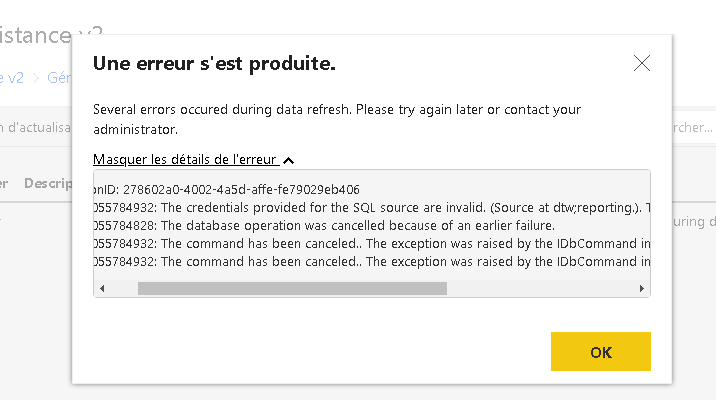
i have problem when refreshing my reports in power BI report server october 2020 rectified release.
I got this error:
The credentials provided for the SQL source are invalid. (Source at .). The exception was raised by the IDbCommand interface.
Any one have a solution for this problem?
- Mark as New
- Bookmark
- Subscribe
- Mute
- Subscribe to RSS Feed
- Permalink
- Report Inappropriate Content
Hello,
Sorry to non reply early
1- the datasourses type is sql server
2- i'm using sql auth
3- the issue repro all the time
4-the last version october 2020 and i have also installed the vesion pblished in november



- Mark as New
- Bookmark
- Subscribe
- Mute
- Subscribe to RSS Feed
- Permalink
- Report Inappropriate Content
@IchrafPGH thanks for the update, couple more questions:
1. How many datasources do you have in the report?
2. If there is more than one are they all SQL Server?
3. If you go to the Datasource setting in Desktop if you click edit permissions what do you have set for the properties in there (e.g. Credential Type, Encryption, Privacy, Native Queries)?
4. When you go into the power query editor how many queries to you have in there?
5. Can you share the failures in your RSPower* and ASManagedRoot* logs (you can private message me if you want)?
Also I sent you a private message with my contact info, if possible i'd like to get on a call to help debug this issue. Thanks!
- Mark as New
- Bookmark
- Subscribe
- Mute
- Subscribe to RSS Feed
- Permalink
- Report Inappropriate Content
Hello,mgmeyer
1- i heve reports with one data sources and reports with more
2- yes sql server
3- Can you see the example in the attachement
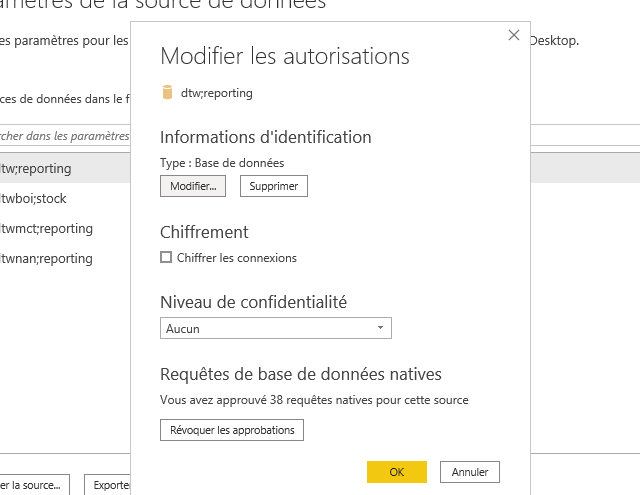
4- i have many reports but for exemple , the report in the previous attachement has 43 query
and i have reports with 1 datasource and few query where i have the same problem
5- sorry i don't understand how
- Mark as New
- Bookmark
- Subscribe
- Mute
- Subscribe to RSS Feed
- Permalink
- Report Inappropriate Content
The log files should be in the install folder of your server if you have access to it, should be in something similar to the following:
C:\Program Files\Microsoft Power BI Report Server\PBIRS\LogFiles
- Mark as New
- Bookmark
- Subscribe
- Mute
- Subscribe to RSS Feed
- Permalink
- Report Inappropriate Content
thank you very much
- Mark as New
- Bookmark
- Subscribe
- Mute
- Subscribe to RSS Feed
- Permalink
- Report Inappropriate Content
@IchrafPGH can you tell me a little bit about the reports that you have that are running into this issue? For example:
1. What type of datasources do you have (I assume SQL but are there more)?
2. What type of auth are you using for those datasources?
3. Does the issue repro intermittently or all the time?
4. Which version of the server to do you have installed? We published a QFE with a couple fixes, have you installed it?
5. Can you share the failures in your RSPower* and ASManagedRoot* logs (you can private message me if you want)?
Thanks!


- Mark as New
- Bookmark
- Subscribe
- Mute
- Subscribe to RSS Feed
- Permalink
- Report Inappropriate Content
Try steps as below,
- Back up config files from c:/windows/program files/powerbi server/*/*.config
- "Repair" the report server
- Uncheck the "Enhanced metadata format" for .pbix files
- Re-publish .pbix files
This thread at here may help.
- Mark as New
- Bookmark
- Subscribe
- Mute
- Subscribe to RSS Feed
- Permalink
- Report Inappropriate Content
i tried "Repair" the report server but the same error
bu what do you mean from "after back up all the config files." from where i can get the backup file?
- Mark as New
- Bookmark
- Subscribe
- Mute
- Subscribe to RSS Feed
- Permalink
- Report Inappropriate Content
thank you very much for your interest
But ,this thread couldn't solve my problem
the same error still existing
- Mark as New
- Bookmark
- Subscribe
- Mute
- Subscribe to RSS Feed
- Permalink
- Report Inappropriate Content
Please try "Repair" the report server after back up all the config files.


- Mark as New
- Bookmark
- Subscribe
- Mute
- Subscribe to RSS Feed
- Permalink
- Report Inappropriate Content

Helpful resources

Join us at the Microsoft Fabric Community Conference
March 31 - April 2, 2025, in Las Vegas, Nevada. Use code MSCUST for a $150 discount!

Join our Community Sticker Challenge 2025
If you love stickers, then you will definitely want to check out our Community Sticker Challenge!

Fabric Community Update - February 2025
Find out what's new and trending in the Fabric community.

| User | Count |
|---|---|
| 7 | |
| 4 | |
| 2 | |
| 2 | |
| 1 |


