Get certified for free when you join Fabric Data Days 2026 and dive into Fabric, Power BI, SQL, AI, and other essential data skills.
Join nowTry your skills in the Power BI Dataviz World Championship! Round one ends June 26. Join now
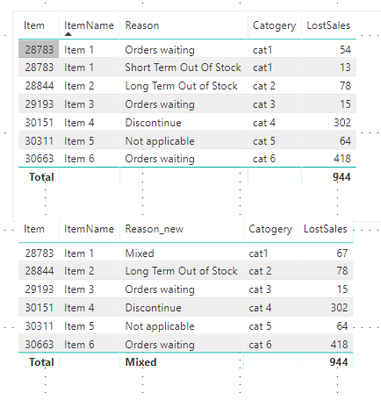
I've a requirement on a Table to summarise the data based on below scenarios: The Table 1 is the existing, the Table 2 is what is expecting.
Table 1
| Item# | ItemName | Reason | Catogery | LostSales |
| 28783 | Item 1 | Orders waiting | cat1 | $54 |
| 28783 | Item 1 | Short Term Out Of Stock | cat1 | $13 |
| 28844 | Item 2 | Long Term Out of Stock | cat 2 | $78 |
| 29193 | Item 3 | Orders waiting | cat 3 | $15 |
| 30151 | Item 4 | Discontinue | cat 4 | $302 |
| 30311 | Item 5 | Not applicable | cat 5 | $64 |
| 30663 | Item 6 | Orders waiting | cat 6 | $418 |
Table 2
| Item# | ItemName | Reason | Catogery | LostSales |
| 28783 | Item 1 | Mixed | cat1 | $68 |
| 28844 | Item 2 | Long Term Out of Stock | cat 2 | $78 |
| 29193 | Item 3 | Orders waiting | cat 3 | $15 |
| 30151 | Item 4 | Discontinue | cat 4 | $302 |
| 30311 | Item 5 | Not applicable | cat 5 | $64 |
| 30663 | Item 6 | Orders waiting | cat 6 | $418 |
Any one help on this achieving the Table 2.
Solved! Go to Solution.
Hi,
You need to create measure like this:
Reason_new =
var _Reason = LASTNONBLANK(Arkusz1[Reason];1)
RETURN
IF(
CALCULATE( DISTINCTCOUNT(Arkusz1[Reason]) ;
all(Arkusz1[Reason])) > 1
;"Mixed"
;_Reason
)This is solution for you.
Hi,
You need to create measure like this:
Reason_new =
var _Reason = LASTNONBLANK(Arkusz1[Reason];1)
RETURN
IF(
CALCULATE( DISTINCTCOUNT(Arkusz1[Reason]) ;
all(Arkusz1[Reason])) > 1
;"Mixed"
;_Reason
)This is solution for you.
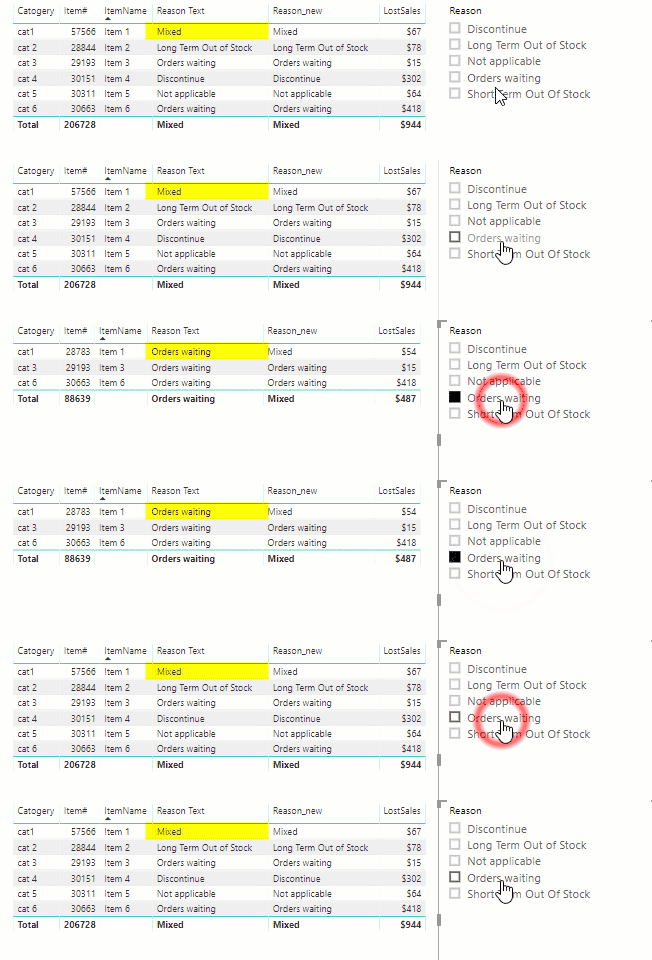
I'm not sure what behaviour you want when filters are applied via slicers that result in only 1 reason being present, but just note that @saykasku 's approach will always return "Mixed" regardless of any current filters, while the approach using SELECTEDVALUE() function will switch to showing the single reason if the current filter context eliminates the multiple reasons. Both approaches are valid, it just depends on what your requirements are.
eg
Is there some way to have something like this that will instead solo out Columns along with their supporting rows? I also need a way to group 4 columns without changing the data just want power BI to recognize that these 4 columns are all under 1 main name
The only way I can think of for doing this would be to create a measure which you would use in place of the "Reason" attribute.
eg.
Reason Text = SELECTEDVALUE( 'Table 1'[Reason], "Mixed")
Don't miss out on Data Days, June 15 through August 7. Learn Fabric, Power BI, SQL, AI and more.
Check out the May 2026 Power BI update to learn about new features.
| User | Count |
|---|---|
| 3 | |
| 1 | |
| 1 | |
| 1 | |
| 1 |