This is best Fabric, Power BI, SQL and AI community event. How do we know? The last event sold out! Save €200 with code FABCMTY200.
Register nowJuly 28 - August 9 | Final Round of the Power BI Dataviz World Championships. This is your chance. Learn more
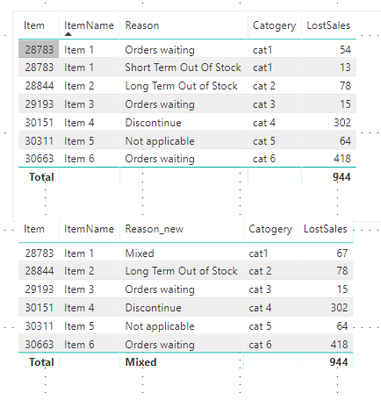
I've a requirement on a Table to summarise the data based on below scenarios: The Table 1 is the existing, the Table 2 is what is expecting.
Table 1
| Item# | ItemName | Reason | Catogery | LostSales |
| 28783 | Item 1 | Orders waiting | cat1 | $54 |
| 28783 | Item 1 | Short Term Out Of Stock | cat1 | $13 |
| 28844 | Item 2 | Long Term Out of Stock | cat 2 | $78 |
| 29193 | Item 3 | Orders waiting | cat 3 | $15 |
| 30151 | Item 4 | Discontinue | cat 4 | $302 |
| 30311 | Item 5 | Not applicable | cat 5 | $64 |
| 30663 | Item 6 | Orders waiting | cat 6 | $418 |
Table 2
| Item# | ItemName | Reason | Catogery | LostSales |
| 28783 | Item 1 | Mixed | cat1 | $68 |
| 28844 | Item 2 | Long Term Out of Stock | cat 2 | $78 |
| 29193 | Item 3 | Orders waiting | cat 3 | $15 |
| 30151 | Item 4 | Discontinue | cat 4 | $302 |
| 30311 | Item 5 | Not applicable | cat 5 | $64 |
| 30663 | Item 6 | Orders waiting | cat 6 | $418 |
Any one help on this achieving the Table 2.
Solved! Go to Solution.
Hi,
You need to create measure like this:
Reason_new =
var _Reason = LASTNONBLANK(Arkusz1[Reason];1)
RETURN
IF(
CALCULATE( DISTINCTCOUNT(Arkusz1[Reason]) ;
all(Arkusz1[Reason])) > 1
;"Mixed"
;_Reason
)This is solution for you.
Hi,
You need to create measure like this:
Reason_new =
var _Reason = LASTNONBLANK(Arkusz1[Reason];1)
RETURN
IF(
CALCULATE( DISTINCTCOUNT(Arkusz1[Reason]) ;
all(Arkusz1[Reason])) > 1
;"Mixed"
;_Reason
)This is solution for you.
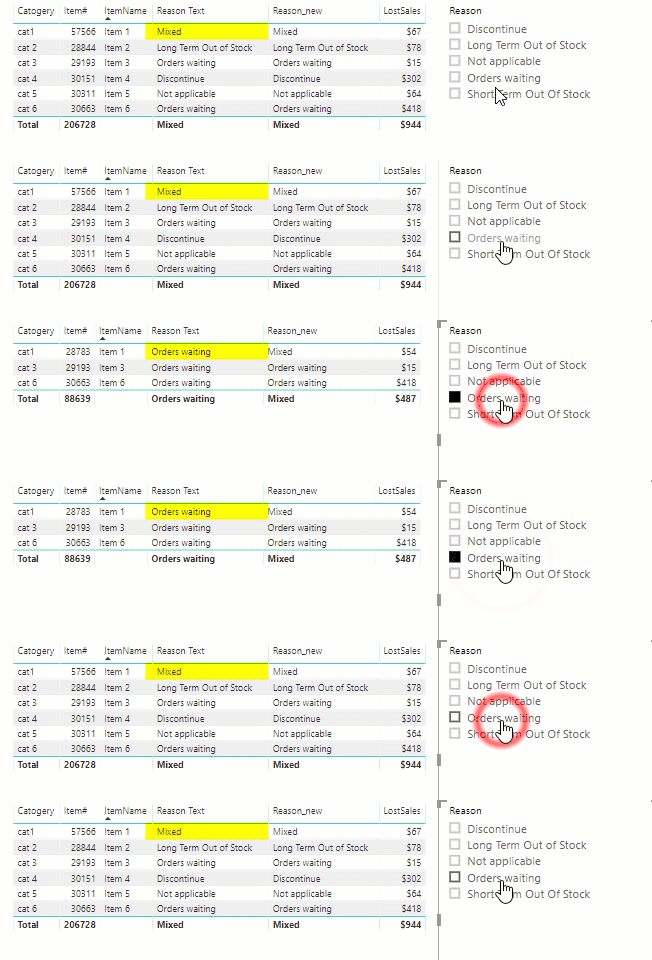
I'm not sure what behaviour you want when filters are applied via slicers that result in only 1 reason being present, but just note that @saykasku 's approach will always return "Mixed" regardless of any current filters, while the approach using SELECTEDVALUE() function will switch to showing the single reason if the current filter context eliminates the multiple reasons. Both approaches are valid, it just depends on what your requirements are.
eg
Is there some way to have something like this that will instead solo out Columns along with their supporting rows? I also need a way to group 4 columns without changing the data just want power BI to recognize that these 4 columns are all under 1 main name
The only way I can think of for doing this would be to create a measure which you would use in place of the "Reason" attribute.
eg.
Reason Text = SELECTEDVALUE( 'Table 1'[Reason], "Mixed")
Join us in Barcelona for FabCon and SQLCon, the Fabric, Power BI, SQL, and AI community event. Save €200 with code FABCMTY200.
| User | Count |
|---|---|
| 4 | |
| 2 | |
| 2 | |
| 1 | |
| 1 |