cancel
Showing results for 
Search instead for 
Did you mean: 

The Power BI Data Visualization World Championships is back! Get ahead of the game and start preparing now! Learn more

Reply
anthony_lecoq
Regular Visitor

NETWORKDAYS overriding Variables

Hello,


I was struggling with the new function NETWORKDAYS, that does not give the proper value at total. I insvestigated, and end up, to the following DAX to put in evidence the issue ;

 
Duration in work days from Release date to Last Ship Date =
Var selection =
ADDCOLUMNS(
    CALCULATETABLE(
                FACT_CUSTOMER_ORDER_LINE_C,
                    FILTER(FACT_CUSTOMER_ORDER_LINE_C ,
                        FACT_CUSTOMER_ORDER_LINE_C[Date First Released] <> BLANK()
                        && FACT_CUSTOMER_ORDER_LINE_C[Date Last Actual Ship] <> BLANK()
                        && FACT_CUSTOMER_ORDER_LINE_C[Date First Released] >= DATE(2022,01,05)
                    )
            ) ,
    "Date First Released bis" , FACT_CUSTOMER_ORDER_LINE_C[Date First Released]
)
VAR list_with_days =
        ADDCOLUMNS(
             selection   ,
            "calc_duration_work_day" ,
                VAR selected_site = SELECTEDVALUE(DIM_SITE[Site])
                VAR list_exception =
                UNION(
                    CALCULATETABLE(
                        SELECTCOLUMNS('Calendar WORK_TIME_EXCEPTION_C',
                            "exception date" ,'Calendar WORK_TIME_EXCEPTION_C'[EXCEPTION_DATE]
                        ), TREATAS({selected_site},'Calendar WORK_TIME_EXCEPTION_C'[SITE] )
                    ) , {[Date Last Actual Ship]  }
                )
                RETURN
                NETWORKDAYS([Date First Released bis] , [Date Last Actual Ship]   , 1 ,  list_exception  )
        )
return
CONCATENATEX(list_with_days  ,
    FACT_CUSTOMER_ORDER_LINE_C[Date First Released]   & " to " &  FACT_CUSTOMER_ORDER_LINE_C[Date Last Actual Ship] & " give "  &     [calc_duration_work_day] , ", " , FACT_CUSTOMER_ORDER_LINE_C[Date First Released] ,ASC
)
 
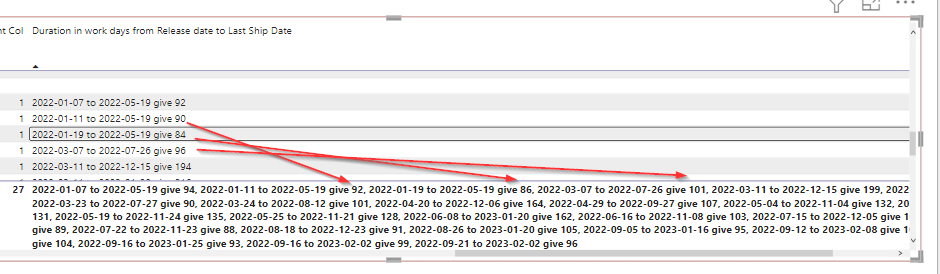
Here below is the resulut I et.
 2023-02-22 23_58_42-BEG L_M Customer Dashboard - Power BI Desktop.png
 
I thought the the duation of days would be stored in the variable  "list_with_days" and frozen.
 
But t seems the duration of days by line given afterwards has a different value.

 Does anyone already met this kind or issue ?
 
Thanks in advance to the community for the support.
Anthony
 
 
1 ACCEPTED SOLUTION
anthony_lecoq
Regular Visitor

To bypass  this issue of inacuracy of NETWORKDAYS at the total line, I came back to the basic,


I skipped the NETWORKDAYS funktion, and count days in a calculated variable table. and chetck that the aggregation worked properly at the end.


Duration in work days from Release date to Last Ship Date2 =
Var selection =
    CALCULATETABLE(
        FACT_CUSTOMER_ORDER_LINE_C,
            FILTER(FACT_CUSTOMER_ORDER_LINE_C ,
                FACT_CUSTOMER_ORDER_LINE_C[Date First Released] <> BLANK()
                && FACT_CUSTOMER_ORDER_LINE_C[Date Last Actual Ship] <> BLANK()
        )
    )
VAR list_with_days =
        ADDCOLUMNS(
             selection   ,
            "duration work days",
            COUNTROWS(
                FILTER(ALL('Calendar'),
                    WEEKDAY('Calendar'[Date],2) <= 5
                    &&  'Calendar'[Date] >=  [Date First Released]
                    &&  'Calendar'[Date] <  [Date Last Actual Ship]
                )
            )
            ,
            "count exception days",
            COUNTROWS(
                FILTER(ALL('Calendar WORK_TIME_EXCEPTION_C'),
                    FACT_CUSTOMER_ORDER_LINE_C[SITE] = 'Calendar WORK_TIME_EXCEPTION_C'[SITE]
                    && [EXCEPTION_DATE] >=  [Date First Released]
                    &&  [EXCEPTION_DATE]  <=  [Date Last Actual Ship]
                )
            )
        )
       
return
CONCATENATEX(list_with_days  ,
    FACT_CUSTOMER_ORDER_LINE_C[Date First Released]   & " to " &  FACT_CUSTOMER_ORDER_LINE_C[Date Last Actual Ship] & " give "  &  [duration work days] -  [count exception days]    , ", " , FACT_CUSTOMER_ORDER_LINE_C[Date First Released] ,ASC
)
 
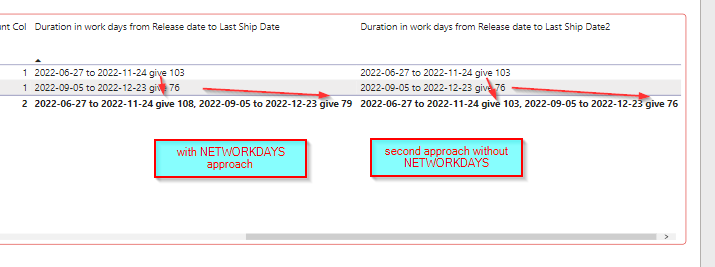
This new basic approch is much more accurate,
 
2023-02-23 11_36_46-BEG L_M Customer Dashboard - Power BI Desktop (september 2022).png


I do not know how to reports these bug on NETWORKDAYS to developer team ?


View solution in original post

1 REPLY 1
anthony_lecoq
Regular Visitor

To bypass  this issue of inacuracy of NETWORKDAYS at the total line, I came back to the basic,


I skipped the NETWORKDAYS funktion, and count days in a calculated variable table. and chetck that the aggregation worked properly at the end.


Duration in work days from Release date to Last Ship Date2 =
Var selection =
    CALCULATETABLE(
        FACT_CUSTOMER_ORDER_LINE_C,
            FILTER(FACT_CUSTOMER_ORDER_LINE_C ,
                FACT_CUSTOMER_ORDER_LINE_C[Date First Released] <> BLANK()
                && FACT_CUSTOMER_ORDER_LINE_C[Date Last Actual Ship] <> BLANK()
        )
    )
VAR list_with_days =
        ADDCOLUMNS(
             selection   ,
            "duration work days",
            COUNTROWS(
                FILTER(ALL('Calendar'),
                    WEEKDAY('Calendar'[Date],2) <= 5
                    &&  'Calendar'[Date] >=  [Date First Released]
                    &&  'Calendar'[Date] <  [Date Last Actual Ship]
                )
            )
            ,
            "count exception days",
            COUNTROWS(
                FILTER(ALL('Calendar WORK_TIME_EXCEPTION_C'),
                    FACT_CUSTOMER_ORDER_LINE_C[SITE] = 'Calendar WORK_TIME_EXCEPTION_C'[SITE]
                    && [EXCEPTION_DATE] >=  [Date First Released]
                    &&  [EXCEPTION_DATE]  <=  [Date Last Actual Ship]
                )
            )
        )
       
return
CONCATENATEX(list_with_days  ,
    FACT_CUSTOMER_ORDER_LINE_C[Date First Released]   & " to " &  FACT_CUSTOMER_ORDER_LINE_C[Date Last Actual Ship] & " give "  &  [duration work days] -  [count exception days]    , ", " , FACT_CUSTOMER_ORDER_LINE_C[Date First Released] ,ASC
)
 
This new basic approch is much more accurate,
 
2023-02-23 11_36_46-BEG L_M Customer Dashboard - Power BI Desktop (september 2022).png


I do not know how to reports these bug on NETWORKDAYS to developer team ?


Helpful resources

Announcements
Power BI DataViz World Championships

Power BI Dataviz World Championships

The Power BI Data Visualization World Championships is back! Get ahead of the game and start preparing now!

December 2025 Power BI Update Carousel

Power BI Monthly Update - December 2025

Check out the December 2025 Power BI Holiday Recap!

FabCon Atlanta 2026 carousel

FabCon Atlanta 2026

Join us at FabCon Atlanta, March 16-20, for the ultimate Fabric, Power BI, AI and SQL community-led event. Save $200 with code FABCOMM.