cancel
Showing results for 
Search instead for 
Did you mean: 

Vote for your favorite vizzies from the Power BI Dataviz World Championship submissions. Vote now!

Reply
Ritesh_Air
Post Patron
Post Patron

Multivalue Parameter Paginated Report Snowflake SQL as a source

Hello,


Trying to figure out the multi-value parameter in Paginated report when Snowflake SQL is the source and running into issue.


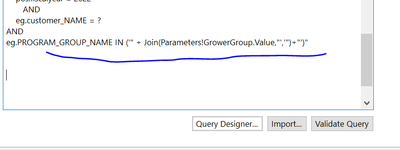
#1. Tried this:


Ritesh_Air_0-1667509489326.png


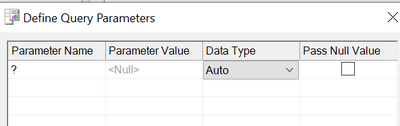
and I get this Query window:


Ritesh_Air_1-1667509549843.png


Not sure, what to do with this. But if I cancel then it goes away but the query doesn't work.


I tried this link as well and that's where I got the string that is above. But I am not sure what am I doing wrong here?


https://community.powerbi.com/t5/Desktop/Using-ODBC-to-Snowflake-as-a-Datasource-within-Report-Build...


Any help is appreciated...


Ritesh

2 REPLIES 2
Ritesh_Air
Post Patron
Post Patron

@Anonymous 


Thanks for reply. I am trying to figure out what would be the code for myltivalue parameter?  Just as a background, snowflake sql is the data source as an ODBC connector. I tried to follow the link I mentioned in my earlier message but it didn't work.


make sense?


thanks in advance,

Ritesh

Anonymous
Not applicable

Hi @Ritesh_Air ,


“Trying to figure out the multi-value parameter in Paginated report when Snowflake SQL is the source and running into issue.”

I don't quite understand your needs, what is the last problem you wish to solve?
It seems like there is a problem when Snowflake SQL is the source, can you describe in detail what the problem is?


Best regards.
Community Support Team_ Caitlyn


Helpful resources

Announcements
Power BI DataViz World Championships

Power BI Dataviz World Championships

Vote for your favorite vizzies from the Power BI World Championship submissions!

Sticker Challenge 2026 Carousel

Join our Community Sticker Challenge 2026

If you love stickers, then you will definitely want to check out our Community Sticker Challenge!

January Power BI Update Carousel

Power BI Monthly Update - January 2026

Check out the January 2026 Power BI update to learn about new features.

FabCon Atlanta 2026 carousel

FabCon Atlanta 2026

Join us at FabCon Atlanta, March 16-20, for the ultimate Fabric, Power BI, AI and SQL community-led event. Save $200 with code FABCOMM.