cancel
Showing results for 
Search instead for 
Did you mean: 

We've captured the moments from FabCon & SQLCon that everyone is talking about, and we are bringing them to the community, live and on-demand. Starts on April 14th. Register now

Reply
Anonymous
Not applicable

Multiple value parameters in URL paramters

Hello


I am trying to trigger paginated report by passing paramters from Power BI. My question is how I can pass multiple values of the same parameter and multiple such parameters from URL to paginted report. There are a few threads in the forum that are similar. https://community.powerbi.com/t5/Service/Paginated-Report-Using-URL-Parameters-and-Select-ALL/m-p/88.... However, I have not found the solution. I have used the following measures. This is the base URL measure: 

Base URL =
var pid = [Selected Prid]
RETURN
CONCATENATE(baseURL, pid)
This is the measure to select the parameter values
Selected Prid = CALCULATE( (
        CONCATENATEX(
            MASTER_REFERENCES,
            MASTER_REFERENCES[Program ID],
            ","
        )
    )
)
This is the measure to download the report in a format
Word =
VAR baseURL =  [Base URL]
RETURN
CONCATENATE(baseURL, "&rdl:format=pdf")
 
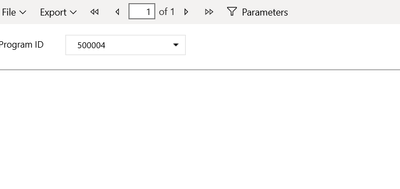
The problem is it only generates the report when I select only 1 value from the slicer. The program ID in the service is not triggered when I select multiple values from the slicer. pic.png


pic2.png

1) I want to select multiple program IDs in the slicer and generate report for it and I also have other slicers as well where the user would generally select from one of the slicers.

2) Is it possible to download the report without the end-user-viewing of the service page? Thank you.Any help is much appreciated and valuable.

2 REPLIES 2
d_gosbell
Super User
Super User

If this is for a report hosted on the service you should be able to do this using the "in" operator

see https://docs.microsoft.com/en-us/power-bi/service-url-filters#filter-on-more-than-one-value-in-a-fie...

dar100111
Frequent Visitor

In the past, I have just generated a hyplerlink with the formatted values in a table already from the rows of data.  That may not be the best way to try what you are doing, but it should be easy to create a calculated field for this.  Hoping to also find other good examples of this.

Helpful resources

Announcements
New to Fabric survey Carousel

New to Fabric Survey

If you have recently started exploring Fabric, we'd love to hear how it's going. Your feedback can help with product improvements.

Power BI DataViz World Championships carousel

Power BI DataViz World Championships - June 2026

A new Power BI DataViz World Championship is coming this June! Don't miss out on submitting your entry.

Join our Fabric User Panel

Join our Fabric User Panel

Share feedback directly with Fabric product managers, participate in targeted research studies and influence the Fabric roadmap.

March Power BI Update Carousel

Power BI Community Update - March 2026

Check out the March 2026 Power BI update to learn about new features.