cancel
Showing results for 
Search instead for 
Did you mean: 

The Power BI Data Visualization World Championships is back! Get ahead of the game and start preparing now! Learn more

Reply
GA1993
Helper II
Helper II

Migrate from personal data gateway to public cloud server/source

Hi, I would like to migrate/use a public gateway instead of using my personal gateway for my PowerBI data source. How do I do this properly? I would like to do this so my data refresh can go successfully even if I am not online.


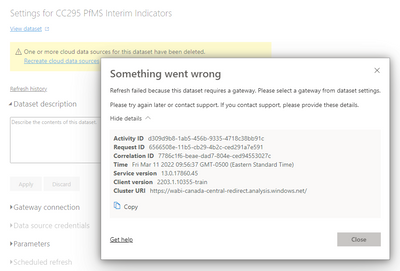
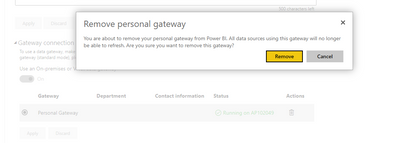
I tried deleting this but I encountered the issue below. Please advise. Thank you.


GA1993_0-1647010979923.png

GA1993_1-1647011030906.png


1 ACCEPTED SOLUTION
Anonymous
Not applicable

Hi @GA1993 ,


For ease of distinction, we usually refer to the other type of On-premises data gateway as On-premises data gateway (Standard mode).

There are different types of gateways, each for a different scenario:

On-premises data gateway: Allows multiple users to connect to multiple on-premises data sources. With a single gateway installation, you can use an on-premises data gateway with all supported services. This gateway is well-suited to complex scenarios in which multiple people access multiple data sources.

On-premises data gateway (personal mode): Allows one user to connect to sources and can’t be shared with others. An on-premises data gateway (personal mode) can be used only with Power BI. This gateway is well-suited to scenarios in which you’re the only person who creates reports, and you don't need to share any data sources with others.


For more,you could see:On-premises data gateway vs. on-premises data gateway (personal mode) 


They cannot migrate between each other. If you want to use the standard gateway to refresh the data, you need to configure the data source after configuring the gateway, you can refer to this article:

Add or remove a gateway data source 

Manage your data source - Import/scheduled refresh 

Configure scheduled refresh 


Hope it helps,


Community Support Team _ Caitlyn

If this post helps then please consider Accept it as the solution to help the other members find it more quickly.


View solution in original post

2 REPLIES 2
Anonymous
Not applicable

Hi @GA1993 ,


For ease of distinction, we usually refer to the other type of On-premises data gateway as On-premises data gateway (Standard mode).

There are different types of gateways, each for a different scenario:

On-premises data gateway: Allows multiple users to connect to multiple on-premises data sources. With a single gateway installation, you can use an on-premises data gateway with all supported services. This gateway is well-suited to complex scenarios in which multiple people access multiple data sources.

On-premises data gateway (personal mode): Allows one user to connect to sources and can’t be shared with others. An on-premises data gateway (personal mode) can be used only with Power BI. This gateway is well-suited to scenarios in which you’re the only person who creates reports, and you don't need to share any data sources with others.


For more,you could see:On-premises data gateway vs. on-premises data gateway (personal mode) 


They cannot migrate between each other. If you want to use the standard gateway to refresh the data, you need to configure the data source after configuring the gateway, you can refer to this article:

Add or remove a gateway data source 

Manage your data source - Import/scheduled refresh 

Configure scheduled refresh 


Hope it helps,


Community Support Team _ Caitlyn

If this post helps then please consider Accept it as the solution to help the other members find it more quickly.
 

d_gosbell
Super User
Super User

There are no "public" gateways. What you would have to do is to install a standard gateway somewhere either in an on-prem server or in a cloud VM which has access to your on-prem network.

Helpful resources

Announcements
Power BI DataViz World Championships

Power BI Dataviz World Championships

The Power BI Data Visualization World Championships is back! Get ahead of the game and start preparing now!

December 2025 Power BI Update Carousel

Power BI Monthly Update - December 2025

Check out the December 2025 Power BI Holiday Recap!

FabCon Atlanta 2026 carousel

FabCon Atlanta 2026

Join us at FabCon Atlanta, March 16-20, for the ultimate Fabric, Power BI, AI and SQL community-led event. Save $200 with code FABCOMM.