Learn from the best! Meet the four finalists headed to the FINALS of the Power BI Dataviz World Championships! Register now
docs.microsoft.com/en-us/learn/modules/data-driven-story-power-bi/13-lab
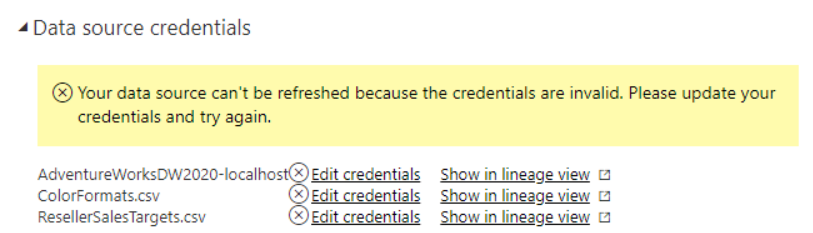
I'm trying to do this tutortial but when I upload the dataset as guided, the data won't show up. After detailed investigation, I found that the dataset can't be displayed because of the error displayed in the figure below. Please help me !
Hi @nghiabeooo ,
looka like what you need is a gateway ;).
Your data is stored on your PC and If you use Direct Query in youre Adv. Works you must connect it first otherwise yoou can't see any data :). If you change the connection to import for your SQL Server it would show you the data without a gateway bacause tha data would be in your pbix model :).
Best,
Kathrin
If this post has helped you, please give it a thumbs up!
Did I answer your question? Mark my post as a solution!
A new Power BI DataViz World Championship is coming this June! Don't miss out on submitting your entry.
Share feedback directly with Fabric product managers, participate in targeted research studies and influence the Fabric roadmap.
| User | Count |
|---|---|
| 1 | |
| 1 | |
| 1 | |
| 1 | |
| 1 |
| User | Count |
|---|---|
| 3 | |
| 2 | |
| 2 | |
| 2 | |
| 1 |