Join us at FabCon Atlanta from March 16 - 20, 2026, for the ultimate Fabric, Power BI, AI and SQL community-led event. Save $200 with code FABCOMM.
Register now!Vote for your favorite vizzies from the Power BI Dataviz World Championship submissions. Vote now!
docs.microsoft.com/en-us/learn/modules/data-driven-story-power-bi/13-lab
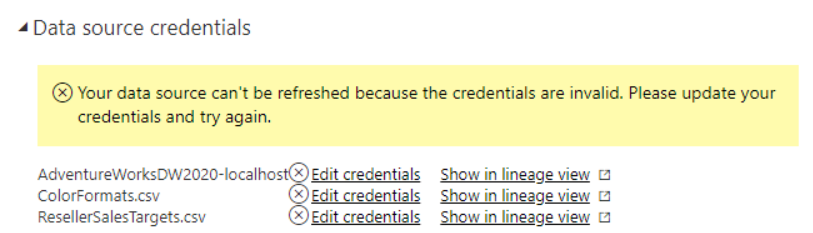
I'm trying to do this tutortial but when I upload the dataset as guided, the data won't show up. After detailed investigation, I found that the dataset can't be displayed because of the error displayed in the figure below. Please help me !
Hi @nghiabeooo ,
looka like what you need is a gateway ;).
Your data is stored on your PC and If you use Direct Query in youre Adv. Works you must connect it first otherwise yoou can't see any data :). If you change the connection to import for your SQL Server it would show you the data without a gateway bacause tha data would be in your pbix model :).
Best,
Kathrin
If this post has helped you, please give it a thumbs up!
Did I answer your question? Mark my post as a solution!
Vote for your favorite vizzies from the Power BI World Championship submissions!
If you love stickers, then you will definitely want to check out our Community Sticker Challenge!
Check out the January 2026 Power BI update to learn about new features.
| User | Count |
|---|---|
| 5 | |
| 4 | |
| 4 | |
| 3 | |
| 2 |