Don't miss your chance to take the Fabric Data Engineer (DP-600) exam for FREE! Find out how by attending the DP-600 session on April 23rd (pacific time), live or on-demand.
Learn moreNext up in the FabCon + SQLCon recap series: The roadmap for Microsoft SQL and Maximizing Developer experiences in Fabric. All sessions are available on-demand after the live show. Register now
in excel i created a template with a graph and a baseline, we now wish to record this data into a sharepoint list and then have powerbi generate the graph, i am having difficulty creating the graph however. in excel i have the following:
so the 197 is the 'baseline' or the straight line across the graph and the other line being the results.
i have worked out how to get the data into PowerBI as well as transform the data to get the graph to kind of display correctly but the 'Baseline' always displays as a 'count of target' rather than display the value.
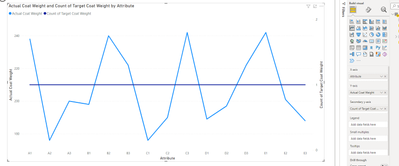
so this is displaying fine on this set of results, but if we have a uniform result we get the following:
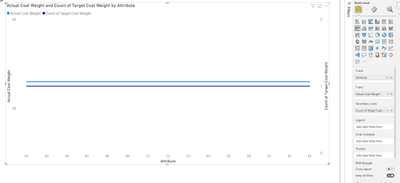
am i missing something really simple?
Make sure that your data type for Target is Numeric/Whole number .. it looks like Target is text data type
Proud to be a Super User!
If you have recently started exploring Fabric, we'd love to hear how it's going. Your feedback can help with product improvements.
A new Power BI DataViz World Championship is coming this June! Don't miss out on submitting your entry.
Share feedback directly with Fabric product managers, participate in targeted research studies and influence the Fabric roadmap.
| User | Count |
|---|---|
| 3 | |
| 2 | |
| 2 | |
| 1 | |
| 1 |