cancel
Showing results for 
Search instead for 
Did you mean: 

Data Days is here! Join us now for 60+ days of learning, challenges, and connection. Learn more

Reply
tonyb1986
New Member

Line Graph with Base Line

in excel i created a template with a graph and a baseline, we now wish to record this data into a sharepoint list and then have powerbi generate the graph, i am having difficulty creating the graph however. in excel i have the following:


tonyb1986_0-1653037405385.png

so the 197 is the 'baseline' or the straight line across the graph and the other line being the results.


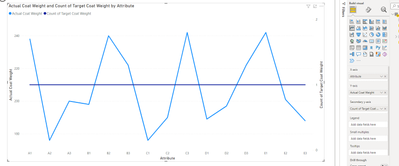
i have worked out how to get the data into PowerBI as well as transform the data to get the graph to kind of display correctly but the 'Baseline' always displays as a 'count of target' rather than display the value.


tonyb1986_1-1653037691123.png

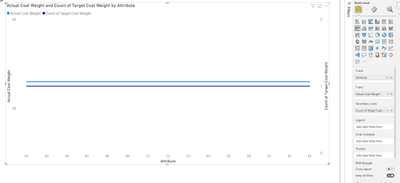
so this is displaying fine on this set of results, but if we have a uniform result we get the following:

tonyb1986_2-1653037746359.png

am i missing something really simple?


1 REPLY 1
FarhanAhmed
Community Champion
Community Champion

Make sure that your data type for Target is Numeric/Whole number .. it looks like Target is text data type


Did I answer your question? Mark my post as a solution! Appreciate your Kudos!!

Proud to be a Super User!


Helpful resources

Announcements
Fabric Data Days is here Carousel

Fabric Data Days 2026

Don't miss out on Data Days, June 15 through August 7. Learn Fabric, Power BI, SQL, AI and more.

May Power BI Update Carousel

Power BI Monthly Update - May 2026

Check out the May 2026 Power BI update to learn about new features.

Power BI DataViz World Championships carousel

Power BI DataViz World Championships - June 2026

A new Power BI DataViz World Championship is coming this June! Don't miss out on submitting your entry.