cancel
Showing results for 
Search instead for 
Did you mean: 

July 7 - July 17 | Round 2 of the Power BI Dataviz World Championships. Don't miss your chance! Learn more

Reply
philburns
New Member

Is RLS what I need?

I'm planning to close down a load of SQL driven .asp pages and replace them with Power BI reports. Currently I make sure that a user gets a unique dataset with a SQL query such as SELECT * FROM Table1 WHERE Field1=USERID.


How can I make sure that this functionality is replicated in power BI?


Is RLS what I need to use, or something else?


And would it be best to apply RLS to one query to select the USERID and then link that query with each of the various other queries which produce various datasets?


Thanks

4 REPLIES 4
cbarrettEM
Advocate I
Advocate I

RLS will do what you need.

Setting up RLS in the editor is just a GUI for a query. It shows you the list of tables in your dataset, and you can filter on any combination of the fields once certain criteria are met, ie UserID. I think the one problem you may have is I believe you will have to set up a role, for every single one of your users (eg UserID = 'ABC' Filter table for 'ABC' ... UserID = DEF Filter table for 'DEF, etc). I may be wrong, but I believe the filter 'where clause' is static, so you cant build a one fits all dynamic role.

Thanks for that.
I haven't come across role settings yet - where can I find out about that and where are they defined?

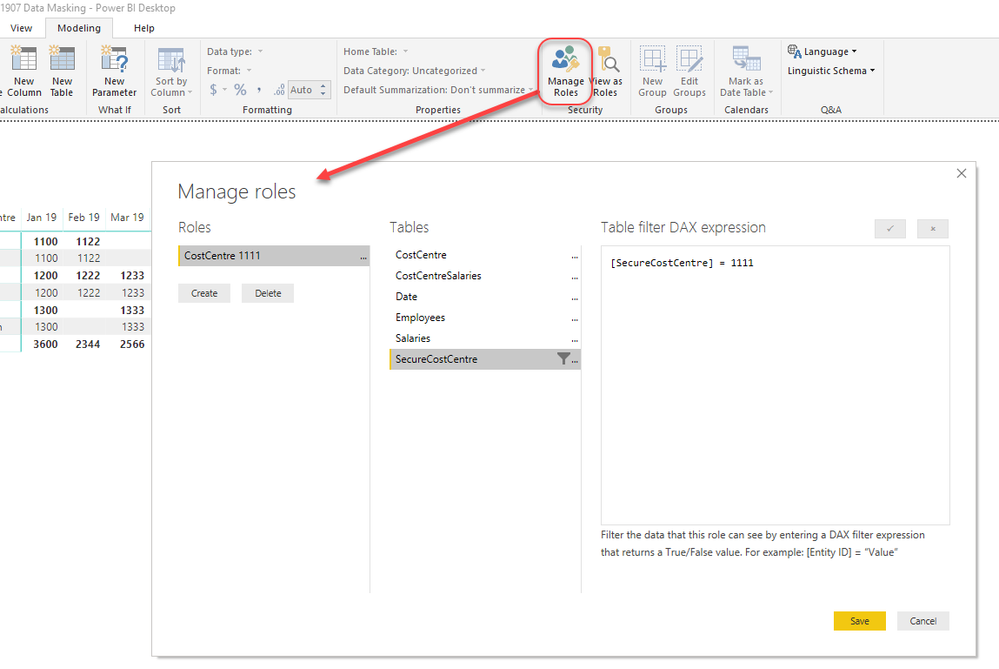
If you click on the Modelling tab in Power BI there is a manage roles button which brings up the following dialog box


2019-07 manage roles.png

In the role above users in the role will only see the one "SecureCostCentre" where it is equal to 1111 and this filter will flow down to any related tables.


This filter can be any valid DAX expression. In your case you could use the USERNAME() function in your filter to make a single dynamic role if you have a table in your model with a list of usernames that is then also related to the other tables in your model. So if you had a 'Users' table with a [Login] column you could create a filter expression like the following on your Users table.


Users[Login] = USERNAME()

Wow thats fantastic, thank you all so much.
I'm going to have fun with this now!!!!

Helpful resources

Announcements
FabCon and SQLCon Barcelona 2026

FabCon & SQLCon – Barcelona 2026

Join us in Barcelona for FabCon and SQLCon, the Fabric, Power BI, SQL, and AI community event. Save €200 with code FABCMTY200.

60 days of Data Days Carousel

Data Days 2026

Join Fabric Data Days 2026: 60 days of free live/on-demand sessions, challenges, study groups, and certification opportunities.

Power BI DataViz World Championships carousel

Power BI DataViz World Championships - June 2026

A new Power BI DataViz World Championship is coming this June! Don't miss out on submitting your entry.