Join us at FabCon Atlanta from March 16 - 20, 2026, for the ultimate Fabric, Power BI, AI and SQL community-led event. Save $200 with code FABCOMM.
Register now!The Power BI Data Visualization World Championships is back! Get ahead of the game and start preparing now! Learn more
Hello,
I am trying to create a gantt chart to display a construction schedule. We occasionally have tasks which take 12h, or half a day assuming 24h work.
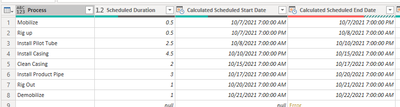
My dataset recognizes that the task is only 12h. It starts at 7am and ends at 7pm, with the following task starting at 7pm and ending at 7am. So two tasks have been scheduled for one 24h block. See the "Calculated Scheduled Start/End Time" columns below.
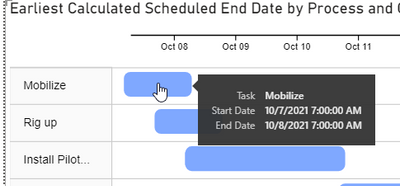
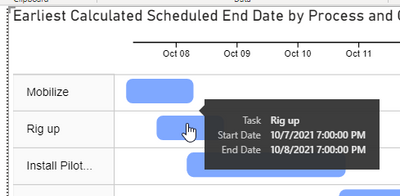
On the Gantt chart, each of these 12h tasks are being displayed as 24h, but maintaining the correct start times. As a result, the durations are incorrect and there is overlap between subsequent tasks ("Mobilize" and "Rig up"). Does the graphing component just have a minimum duration of one day? Is there any known workarounds for this? I would like to display this schedule accurately.
Any help would be greatly appreciated.
Thanks
Solved! Go to Solution.
Hi @jmiller2224 ,
According to your description, just change Days to Hours in the Format-General-Duration unit. Refer to the following test results:
If the problem is still not resolved, please provide detailed error information and let me know immediately. Looking forward to your reply.
Best Regards,
Henry
If this post helps, then please consider Accept it as the solution to help the other members find it more quickly.
Hi @jmiller2224 ,
According to your description, just change Days to Hours in the Format-General-Duration unit. Refer to the following test results:
If the problem is still not resolved, please provide detailed error information and let me know immediately. Looking forward to your reply.
Best Regards,
Henry
If this post helps, then please consider Accept it as the solution to help the other members find it more quickly.
This worked! Thank you very much!
Hi @jmiller2224 ,
If the question has been solved, you can mark the correct response as the standard answer to help the other members find it more quickly.
Best Regards,
Henry
The Power BI Data Visualization World Championships is back! Get ahead of the game and start preparing now!
Check out the November 2025 Power BI update to learn about new features.
| User | Count |
|---|---|
| 8 | |
| 2 | |
| 2 | |
| 2 | |
| 2 |