Join us at FabCon Atlanta from March 16 - 20, 2026, for the ultimate Fabric, Power BI, AI and SQL community-led event. Save $200 with code FABCOMM.
Register now!The Power BI Data Visualization World Championships is back! Get ahead of the game and start preparing now! Learn more
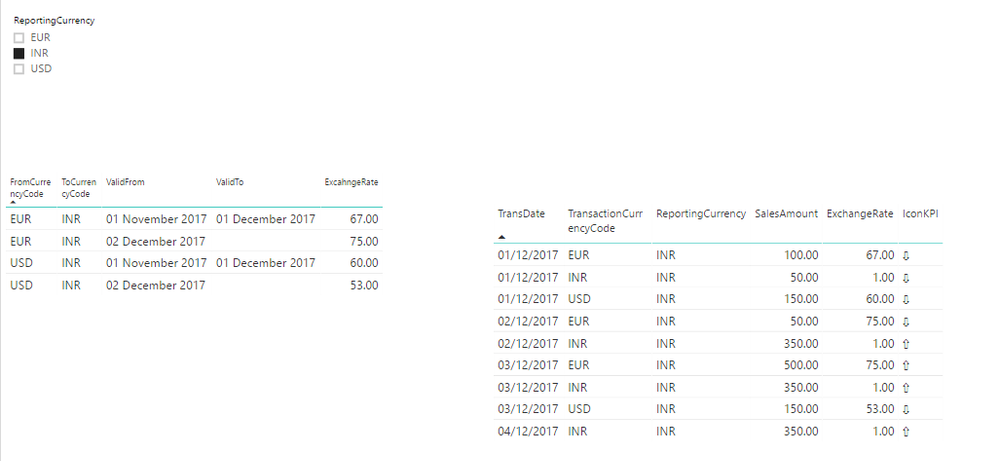
I want to get my amount to change as per currency code selected dynamically.
In my FactSales table I have currency and Amount. If user want to see that amount in any currency he select the currency from slicer and my excahnge rate will apply to that amount.
I tried below DAX to get dynamic Exchange Rate but no luck:
ExchangeRate = CALCULATE(MIN(ExchangeRate[ExcahngeRate]), FILTER(ExchangeRate, AND(AND(AND(MIN(FactSales[TransDate])>=MIN(ExchangeRate[ValidFrom]), MIN(FactSales[TransDate])<=IF(ISBLANK(MIN(ExchangeRate[ValidTo])), DATEVALUE("01-01-2070"), MIN(ExchangeRate[ValidTo]))), MIN(ExchangeRate[FromCurrencyCode]) = MIN(FactSales[CurrencyCode])), MIN(ExchangeRate[ToCurrencyCode]) = FIRSTNONBLANK(ExchangeRate[ToCurrencyCode],1))))
https://drive.google.com/file/d/1BCD3cycq-tNTc9xPEK458dn-BjJj9Qao/view?usp=sharing
Solved! Go to Solution.
If we have Exchange rate on daily basis then we can go for below solution:
https://www.kasperonbi.com/currency-conversion-in-dax-for-power-bi-and-ssas/
If we have Exchange Rate as date range then use dynamic DAX:
ExchangeRate =
IF(ISBLANK
(
CALCULATE(MIN(ExchangeRate[ExcahngeRate]),
FILTER(FILTER(ExchangeRate, AND(AND(ExchangeRate[FromCurrencyCode] = MIN(FactSales[TransactionCurrencyCode]), ExchangeRate[ToCurrencyCode] = FIRSTNONBLANK(ExchangeRate[ToCurrencyCode],1))
, MIN(FactSales[TransDate])<=IF(ISBLANK(ExchangeRate[ValidTo].[Date]), DATEVALUE("2070-01-01"), ExchangeRate[ValidTo]))), MIN(FactSales[TransDate])>= ExchangeRate[ValidFrom]))
)
, 1
, CALCULATE(MIN(ExchangeRate[ExcahngeRate]),
FILTER(FILTER(ExchangeRate, AND(AND(ExchangeRate[FromCurrencyCode] = MIN(FactSales[TransactionCurrencyCode])
, ExchangeRate[ToCurrencyCode] = FIRSTNONBLANK(ExchangeRate[ToCurrencyCode],1))
, MIN(FactSales[TransDate])<=IF(ISBLANK(ExchangeRate[ValidTo].[Date]), DATEVALUE("2070-01-01"), ExchangeRate[ValidTo])))
, MIN(FactSales[TransDate])>= ExchangeRate[ValidFrom]))
)
If we have Exchange rate on daily basis then we can go for below solution:
https://www.kasperonbi.com/currency-conversion-in-dax-for-power-bi-and-ssas/
If we have Exchange Rate as date range then use dynamic DAX:
ExchangeRate =
IF(ISBLANK
(
CALCULATE(MIN(ExchangeRate[ExcahngeRate]),
FILTER(FILTER(ExchangeRate, AND(AND(ExchangeRate[FromCurrencyCode] = MIN(FactSales[TransactionCurrencyCode]), ExchangeRate[ToCurrencyCode] = FIRSTNONBLANK(ExchangeRate[ToCurrencyCode],1))
, MIN(FactSales[TransDate])<=IF(ISBLANK(ExchangeRate[ValidTo].[Date]), DATEVALUE("2070-01-01"), ExchangeRate[ValidTo]))), MIN(FactSales[TransDate])>= ExchangeRate[ValidFrom]))
)
, 1
, CALCULATE(MIN(ExchangeRate[ExcahngeRate]),
FILTER(FILTER(ExchangeRate, AND(AND(ExchangeRate[FromCurrencyCode] = MIN(FactSales[TransactionCurrencyCode])
, ExchangeRate[ToCurrencyCode] = FIRSTNONBLANK(ExchangeRate[ToCurrencyCode],1))
, MIN(FactSales[TransDate])<=IF(ISBLANK(ExchangeRate[ValidTo].[Date]), DATEVALUE("2070-01-01"), ExchangeRate[ValidTo])))
, MIN(FactSales[TransDate])>= ExchangeRate[ValidFrom]))
)
The Power BI Data Visualization World Championships is back! Get ahead of the game and start preparing now!
| User | Count |
|---|---|
| 8 | |
| 4 | |
| 3 | |
| 2 | |
| 1 |