Join us at FabCon Atlanta from March 16 - 20, 2026, for the ultimate Fabric, Power BI, AI and SQL community-led event. Save $200 with code FABCOMM.
Register now!Vote for your favorite vizzies from the Power BI Dataviz World Championship submissions. Vote now!
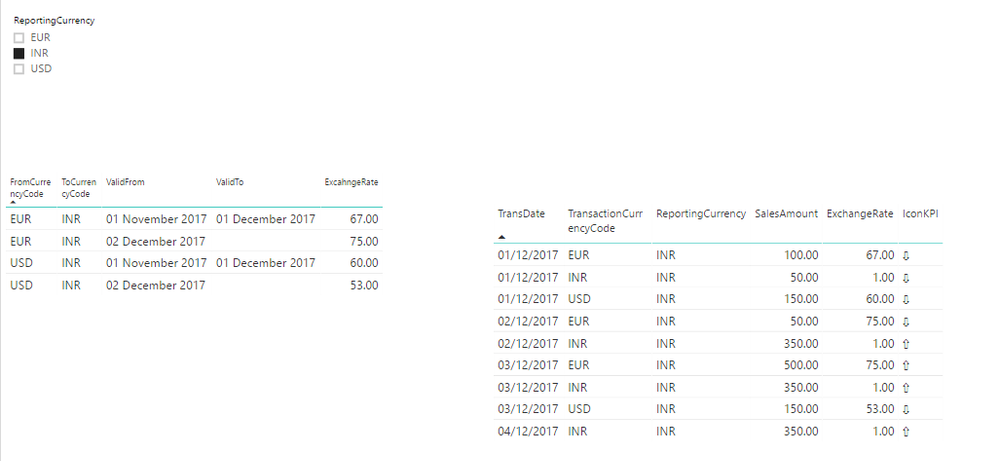
I want to get my amount to change as per currency code selected dynamically.
In my FactSales table I have currency and Amount. If user want to see that amount in any currency he select the currency from slicer and my excahnge rate will apply to that amount.
I tried below DAX to get dynamic Exchange Rate but no luck:
ExchangeRate = CALCULATE(MIN(ExchangeRate[ExcahngeRate]), FILTER(ExchangeRate, AND(AND(AND(MIN(FactSales[TransDate])>=MIN(ExchangeRate[ValidFrom]), MIN(FactSales[TransDate])<=IF(ISBLANK(MIN(ExchangeRate[ValidTo])), DATEVALUE("01-01-2070"), MIN(ExchangeRate[ValidTo]))), MIN(ExchangeRate[FromCurrencyCode]) = MIN(FactSales[CurrencyCode])), MIN(ExchangeRate[ToCurrencyCode]) = FIRSTNONBLANK(ExchangeRate[ToCurrencyCode],1))))
https://drive.google.com/file/d/1BCD3cycq-tNTc9xPEK458dn-BjJj9Qao/view?usp=sharing
Solved! Go to Solution.
If we have Exchange rate on daily basis then we can go for below solution:
https://www.kasperonbi.com/currency-conversion-in-dax-for-power-bi-and-ssas/
If we have Exchange Rate as date range then use dynamic DAX:
ExchangeRate =
IF(ISBLANK
(
CALCULATE(MIN(ExchangeRate[ExcahngeRate]),
FILTER(FILTER(ExchangeRate, AND(AND(ExchangeRate[FromCurrencyCode] = MIN(FactSales[TransactionCurrencyCode]), ExchangeRate[ToCurrencyCode] = FIRSTNONBLANK(ExchangeRate[ToCurrencyCode],1))
, MIN(FactSales[TransDate])<=IF(ISBLANK(ExchangeRate[ValidTo].[Date]), DATEVALUE("2070-01-01"), ExchangeRate[ValidTo]))), MIN(FactSales[TransDate])>= ExchangeRate[ValidFrom]))
)
, 1
, CALCULATE(MIN(ExchangeRate[ExcahngeRate]),
FILTER(FILTER(ExchangeRate, AND(AND(ExchangeRate[FromCurrencyCode] = MIN(FactSales[TransactionCurrencyCode])
, ExchangeRate[ToCurrencyCode] = FIRSTNONBLANK(ExchangeRate[ToCurrencyCode],1))
, MIN(FactSales[TransDate])<=IF(ISBLANK(ExchangeRate[ValidTo].[Date]), DATEVALUE("2070-01-01"), ExchangeRate[ValidTo])))
, MIN(FactSales[TransDate])>= ExchangeRate[ValidFrom]))
)
If we have Exchange rate on daily basis then we can go for below solution:
https://www.kasperonbi.com/currency-conversion-in-dax-for-power-bi-and-ssas/
If we have Exchange Rate as date range then use dynamic DAX:
ExchangeRate =
IF(ISBLANK
(
CALCULATE(MIN(ExchangeRate[ExcahngeRate]),
FILTER(FILTER(ExchangeRate, AND(AND(ExchangeRate[FromCurrencyCode] = MIN(FactSales[TransactionCurrencyCode]), ExchangeRate[ToCurrencyCode] = FIRSTNONBLANK(ExchangeRate[ToCurrencyCode],1))
, MIN(FactSales[TransDate])<=IF(ISBLANK(ExchangeRate[ValidTo].[Date]), DATEVALUE("2070-01-01"), ExchangeRate[ValidTo]))), MIN(FactSales[TransDate])>= ExchangeRate[ValidFrom]))
)
, 1
, CALCULATE(MIN(ExchangeRate[ExcahngeRate]),
FILTER(FILTER(ExchangeRate, AND(AND(ExchangeRate[FromCurrencyCode] = MIN(FactSales[TransactionCurrencyCode])
, ExchangeRate[ToCurrencyCode] = FIRSTNONBLANK(ExchangeRate[ToCurrencyCode],1))
, MIN(FactSales[TransDate])<=IF(ISBLANK(ExchangeRate[ValidTo].[Date]), DATEVALUE("2070-01-01"), ExchangeRate[ValidTo])))
, MIN(FactSales[TransDate])>= ExchangeRate[ValidFrom]))
)
Vote for your favorite vizzies from the Power BI World Championship submissions!
If you love stickers, then you will definitely want to check out our Community Sticker Challenge!
Check out the January 2026 Power BI update to learn about new features.
| User | Count |
|---|---|
| 3 | |
| 3 | |
| 1 | |
| 1 | |
| 1 |
| User | Count |
|---|---|
| 6 | |
| 4 | |
| 4 | |
| 3 | |
| 2 |