cancel
Showing results for 
Search instead for 
Did you mean: 

Get Fabric certified for FREE! Don't miss your chance! Learn more

Reply
Anonymous
Not applicable

Data Source

Hello everyone,

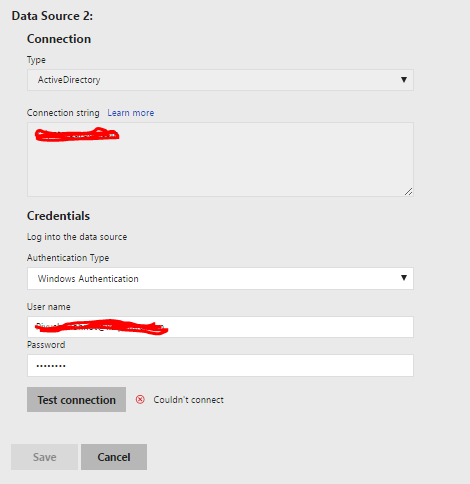
I have developed a dashboard in desktop client (October 2017) and published report on Report Server. The problem comes when I try to connect to Active Directory data source. It displays an error shown below in the picture. Without connecting data source, I can't schedule refresh. Any suggestions would be helpful.

error_AD.PNG


Thnanks and Regards

Piyush


1 ACCEPTED SOLUTION
Anonymous
Not applicable

Active Directory as a data source for refresh isn't supported yet.


Check here

View solution in original post

2 REPLIES 2
Anonymous
Not applicable

Hello everyone,

I have been trying to connect Active Directory data source in powerBI Report Server. But it doesn't connects. Is Active Directory data source (on-prem) supportable in Report Server or not?

error_AD.PNGAny help?


Thanks and Regards,

Piyush

Anonymous
Not applicable

Active Directory as a data source for refresh isn't supported yet.


Check here

Helpful resources

Announcements
Join our Fabric User Panel

Join our Fabric User Panel

Share feedback directly with Fabric product managers, participate in targeted research studies and influence the Fabric roadmap.

February Power BI Update Carousel

Power BI Monthly Update - February 2026

Check out the February 2026 Power BI update to learn about new features.

FabCon Atlanta 2026 carousel

FabCon Atlanta 2026

Join us at FabCon Atlanta, March 16-20, for the ultimate Fabric, Power BI, AI and SQL community-led event. Save $200 with code FABCOMM.